Google Maps Import on iPad

Quote from Hein_38 on 05.03.2025, 14:35Hallo,
folgende Frage bezieht sich auf das iPad und nur auf das iPad, also nicht vom Windows PC zum iPad.
Ist es möglich auf dem iPad eine in Google Maps erstellte Route nach Scenic (V4.13) zu importieren?
Habe es mit der Web App (mit Safari) probiert, aber da kommt immer diese Fehlermeldung:
Invalid Google Maps URL
It should be a full copy-paste of your browser address-bar after you've planned your route.
For Example:
https://www.google.nl/maps/dir/52.3034406,4.9548344/52.0609348,5.240479/@52.1927125,4.9528563,11z/data=!3m1!4b1!4m2!4m1!3e0Grüsse Heinrich
Hallo,
folgende Frage bezieht sich auf das iPad und nur auf das iPad, also nicht vom Windows PC zum iPad.
Ist es möglich auf dem iPad eine in Google Maps erstellte Route nach Scenic (V4.13) zu importieren?
Habe es mit der Web App (mit Safari) probiert, aber da kommt immer diese Fehlermeldung:
Invalid Google Maps URL
It should be a full copy-paste of your browser address-bar after you've planned your route.
Grüsse Heinrich

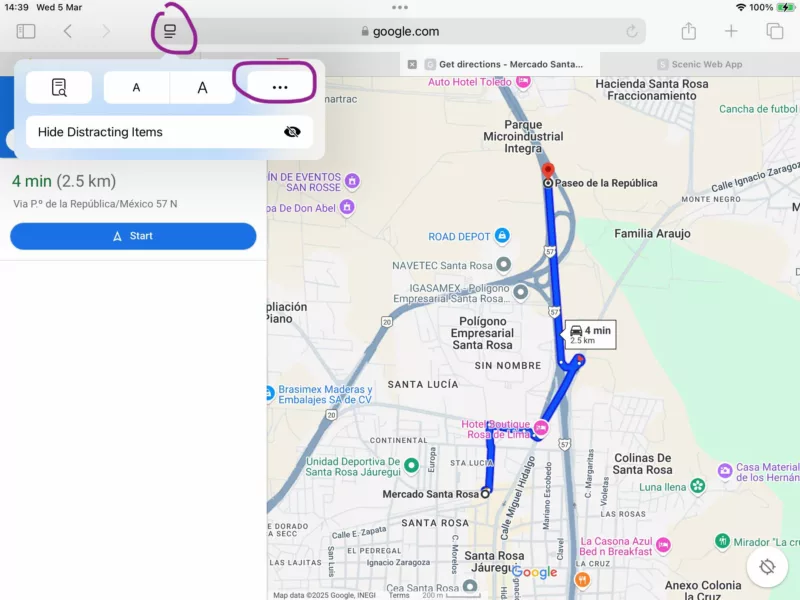
Quote from Guido on 05.03.2025, 14:52The links of the Google Maps mobile site do not work. But, you can choose to use the desktop site on your iPad. To do that on you iPad.
- Open Safari
- Go to maps.google.com
- Then, tap button to the left of the URL, then 3 dots button, then "Request Desktop Site".On other browsers you should also be able to do that in a similar way.
The links of the Google Maps mobile site do not work. But, you can choose to use the desktop site on your iPad. To do that on you iPad.
- Open Safari
- Go to maps.google.com
- Then, tap button to the left of the URL, then 3 dots button, then "Request Desktop Site".
On other browsers you should also be able to do that in a similar way.