
Fuel and Rest stop planning in Scenic 4?

Quote from pleasantone on 29.12.2025, 14:06I'm not sure if this is a set of feature requests, or I'm just missing it.
I was just working on a multi-day trip (historically I used Garmin basecamp to plan these but I despise Garmin software and have been converting all of my friends to Scenic).
Things I'd like to be able to do:
- Plan a long route (2500km) by entering start/end and then
- Roughly calculate where I want to stay for the night.
- Split the route up into per-day segments (just a route split where the full route gets copied into two routes (current day, rest of trip).
- Roughly calculate where I want to plan for fuel stops.
- Roughly calculate travel time along route
- Roughly display travel distance along route.
- Name the start and end points, not just "Start" and "End"
I'm sure these are things users have been doing for a while, so I feel like an idiot asking for features, but I'll leave it in the feature request area just in case I'm missing the usability hacks that people are already using.
Here's an example:
I want to travel from San Francisco, California, to Santa Fe, New Mexico in the US.
I'd like to set the start and end points for the route, and use one of the algorithms (default, Furkot, Happy Roads) to plan the overall trip, along with any custom via points I might want to add. I'd like to see milage-from-start displayed along the route similar to the way "on the go maps" displays it (see attached screenshot). Likewise, it would be lovely to see distance-from-start and rough travel time from start for any via or stop that I put in, when we flip up the "distance/time/show-vias/edit" toolbar in the planner. This makes it easier for me to start my "find a fuel stop" search area. Once I get to the end of my first day, I'd like to search for a place to stay for the night, so do a similar search starting near distance X.
For day-by-day style planning. once I've located my stop for the night, I'd then hit "split the journey" and that would lock in that day's travel as a route (and save it). I'd be left with the remainder of the route, and could start my next day using the above algorithm.
Some users would not want to do day-by-day style planning, that's fine, they just wouldn't hit split-route. They'd still get travel times and distances from start.
A final feature basecamp has, that I'd love to see, is departure time from start/stop or planned layover times for stops (screenshot from BC).
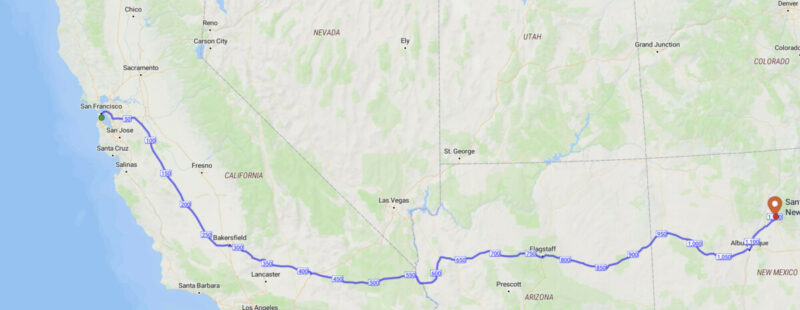
Again, this is fairly basic stuff that I suspect people are already doing, so I'd appreciate usage tips if you've got an alternative solution. I'm not stuck in my ways. and I know that you plan big trips yourself Guido... thanks so much, I love Scenic.
I'm not sure if this is a set of feature requests, or I'm just missing it.
I was just working on a multi-day trip (historically I used Garmin basecamp to plan these but I despise Garmin software and have been converting all of my friends to Scenic).
Things I'd like to be able to do:
- Plan a long route (2500km) by entering start/end and then
- Roughly calculate where I want to stay for the night.
- Split the route up into per-day segments (just a route split where the full route gets copied into two routes (current day, rest of trip).
- Roughly calculate where I want to plan for fuel stops.
- Roughly calculate travel time along route
- Roughly display travel distance along route.
- Name the start and end points, not just "Start" and "End"
I'm sure these are things users have been doing for a while, so I feel like an idiot asking for features, but I'll leave it in the feature request area just in case I'm missing the usability hacks that people are already using.
Here's an example:
I want to travel from San Francisco, California, to Santa Fe, New Mexico in the US.
I'd like to set the start and end points for the route, and use one of the algorithms (default, Furkot, Happy Roads) to plan the overall trip, along with any custom via points I might want to add. I'd like to see milage-from-start displayed along the route similar to the way "on the go maps" displays it (see attached screenshot). Likewise, it would be lovely to see distance-from-start and rough travel time from start for any via or stop that I put in, when we flip up the "distance/time/show-vias/edit" toolbar in the planner. This makes it easier for me to start my "find a fuel stop" search area. Once I get to the end of my first day, I'd like to search for a place to stay for the night, so do a similar search starting near distance X.
For day-by-day style planning. once I've located my stop for the night, I'd then hit "split the journey" and that would lock in that day's travel as a route (and save it). I'd be left with the remainder of the route, and could start my next day using the above algorithm.
Some users would not want to do day-by-day style planning, that's fine, they just wouldn't hit split-route. They'd still get travel times and distances from start.
A final feature basecamp has, that I'd love to see, is departure time from start/stop or planned layover times for stops (screenshot from BC). 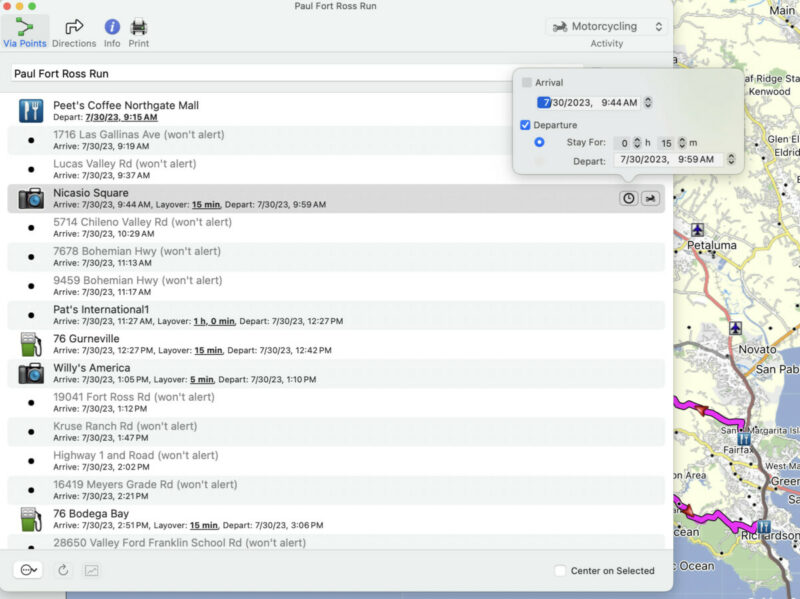
Again, this is fairly basic stuff that I suspect people are already doing, so I'd appreciate usage tips if you've got an alternative solution. I'm not stuck in my ways. and I know that you plan big trips yourself Guido... thanks so much, I love Scenic.
Quote from LaszloK on 29.12.2025, 14:42Würde mich darüber auch freuen. Gerade Urlaubstouren plane ich (mit Scenic) ähnlich. Es besteht eine grobe Idee, wohin die Reise gehen soll. Z.B. von hier nach Kroatien und dann wieder zurück. Ein erster Teil auf der Autobahn und der Rest auf Überland-, Neben- oder Schotterstrasse. Anschliessend werden entlang der Route sehenswerte Orte, Strecken oder Pässe eingebunden. Die Route - die dann garantiert gut für die doppelte Anzahl Urlaubstage reicht - wird dann „bereinigt“ und die Tagesetappen generiert.
Für eine solche Routenplanung bietet Scenic derzeit noch wenige Tools … insbesondere zum Aufteilen der Route.
Laszlo
Würde mich darüber auch freuen. Gerade Urlaubstouren plane ich (mit Scenic) ähnlich. Es besteht eine grobe Idee, wohin die Reise gehen soll. Z.B. von hier nach Kroatien und dann wieder zurück. Ein erster Teil auf der Autobahn und der Rest auf Überland-, Neben- oder Schotterstrasse. Anschliessend werden entlang der Route sehenswerte Orte, Strecken oder Pässe eingebunden. Die Route - die dann garantiert gut für die doppelte Anzahl Urlaubstage reicht - wird dann „bereinigt“ und die Tagesetappen generiert.
Für eine solche Routenplanung bietet Scenic derzeit noch wenige Tools … insbesondere zum Aufteilen der Route.
Laszlo

Quote from Guido on 29.12.2025, 16:17I understand what you mean. I'll explain first what IS possible and what's not yet possible. Then below I'll give you my workflow on how I do this at the moment.
Roughly calculate where I want to stay for the night.
Could you tell me a bit more about this? Do you want to enter a time or distance and then have Scenic suggest hotels or camp-spots?
Split the route up into per-day segments (just a route split where the full route gets copied into two routes (current day, rest of trip).
I imagine you would select the stops that indicate the hotel/campstot so that Scenic can use that to split the route?
Roughly calculate where I want to plan for fuel stops.
Do you want to enter a distance and then have Scenic suggest gas stations along the way?
Roughly calculate travel time along route
There is a route-timeline feature that shows you the distance and time to- and between each stop. To show the timeline tap the button where you see total time and distance. I am planning on adding something to this, where you can scroll over a route and you'll see the time and distance at the selected point.
Roughly display travel distance along route.
See above
Name the start and end points, not just "Start" and "End"
Yes.. this is already on the feature request list.
A final feature basecamp has, that I'd love to see, is departure time from start/stop or planned layover times for stops
Yes. This is also already on the feature request list. I know your next question is going to be when 🙂. But I can't answer that at the moment. The feature request is long and changing all the time as requests come in.
My Workflow 1
- I plan the multi day route in Google Maps (you could also use Furkot for a more powerful planner. If you import a Furkot Trip, the route splitting per day is done automatically upon import). I prefer Google Maps because it's easier to use and has the best places database.
- Import the Google Maps link into Scenic (it's placed in the import queue)
- Then I import it from the import queue. On the first import, I delete everything that's not day 1. Then I import it again and delete everything that's not day 2, etc.
- Typically I don't plan fuel stops, but if I know I'm traveling in an area where fuel might be difficult to get, I plan gas stations as stops in Google Maps too.
- If you go for Furkot, then it's even easier. In furkot you can mark a stop as an overnight stop. Based on that, Scenic will do the splitting for you and you just need to import each day route from the import queue.
My Workflow 2
- I create the full multi-day trip in Scenic, including hotels/camping stops/view points/restaurants and, if in an area where fuel is difficult, then also stops for fuel.
- Then I duplicate that route as many times as there are days in the trip.
- Then, for each duplicate, I remove the stops that don't apply for that day.
Hope this helps for the moment.
I understand what you mean. I'll explain first what IS possible and what's not yet possible. Then below I'll give you my workflow on how I do this at the moment.
-
Roughly calculate where I want to stay for the night.
Could you tell me a bit more about this? Do you want to enter a time or distance and then have Scenic suggest hotels or camp-spots?
-
Split the route up into per-day segments (just a route split where the full route gets copied into two routes (current day, rest of trip).
I imagine you would select the stops that indicate the hotel/campstot so that Scenic can use that to split the route?
-
Roughly calculate where I want to plan for fuel stops.
Do you want to enter a distance and then have Scenic suggest gas stations along the way?
-
Roughly calculate travel time along route
There is a route-timeline feature that shows you the distance and time to- and between each stop. To show the timeline tap the button where you see total time and distance. I am planning on adding something to this, where you can scroll over a route and you'll see the time and distance at the selected point.
-
Roughly display travel distance along route.
See above
-
Name the start and end points, not just "Start" and "End"
Yes.. this is already on the feature request list.
A final feature basecamp has, that I'd love to see, is departure time from start/stop or planned layover times for stops
Yes. This is also already on the feature request list. I know your next question is going to be when 🙂. But I can't answer that at the moment. The feature request is long and changing all the time as requests come in.
My Workflow 1
- I plan the multi day route in Google Maps (you could also use Furkot for a more powerful planner. If you import a Furkot Trip, the route splitting per day is done automatically upon import). I prefer Google Maps because it's easier to use and has the best places database.
- Import the Google Maps link into Scenic (it's placed in the import queue)
- Then I import it from the import queue. On the first import, I delete everything that's not day 1. Then I import it again and delete everything that's not day 2, etc.
- Typically I don't plan fuel stops, but if I know I'm traveling in an area where fuel might be difficult to get, I plan gas stations as stops in Google Maps too.
- If you go for Furkot, then it's even easier. In furkot you can mark a stop as an overnight stop. Based on that, Scenic will do the splitting for you and you just need to import each day route from the import queue.
My Workflow 2
- I create the full multi-day trip in Scenic, including hotels/camping stops/view points/restaurants and, if in an area where fuel is difficult, then also stops for fuel.
- Then I duplicate that route as many times as there are days in the trip.
- Then, for each duplicate, I remove the stops that don't apply for that day.
Hope this helps for the moment.

Quote from Mex on 30.12.2025, 02:46Hi pleasantone.
My workflow:
I make a folder for e.g.: France2026
In this folder i have multiple routes. At first the complete route, just to make sure i stay on what i planned. You may copy this and shorten it to your needs.
Normaly i create my routes and name them day1, day2, etc. I set stops for breaks and gasstations, every 200 km (135 miles).
On longer trips i plan one day off, in case of difficulties. 2 years ago a road was blocked cause off snow, so we stopped our route at 2 p.m. ohterwise we had to go 248 km deviation around the blocked road.
In my opinion you run into struggles following just a single route with more than 2.000 km/miles.
Each ride is saved in a new folder: e.g.: Rides France 2026 and i can compare the planned with the driven rides.
It also makes a great difference if you ride alone or with 6 buddies.So enjoy your trip and: ride safe, Mex
Hi pleasantone.
My workflow:
I make a folder for e.g.: France2026
In this folder i have multiple routes. At first the complete route, just to make sure i stay on what i planned. You may copy this and shorten it to your needs.
Normaly i create my routes and name them day1, day2, etc. I set stops for breaks and gasstations, every 200 km (135 miles).
On longer trips i plan one day off, in case of difficulties. 2 years ago a road was blocked cause off snow, so we stopped our route at 2 p.m. ohterwise we had to go 248 km deviation around the blocked road.
In my opinion you run into struggles following just a single route with more than 2.000 km/miles.
Each ride is saved in a new folder: e.g.: Rides France 2026 and i can compare the planned with the driven rides.
It also makes a great difference if you ride alone or with 6 buddies.
So enjoy your trip and: ride safe, Mex

Quote from MjK on 08.01.2026, 18:09Interesting read, I guess everyone does a mix of those workflow suggestions, juts what feels best, but mainly I am working similar like @mex
@pleasantone - I just wanted to share the solution I am using for solving already the "Name the start and end points, not just "Start" and "End" topic
- place a stop at the start as well at the end location and use its naming (hotel name for example) or just name it as you like it.
- when you now select this stops, select the start and stop flag respectively
- you can now delete the tow stops temporarily created, as the flags already use the names accordingly ...
its not a one-click and forget solution, so you still have a few clicks to do, but given the amount of clicks done during the planning I don't care.
Hope this helps, Markus
Interesting read, I guess everyone does a mix of those workflow suggestions, juts what feels best, but mainly I am working similar like @mex
@pleasantone - I just wanted to share the solution I am using for solving already the "Name the start and end points, not just "Start" and "End" topic
- place a stop at the start as well at the end location and use its naming (hotel name for example) or just name it as you like it.
- when you now select this stops, select the start and stop flag respectively
- you can now delete the tow stops temporarily created, as the flags already use the names accordingly ...
its not a one-click and forget solution, so you still have a few clicks to do, but given the amount of clicks done during the planning I don't care.
Hope this helps, Markus
Quote from MjK on 09.01.2026, 03:18Just wanted to add some thoughts, especially to the topics :
- Roughly calculate where I want to plan for fuel stops
- As I am not riding a cool BMW 1300 GS, but rather an 1965 Austin Healey, my fuel consumption is something I need carefully consider. Especially as the Healey prefers Super Plus / SP98 or as much Octane as possible.
- So I cant just rely on the typical fuel station markers in any of the navigation apps around, rather I am using specialized websites like for Switzerland : https://www.tcs.ch/de/tools/tcs-app/tankstellen-schweiz/ or for France and Spain : https://plein-moins-cher.fr/en/carte-carburants-prix-stations-sp98-e5.html
- In scenic I created an location list for fuel stops so they become easy visible and usable along my routes.
- @guidomm Guido, I would really love if the icons used for locations lists are maintained on the map during planning as well during riding, same for the timeline, this would make it much much easier to identify what stop type comes up .. ( using a location lists for restaurants / coffee shops / hotels, they all have different icons to keep them identified)
- If I could have a wish on top, I would love to set attributes per stop lists, like give me a reminder popup 25km ahead of a specific stop - for example for fuel stops
- Roughly calculate travel time along route
- As Guido mentioned the timeline helps a lot to see distance and very roughly timing .. Timing is a bit of a problem, as the data suggest in very windy mountain roads very often a far to high average speed, even for bikers enjoying the scenery.
- @guidomm Guido, I know I can create a, apple shortcut to set an external time to give me a "pause" alarm after a certain time, but it would be very nice to leverage scenic itself - by allowing a configurable time after starting the ride, a simple popup would remind for a healthy break of the day tour.
- departure time from start/stop or planned layover times for stops
- optimal time planning is hard to be done within scenic, as for me its not just the time i will need for a specific distance, but als when is the best weather period during the day.
- not within scenic but with the help of OnTheWay weather app, departure time, planed pauses for coffee, sightseeing is easy to be planned. When you have your route in scenic, select the route, press the menu button and send the route with the direct 'Weather on the Way' button to plan those concrete time steps very easily - have a look https://scenic.app/forum/topic/weather-on-the-way-app-integration/
Just wanted to add some thoughts, especially to the topics :
- Roughly calculate where I want to plan for fuel stops
- As I am not riding a cool BMW 1300 GS, but rather an 1965 Austin Healey, my fuel consumption is something I need carefully consider. Especially as the Healey prefers Super Plus / SP98 or as much Octane as possible.
- So I cant just rely on the typical fuel station markers in any of the navigation apps around, rather I am using specialized websites like for Switzerland : https://www.tcs.ch/de/tools/tcs-app/tankstellen-schweiz/ or for France and Spain : https://plein-moins-cher.fr/en/carte-carburants-prix-stations-sp98-e5.html
- In scenic I created an location list for fuel stops so they become easy visible and usable along my routes.
- @guidomm Guido, I would really love if the icons used for locations lists are maintained on the map during planning as well during riding, same for the timeline, this would make it much much easier to identify what stop type comes up .. ( using a location lists for restaurants / coffee shops / hotels, they all have different icons to keep them identified)
- If I could have a wish on top, I would love to set attributes per stop lists, like give me a reminder popup 25km ahead of a specific stop - for example for fuel stops
- Roughly calculate travel time along route
- As Guido mentioned the timeline helps a lot to see distance and very roughly timing .. Timing is a bit of a problem, as the data suggest in very windy mountain roads very often a far to high average speed, even for bikers enjoying the scenery.
- @guidomm Guido, I know I can create a, apple shortcut to set an external time to give me a "pause" alarm after a certain time, but it would be very nice to leverage scenic itself - by allowing a configurable time after starting the ride, a simple popup would remind for a healthy break of the day tour.
- departure time from start/stop or planned layover times for stops
- optimal time planning is hard to be done within scenic, as for me its not just the time i will need for a specific distance, but als when is the best weather period during the day.
- not within scenic but with the help of OnTheWay weather app, departure time, planed pauses for coffee, sightseeing is easy to be planned. When you have your route in scenic, select the route, press the menu button and send the route with the direct 'Weather on the Way' button to plan those concrete time steps very easily - have a look https://scenic.app/forum/topic/weather-on-the-way-app-integration/
Quote from Guido on 09.01.2026, 10:11Hi Markus,
@guidomm Guido, I would really love if the icons used for locations lists are maintained on the map during planning as well during riding, same for the timeline, this would make it much much easier to identify what stop type comes up .. ( using a location lists for restaurants / coffee shops / hotels, they all have different icons to keep them identified)
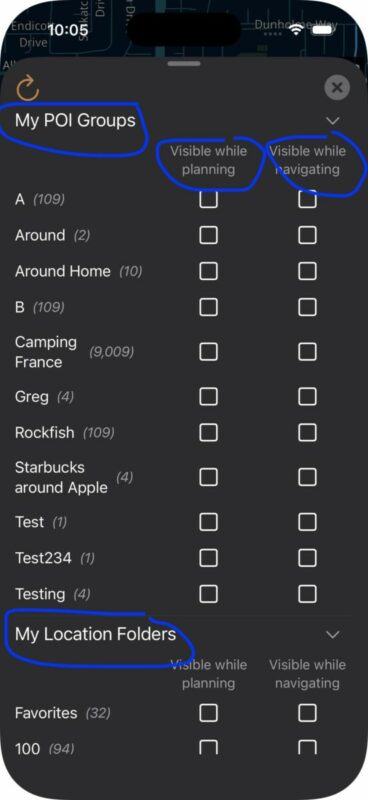
Maybe I'm misunderstanding, but you can set them to show during planning, and you can change the color and icon inside the markers.
I'm not sure if you created a location folder for these locations or if you created a custom POI group? In any case, for both you can set them to show during planning and/or navigation and for both you can change the icon.
If I could have a wish on top, I would love to set attributes per stop lists, like give me a reminder popup 25km ahead of a specific stop - for example for fuel stops
Yes. In a much earlier version of Scenic, POI groups used to have the option to set Proximity Alerts. (visual and audible warning when you get close to a POI). It's on the list to add that back, but will be a while.
@guidomm Guido, I know I can create a, apple shortcut to set an external time to give me a "pause" alarm after a certain time, but it would be very nice to leverage scenic itself - by allowing a configurable time after starting the ride, a simple popup would remind for a healthy break of the day tour.
Hmmm. I'll add it to the list with low priority. This is very much a "nice to have" in my opinion. My car does this. It shows in the display "Time for a break" if I'm driving over 3 hours without stopping I believe. Personally, I find that rather annoying 🙂. Mind your own business, car! 😉.
Hi Markus,
@guidomm Guido, I would really love if the icons used for locations lists are maintained on the map during planning as well during riding, same for the timeline, this would make it much much easier to identify what stop type comes up .. ( using a location lists for restaurants / coffee shops / hotels, they all have different icons to keep them identified)
Maybe I'm misunderstanding, but you can set them to show during planning, and you can change the color and icon inside the markers.
I'm not sure if you created a location folder for these locations or if you created a custom POI group? In any case, for both you can set them to show during planning and/or navigation and for both you can change the icon.
If I could have a wish on top, I would love to set attributes per stop lists, like give me a reminder popup 25km ahead of a specific stop - for example for fuel stops
Yes. In a much earlier version of Scenic, POI groups used to have the option to set Proximity Alerts. (visual and audible warning when you get close to a POI). It's on the list to add that back, but will be a while.
@guidomm Guido, I know I can create a, apple shortcut to set an external time to give me a "pause" alarm after a certain time, but it would be very nice to leverage scenic itself - by allowing a configurable time after starting the ride, a simple popup would remind for a healthy break of the day tour.
Hmmm. I'll add it to the list with low priority. This is very much a "nice to have" in my opinion. My car does this. It shows in the display "Time for a break" if I'm driving over 3 hours without stopping I believe. Personally, I find that rather annoying 🙂. Mind your own business, car! 😉.
Quote from MjK on 09.01.2026, 17:08Hi Guido, @guidomm
understand your view - and also the never ending list of nice to haves and other wishes ... 😉
In regards to the icons - yes I am aware and using the possibility to define for planning and navigation - but
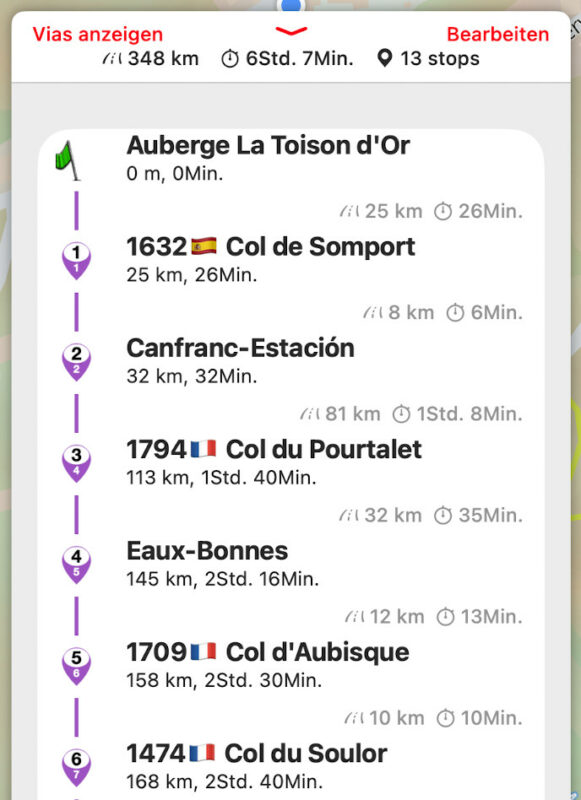
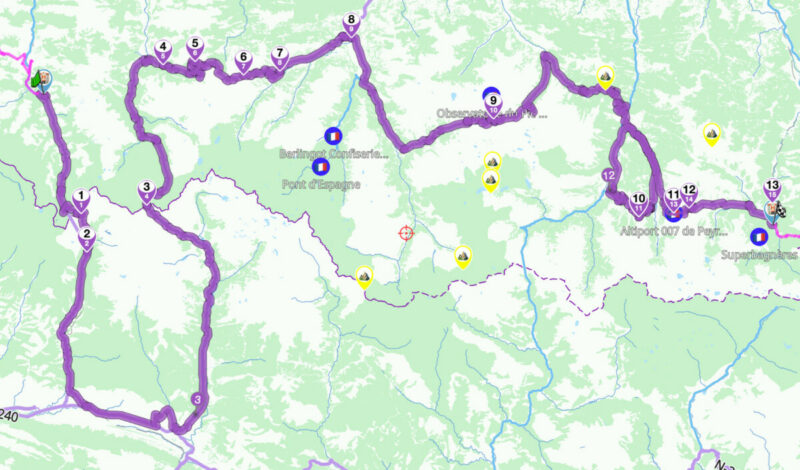
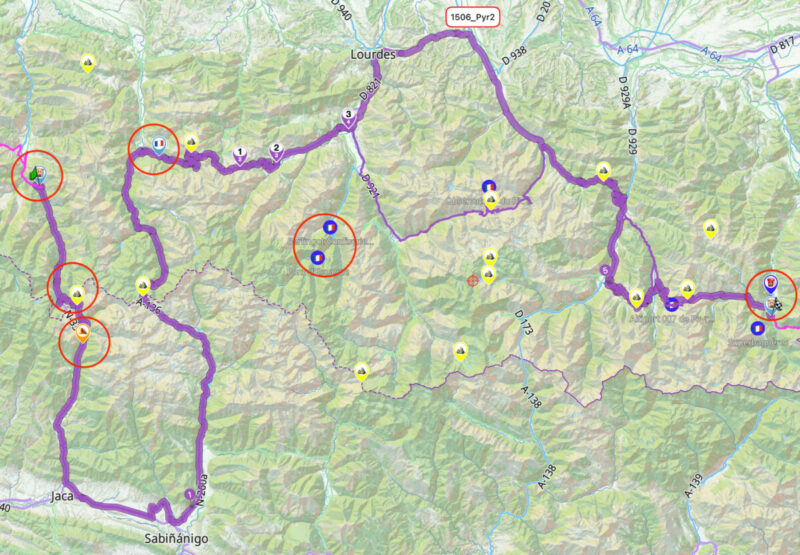
as you can see on the first 3 pictures, the route is following my stops, placed on exact thos different markers like hotels, fuel stations special locations and mountain passes.
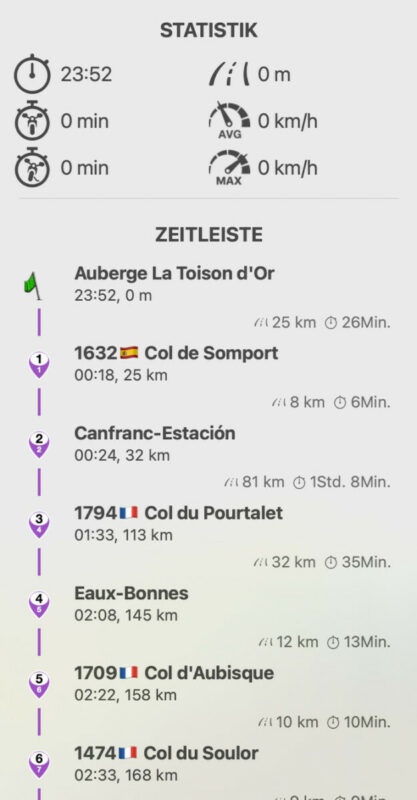
But in the timeline, during planning as well as during the ride and even more on the map, they are all overwritten by the stop icon and its color.
See 4th picture for examples of those icons, visualized by deleting the stop overlaying it.
hence my ask to keep the underlying color and icon for the respective stop, based on the original POI or location definition.
Also in the popup for the next stop, this would make it easier - without the need for special naming - to define if I really want to stop or simply skip ..
Hope I got it across this time, Markus
Hi Guido, @guidomm
understand your view - and also the never ending list of nice to haves and other wishes ... 😉
In regards to the icons - yes I am aware and using the possibility to define for planning and navigation - but
as you can see on the first 3 pictures, the route is following my stops, placed on exact thos different markers like hotels, fuel stations special locations and mountain passes.
But in the timeline, during planning as well as during the ride and even more on the map, they are all overwritten by the stop icon and its color.
See 4th picture for examples of those icons, visualized by deleting the stop overlaying it.
hence my ask to keep the underlying color and icon for the respective stop, based on the original POI or location definition.
Also in the popup for the next stop, this would make it easier - without the need for special naming - to define if I really want to stop or simply skip ..
Hope I got it across this time, Markus
Quote from pleasantone on 11.01.2026, 21:41First off, sorry for the delay responding, work has been killing me. THANK YOU for sharing your workflow, it has helped set my expectations.I think I was asking for a lot less than you might have assumed, responses inline.Quote from Guido on 29.12.2025, 16:17I understand what you mean. I'll explain first what IS possible and what's not yet possible. Then below I'll give you my workflow on how I do this at the moment.
Roughly calculate where I want to stay for the night.
Could you tell me a bit more about this? Do you want to enter a time or distance and then have Scenic suggest hotels or camp-spots?
No, nothing that fancy. What I'd like to do is get a feel for how many km into a route I am, and then I'll take responsibility for looking for fuel or a place to spend the night.
[feature 1]
At a bare minimum, "signposting" on the map how far we are from route start would be helpful. As in the image I showed from "On The Go" maps, it places a little [10] marker every [n] km from the start of the route so I get a "feel" for how long I've traveled. "Oh, I've traveled 400km, I should start looking for hotels. [* see below]
[feature 2]
While I can roughly estimate speed/distance, arrival time at waypoints (real time, not travel time) would be fantastic. However, in order to implement travel time, we'd need to be able to enter an estimated departure time at the start of the route and whenever we place a stop, add either an estimated departure time, or an estimated layover delta time. You display delta distance/time from the route start, which is great, but I don't get "real time" or the ability to put in delays/restarts.
Split the route up into per-day segments (just a route split where the full route gets copied into two routes (current day, rest of trip).
I imagine you would select the stops that indicate the hotel/campstot so that Scenic can use that to split the route?
Yes.
Roughly calculate where I want to plan for fuel stops.
Do you want to enter a distance and then have Scenic suggest gas stations along the way?
Nice, but not necessary if we do the signposting. While planning. when I get to 250km from my last fuel stop, I'll just zoom out a bit and search for fuel stops.
Roughly calculate travel time along route
There is a route-timeline feature that shows you the distance and time to- and between each stop. To show the timeline tap the button where you see total time and distance. I am planning on adding something to this, where you can scroll over a route and you'll see the time and distance at the selected point.
Yes, I'm aware of that.
Right now, you will display a time/distance from start when I enter a stop, which is great, but backwards for planning. I have to put a stop in first, and then go "oh, that's too far/close" and pick another stop.
Roughly display travel distance along route.
See above
See [feature 1] for why the request. It's a "planning the route" thing.
Name the start and end points, not just "Start" and "End"
Yes.. this is already on the feature request list.
<3
A final feature basecamp has, that I'd love to see, is departure time from start/stop or planned layover times for stops
Yes. This is also already on the feature request list. I know your next question is going to be when
. But I can't answer that at the moment. The feature request is long and changing all the time as requests come in.
Nope, not going to pressure you on "when." Your priority list is your priority list. I just know the things that bug me when I use Scenic for planning. However thank you for sharing your workflow. I used to plan routes with Google Maps, and I'll go back to that and import when I'm on a real computer. My biggest problem was that I used to travel with a laptop on multi day trips, and now I travel with just a phone, and Scenic is *so close* to being perfect for trip planning on the phone, but if your planning scenario is to use another program and then import, I can do the same as you. I've never seriously tried Furkot, I'll play with that too.
My Workflow 1
- I plan the multi day route in Google Maps (you could also use Furkot for a more powerful planner. If you import a Furkot Trip, the route splitting per day is done automatically upon import). I prefer Google Maps because it's easier to use and has the best places database.
- Import the Google Maps link into Scenic (it's placed in the import queue)
- Then I import it from the import queue. On the first import, I delete everything that's not day 1. Then I import it again and delete everything that's not day 2, etc.
- Typically I don't plan fuel stops, but if I know I'm traveling in an area where fuel might be difficult to get, I plan gas stations as stops in Google Maps too.
- If you go for Furkot, then it's even easier. In furkot you can mark a stop as an overnight stop. Based on that, Scenic will do the splitting for you and you just need to import each day route from the import queue.
My Workflow 2
- I create the full multi-day trip in Scenic, including hotels/camping stops/view points/restaurants and, if in an area where fuel is difficult, then also stops for fuel.
- Then I duplicate that route as many times as there are days in the trip.
- Then, for each duplicate, I remove the stops that don't apply for that day.
Hope this helps for the moment.
Totally helps,, thank you so much for sharing! Love Scenic.
First off, sorry for the delay responding, work has been killing me. THANK YOU for sharing your workflow, it has helped set my expectations.I think I was asking for a lot less than you might have assumed, responses inline.
Quote from Guido on 29.12.2025, 16:17I understand what you mean. I'll explain first what IS possible and what's not yet possible. Then below I'll give you my workflow on how I do this at the moment.
Roughly calculate where I want to stay for the night.
Could you tell me a bit more about this? Do you want to enter a time or distance and then have Scenic suggest hotels or camp-spots?
No, nothing that fancy. What I'd like to do is get a feel for how many km into a route I am, and then I'll take responsibility for looking for fuel or a place to spend the night.
[feature 1]
At a bare minimum, "signposting" on the map how far we are from route start would be helpful. As in the image I showed from "On The Go" maps, it places a little [10] marker every [n] km from the start of the route so I get a "feel" for how long I've traveled. "Oh, I've traveled 400km, I should start looking for hotels. [* see below]
[feature 2]
While I can roughly estimate speed/distance, arrival time at waypoints (real time, not travel time) would be fantastic. However, in order to implement travel time, we'd need to be able to enter an estimated departure time at the start of the route and whenever we place a stop, add either an estimated departure time, or an estimated layover delta time. You display delta distance/time from the route start, which is great, but I don't get "real time" or the ability to put in delays/restarts.
Split the route up into per-day segments (just a route split where the full route gets copied into two routes (current day, rest of trip).
I imagine you would select the stops that indicate the hotel/campstot so that Scenic can use that to split the route?
Yes.
Roughly calculate where I want to plan for fuel stops.
Do you want to enter a distance and then have Scenic suggest gas stations along the way?
Nice, but not necessary if we do the signposting. While planning. when I get to 250km from my last fuel stop, I'll just zoom out a bit and search for fuel stops.
Roughly calculate travel time along route
There is a route-timeline feature that shows you the distance and time to- and between each stop. To show the timeline tap the button where you see total time and distance. I am planning on adding something to this, where you can scroll over a route and you'll see the time and distance at the selected point.
Yes, I'm aware of that.
Right now, you will display a time/distance from start when I enter a stop, which is great, but backwards for planning. I have to put a stop in first, and then go "oh, that's too far/close" and pick another stop.
Roughly display travel distance along route.
See above
See [feature 1] for why the request. It's a "planning the route" thing.
Name the start and end points, not just "Start" and "End"
Yes.. this is already on the feature request list.
<3
A final feature basecamp has, that I'd love to see, is departure time from start/stop or planned layover times for stops
Yes. This is also already on the feature request list. I know your next question is going to be when
Nope, not going to pressure you on "when." Your priority list is your priority list. I just know the things that bug me when I use Scenic for planning. However thank you for sharing your workflow. I used to plan routes with Google Maps, and I'll go back to that and import when I'm on a real computer. My biggest problem was that I used to travel with a laptop on multi day trips, and now I travel with just a phone, and Scenic is *so close* to being perfect for trip planning on the phone, but if your planning scenario is to use another program and then import, I can do the same as you. I've never seriously tried Furkot, I'll play with that too.
My Workflow 1
- I plan the multi day route in Google Maps (you could also use Furkot for a more powerful planner. If you import a Furkot Trip, the route splitting per day is done automatically upon import). I prefer Google Maps because it's easier to use and has the best places database.
- Import the Google Maps link into Scenic (it's placed in the import queue)
- Then I import it from the import queue. On the first import, I delete everything that's not day 1. Then I import it again and delete everything that's not day 2, etc.
- Typically I don't plan fuel stops, but if I know I'm traveling in an area where fuel might be difficult to get, I plan gas stations as stops in Google Maps too.
- If you go for Furkot, then it's even easier. In furkot you can mark a stop as an overnight stop. Based on that, Scenic will do the splitting for you and you just need to import each day route from the import queue.
My Workflow 2
- I create the full multi-day trip in Scenic, including hotels/camping stops/view points/restaurants and, if in an area where fuel is difficult, then also stops for fuel.
- Then I duplicate that route as many times as there are days in the trip.
- Then, for each duplicate, I remove the stops that don't apply for that day.
Hope this helps for the moment.
Totally helps,, thank you so much for sharing! Love Scenic.
Quote from Guido on 12.01.2026, 10:59@mjk. I understand what you mean now. You'd like the stop icons in the route to maintain the POI icon (color and symbol) on which you based the stop. I'll add it to the list. Although this might sound like a simple change... it's not. This requires a database change as well since there is no room for the database to store color and symbol for stops in a route. So... this might take some time.
@pleasantone
What I'd like to do is get a feel for how many km into a route I am, and then I'll take responsibility for looking for fuel or a place to spend the night.
OK. Got it.
While I can roughly estimate speed/distance, arrival time at waypoints (real time, not travel time) would be fantastic. However, in order to implement travel time, we'd need to be able to enter an estimated departure time at the start of the route and whenever we place a stop, add either an estimated departure time, or an estimated layover delta time. You display delta distance/time from the route start, which is great, but I don't get "real time" or the ability to put in delays/restarts.
Yes... I got more request over time for adding route start time and stop layover time. It's on the list.
@mjk. I understand what you mean now. You'd like the stop icons in the route to maintain the POI icon (color and symbol) on which you based the stop. I'll add it to the list. Although this might sound like a simple change... it's not. This requires a database change as well since there is no room for the database to store color and symbol for stops in a route. So... this might take some time.
What I'd like to do is get a feel for how many km into a route I am, and then I'll take responsibility for looking for fuel or a place to spend the night.
OK. Got it.
While I can roughly estimate speed/distance, arrival time at waypoints (real time, not travel time) would be fantastic. However, in order to implement travel time, we'd need to be able to enter an estimated departure time at the start of the route and whenever we place a stop, add either an estimated departure time, or an estimated layover delta time. You display delta distance/time from the route start, which is great, but I don't get "real time" or the ability to put in delays/restarts.
Yes... I got more request over time for adding route start time and stop layover time. It's on the list.
Quote from pleasantone on 12.01.2026, 11:05re @mjk’s request:
Luckily once the internal database is implemented, gpx already has provisions for <symbol> in both route points and waypoints so they could be imported and exported too! 🙂
re @mjk’s request:
Luckily once the internal database is implemented, gpx already has provisions for <symbol> in both route points and waypoints so they could be imported and exported too! 🙂

Quote from Hubcap on 26.01.2026, 14:29Just to add that in Furkot you can specify how many miles between fuel stops and it will add a fuel symbol to your route at each stop. You can then find the nearest fuel station to the symbol and add it as a stop. This is helpful and works across single and multi day routes. However importing Furkot routes into Scenic does sometime result in a few strange detours in Scenic, so it is worth forensically checking the resulting Scenic route and correcting the strange detours (mostly minor).
Just to add that in Furkot you can specify how many miles between fuel stops and it will add a fuel symbol to your route at each stop. You can then find the nearest fuel station to the symbol and add it as a stop. This is helpful and works across single and multi day routes. However importing Furkot routes into Scenic does sometime result in a few strange detours in Scenic, so it is worth forensically checking the resulting Scenic route and correcting the strange detours (mostly minor).

Quote from Marts on 31.01.2026, 22:52Crikey, lots of ways to a skin a cat in this thread.
I use Google Maps to plan the route if it's a multi-day trip. I then print out the instructions where it shows distance and time between "destinations" or stops.
As my bike only has a 20l tank I have an estimated range of around 320km before getting low fuel alerts. So, using the Google Maps I work out the stops for fuel based on that.
I have a 1,500km trip coming up. I'll overnight halfway. So, 750km a day which means a minimum of one stop (fueled up before the ride, fuel up at the end and one in the middle). Or, if I stop for lunch then that'll be the next fuel stop. And then I work out distance to destination from that point.
If Guido could work his magic and implement that I'd be totally amazed. But, for me, it's easier to simply plan the route in Google, export the data to Scenic's web app and navigate from there.
But one feature would be nice: low fuel alert. The Garmin Zumo Navigators have it. I used to set it to 320km to give me plenty of margin. Fill up and reset it. Garmin will also guess that you've stopped for fuel and ask if you want to reset the fuel calculator. If not filling up, I say no, if I am I say yes and it resets.
Having that as a part of the planned route and in nav mode would be great. Saves me constantly looking at the trip meter, I guess, when getting towards empty.
Crikey, lots of ways to a skin a cat in this thread.
I use Google Maps to plan the route if it's a multi-day trip. I then print out the instructions where it shows distance and time between "destinations" or stops.
As my bike only has a 20l tank I have an estimated range of around 320km before getting low fuel alerts. So, using the Google Maps I work out the stops for fuel based on that.
I have a 1,500km trip coming up. I'll overnight halfway. So, 750km a day which means a minimum of one stop (fueled up before the ride, fuel up at the end and one in the middle). Or, if I stop for lunch then that'll be the next fuel stop. And then I work out distance to destination from that point.
If Guido could work his magic and implement that I'd be totally amazed. But, for me, it's easier to simply plan the route in Google, export the data to Scenic's web app and navigate from there.
But one feature would be nice: low fuel alert. The Garmin Zumo Navigators have it. I used to set it to 320km to give me plenty of margin. Fill up and reset it. Garmin will also guess that you've stopped for fuel and ask if you want to reset the fuel calculator. If not filling up, I say no, if I am I say yes and it resets.
Having that as a part of the planned route and in nav mode would be great. Saves me constantly looking at the trip meter, I guess, when getting towards empty.


