
Export GPX file from Scenic on iPad, Navigate on iPad

Quote from Old Man Emu on 05.02.2024, 22:53Hi Guido, Scenic users,
I'm on a 16 day trip and all routes are loaded into Scenic - both on iPhone and iPad via Synchronisation.
I was going to use my iPad to export all the GPX files to an SD Card so my ride buddies can copy into their iPhone file system. (I have an iPhone SD Card adapter). I ended up using my iPhone and I understand there are other ways to do this but ...
But I find that the extra Export, Share, Navigate etc functions are not on the iPad - is that correct ?
Hi Guido, Scenic users,
I'm on a 16 day trip and all routes are loaded into Scenic - both on iPhone and iPad via Synchronisation.
I was going to use my iPad to export all the GPX files to an SD Card so my ride buddies can copy into their iPhone file system. (I have an iPhone SD Card adapter). I ended up using my iPhone and I understand there are other ways to do this but ...
But I find that the extra Export, Share, Navigate etc functions are not on the iPad - is that correct ?
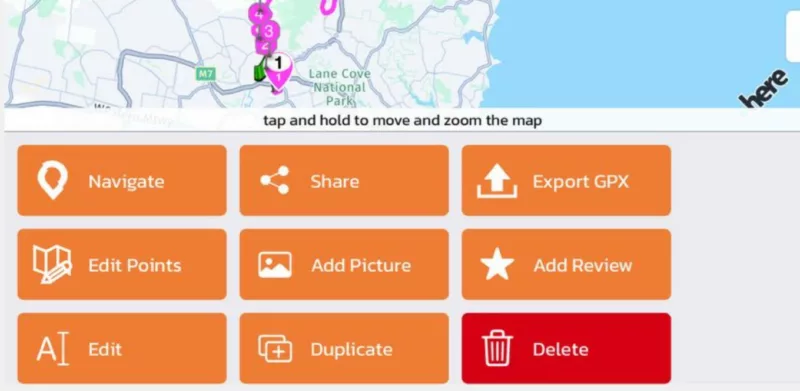

Quote from Dae on 06.02.2024, 00:42I’m not sure what you mean by “extra” share and export functions, but I cam export just fine on my iPad
I’m not sure what you mean by “extra” share and export functions, but I cam export just fine on my iPad


Quote from Old Man Emu on 06.02.2024, 01:27Thanks for that. My mistake I was moving with my finger on the map and not the title bar !
All good.
Thanks for that. My mistake I was moving with my finger on the map and not the title bar !
All good.
Quote from Dae on 06.02.2024, 01:31That is one thing that does frustrate me with Scenic. I’d prefer the buttons to be above the map as it can be a pain on some devices to try and scroll down to the navigate or share options.
That is one thing that does frustrate me with Scenic. I’d prefer the buttons to be above the map as it can be a pain on some devices to try and scroll down to the navigate or share options.


