
Export from Scenic App (MacOS) as GPX

Quote from Yo on 26.07.2023, 02:05Sorry if i missed it but how could i export a route planned with Scenic on MacOS (desktop version) as a GPX file?
Thnx
Reimund
Sorry if i missed it but how could i export a route planned with Scenic on MacOS (desktop version) as a GPX file?
Thnx
Reimund

Quote from massi on 26.07.2023, 02:20When show the route with map and elevation profile, scroll a little bit down and you get the buttons to export GPX and do other things.
When show the route with map and elevation profile, scroll a little bit down and you get the buttons to export GPX and do other things.
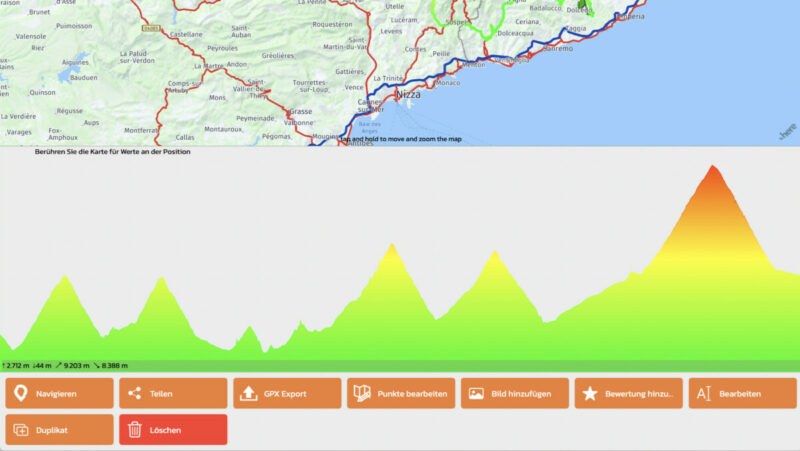
Quote from Yo on 26.07.2023, 02:28Thank you,
great!I always miss/forget to scroll down the page. The window that opens after clicking a route just show the route on the map with no options easily visible. Have to remember!
Thank you,
great!
I always miss/forget to scroll down the page. The window that opens after clicking a route just show the route on the map with no options easily visible. Have to remember!


Quote from Dae on 16.08.2023, 03:40There isn’t one. If you have a Mac with an M1 or M2 chip you can install iOS apps so just install the App Store version of Scenic
There isn’t one. If you have a Mac with an M1 or M2 chip you can install iOS apps so just install the App Store version of Scenic

Quote from Paul on 16.08.2023, 14:09Hi guys,
Recently got a Mac mini M2 and it is great being able to use the Scenic app for planning and investigating routes. In particular with two screens and other programs / maps on the side. Thanks to this the nordic winter will disappear much faster. Thanks Guido!!!
But I have the same issue: cant export and cant duplicate from my Mac. No matter how much I scroll elevation and tabs for export and duplication does not appear. Right now I have to synch the phone and do it from there - works but is primitive.
Hi guys,
Recently got a Mac mini M2 and it is great being able to use the Scenic app for planning and investigating routes. In particular with two screens and other programs / maps on the side. Thanks to this the nordic winter will disappear much faster. Thanks Guido!!!
But I have the same issue: cant export and cant duplicate from my Mac. No matter how much I scroll elevation and tabs for export and duplication does not appear. Right now I have to synch the phone and do it from there - works but is primitive.


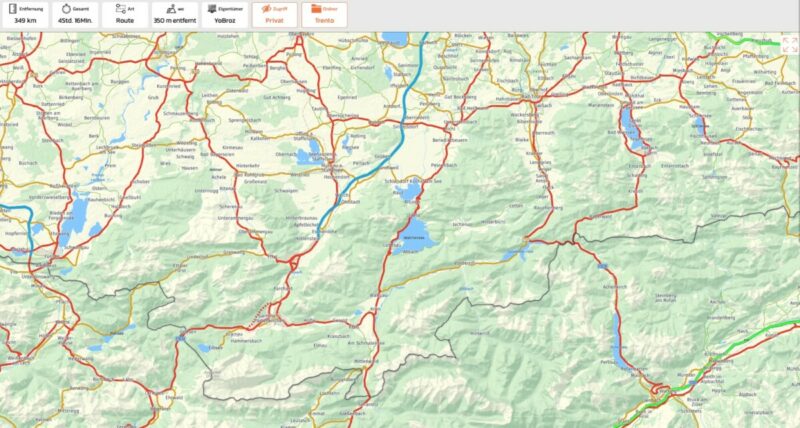
Quote from Guido on 16.08.2023, 15:36Have you tried putting the mouse pointer (and clicking briefly) on the row just above the map (where you see the route info) and then scroll? Or grabbing there and moving the mouse/trackpad up?
Have you tried putting the mouse pointer (and clicking briefly) on the row just above the map (where you see the route info) and then scroll? Or grabbing there and moving the mouse/trackpad up?
Quote from Paul on 16.08.2023, 16:02Hi Guido,
That finally worked. My attention was completely at the bottom. Tried what you wrote - had to fiddle around and click and drag down until the grey scroll bar became visible on the right side. Voila ! Thanks for your fast and great support !!
Hi Guido,
That finally worked. My attention was completely at the bottom. Tried what you wrote - had to fiddle around and click and drag down until the grey scroll bar became visible on the right side. Voila ! Thanks for your fast and great support !!


