
Enable routing vs tracking

Quote from mdh001 on 20.10.2024, 08:37How do we enable routing vs tracking?
If I start a journey to a destination it will initiate a turn by turn route. If I clear the route (not end ride) and pick a new destination, the app stays in tracking versus switching to route and doesn’t provide turn by turn directions.
I could stop the ride and start a new ride, but then I lose the total ride metrics which I prefer to keep for the duration of the activity.
is there a way to change a tracking ride to route?
How do we enable routing vs tracking?
If I start a journey to a destination it will initiate a turn by turn route. If I clear the route (not end ride) and pick a new destination, the app stays in tracking versus switching to route and doesn’t provide turn by turn directions.
I could stop the ride and start a new ride, but then I lose the total ride metrics which I prefer to keep for the duration of the activity.
is there a way to change a tracking ride to route?

Quote from Guido on 20.10.2024, 17:42It should start navigating when clearing the route and adding a new destination. Are you on the latest version v4.03? You can see version number at startup or at the bottom of settings.
It should start navigating when clearing the route and adding a new destination. Are you on the latest version v4.03? You can see version number at startup or at the bottom of settings.
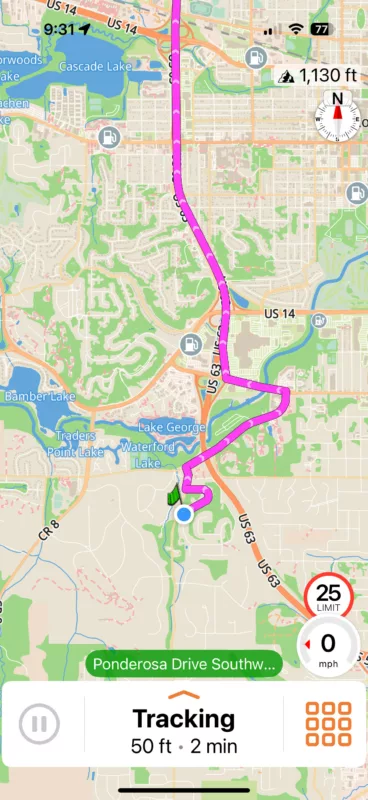
Quote from mdh001 on 20.10.2024, 18:11Latest version installed. While I do get a pathway highlighted on the map, it shows “tracking” and doesn’t give turn by turn navigation, etc. It does work if I stop the ride and start a new one, but then the ride metrics start fresh again too.
You can try my steps and see if it is different for you a maybe I should be doing this differently.
- Open the Scenic app
- Select search to find and select your desired destination
- tap “Ride” to start navigation (this will enable routing and turn by turn directions)
- move the screen and select edit route
- select clear route to remove route and destination
- On the same edit screen, tap search to find new destination
- tap “end”to make it the new endpoint
- Choose the back button and then “close” to get to the main map screen
- A pathway will be highlighted on the map, but it is tracking versus routing (no turn by turn prompts)
It’s a small nuance….and I really like the new map vendor…thanks for all that you do in supporting this app!
Latest version installed. While I do get a pathway highlighted on the map, it shows “tracking” and doesn’t give turn by turn navigation, etc. It does work if I stop the ride and start a new one, but then the ride metrics start fresh again too.
You can try my steps and see if it is different for you a maybe I should be doing this differently.
- Open the Scenic app
- Select search to find and select your desired destination
- tap “Ride” to start navigation (this will enable routing and turn by turn directions)
- move the screen and select edit route
- select clear route to remove route and destination
- On the same edit screen, tap search to find new destination
- tap “end”to make it the new endpoint
- Choose the back button and then “close” to get to the main map screen
- A pathway will be highlighted on the map, but it is tracking versus routing (no turn by turn prompts)
It’s a small nuance….and I really like the new map vendor…thanks for all that you do in supporting this app!
Quote from Guido on 20.10.2024, 18:33OK. Thanks very much for the detailed steps. Very helpful. I'll take a look at it this week.
OK. Thanks very much for the detailed steps. Very helpful. I'll take a look at it this week.


