
Editing/ Renaming stops

Quote from Martyn on 08.02.2025, 02:47I’ve searched the forums and can’t seem to find an answer.
When I create a route with stops and try to edit the stops labels/ names all that comes up is the option to look around or save and show coordinates. I know there should be a move and rename option because I’ve previously used it but can’t recreate it. I’m obviously doing something wrong so any help would be great. Thanks
I’ve searched the forums and can’t seem to find an answer.
When I create a route with stops and try to edit the stops labels/ names all that comes up is the option to look around or save and show coordinates. I know there should be a move and rename option because I’ve previously used it but can’t recreate it. I’m obviously doing something wrong so any help would be great. Thanks

Quote from Guido on 08.02.2025, 02:56When you tap the marker (in the main screen or in plan mode) the callout bubble should have an ‘edit name’ button like this.
If you are not seeing all these buttons perhaps you didn’t tap the marker but very close to it. It can be rather sensitive. Try tapping the marker at the bottom part (where the pointy bit ‘touches’ the map).
When you tap the marker (in the main screen or in plan mode) the callout bubble should have an ‘edit name’ button like this.
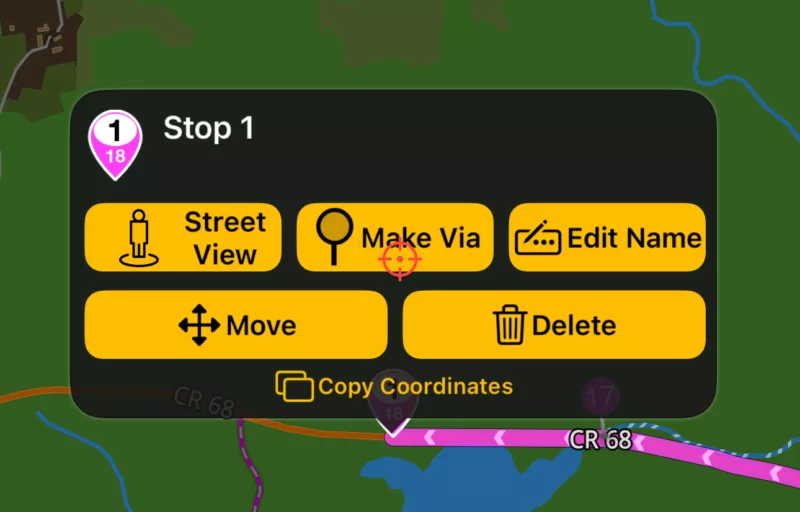
If you are not seeing all these buttons perhaps you didn’t tap the marker but very close to it. It can be rather sensitive. Try tapping the marker at the bottom part (where the pointy bit ‘touches’ the map).


