
Directions in navigation

#1 · 17.07.2022, 15:29
Quote from Raxzor on 17.07.2022, 15:29whenever I try to start a navigation, either from a pre saved route or just typed in my destination, and then press start, the map just comes up blank. No directions or arrows to point me in the direction I need to go.
am I the only one, that have this issue ? The gps on my phone is allowed to register my location all time. IMG_0516
whenever I try to start a navigation, either from a pre saved route or just typed in my destination, and then press start, the map just comes up blank. No directions or arrows to point me in the direction I need to go.
am I the only one, that have this issue ? The gps on my phone is allowed to register my location all time. IMG_0516
Click for thumbs down.0Click for thumbs up.1
vonDrack has reacted to this post.
vonDrack

#2 · 17.07.2022, 17:29
Quote from Guido on 17.07.2022, 17:29There seems to be an issue with the latest update. Not sure what’s going on and how many people it affects. I don’t have any problems myself, but had about half a dozen other reports so far.I’ll be looking into this tomorrow and bring out a fix asap, before the next weekend.What seems to solve it is when the route recalculates. For example, when you detour. Or, what seemed to help other ones as well, is to go into the Nav menu (big button menu), and then tap the 'skip via/stop' button. This will cause a recalculation and the route will become visible after that.This obviously only works if you have a stop/via in the route.Best regards and sorry for the inconvenience,Guido
There seems to be an issue with the latest update. Not sure what’s going on and how many people it affects. I don’t have any problems myself, but had about half a dozen other reports so far.
I’ll be looking into this tomorrow and bring out a fix asap, before the next weekend.
What seems to solve it is when the route recalculates. For example, when you detour. Or, what seemed to help other ones as well, is to go into the Nav menu (big button menu), and then tap the 'skip via/stop' button. This will cause a recalculation and the route will become visible after that.
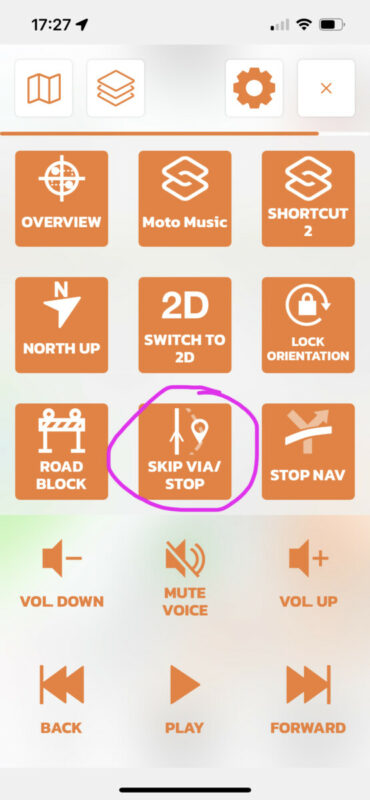
This obviously only works if you have a stop/via in the route.
Best regards and sorry for the inconvenience,
Guido
Click for thumbs down.0Click for thumbs up.0
Last edited on 18.07.2022, 15:26 by Guido
If you're enjoying Scenic and are happy with the support, please leave a nice rating in the App Store. It would mean a lot to me ❤️


