
Direction glitch

Quote from Bangkok on 17.02.2024, 13:53Hi Guido,
today I noticed during a ride that the app sometimes is wrong in showing the right direction as you can see in the photo.
It says turn right in 3 km while it actually is turn left in 50 meters
Hi Guido,
today I noticed during a ride that the app sometimes is wrong in showing the right direction as you can see in the photo.
It says turn right in 3 km while it actually is turn left in 50 meters
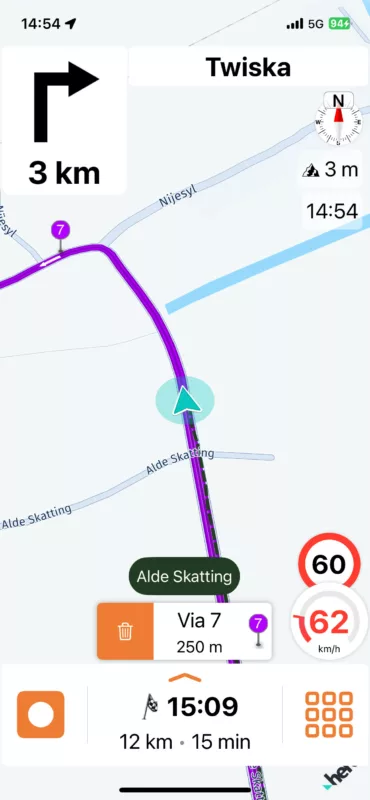

Quote from Guido on 17.02.2024, 14:37This can happen when via points are placed close to junctions. It’s showing the next turn. I’ll see if I can improve this. Until that time, a workaround is to place the via points away from junctions, or try and remove them al together and see if it still takes the same route. Not ideal, I know, but perhaps workable until I improve this.
This can happen when via points are placed close to junctions. It’s showing the next turn. I’ll see if I can improve this. Until that time, a workaround is to place the via points away from junctions, or try and remove them al together and see if it still takes the same route. Not ideal, I know, but perhaps workable until I improve this.

Quote from Mex on 18.02.2024, 00:55Hi Bangkok, Hi Guido.
In my opinion, there is no way to change this.
Sometimes this happens to me too. E.g.: Senic tells you: Follow the road for 20 miles. But you find a priority road leading left. Do you follow the priority road to the left or do you go straight?
I guess it depends on the number of the road your riding. While you are on, lets say: N82 you should stay on N82 for 20 miles even if it turns.
Here maps dont know about priority rules. No navigation system does it.
@bangkok : the screenshot looks like you follow main road, correct?
Just my 2 cents, Mex
Hi Bangkok, Hi Guido.
In my opinion, there is no way to change this.
Sometimes this happens to me too. E.g.: Senic tells you: Follow the road for 20 miles. But you find a priority road leading left. Do you follow the priority road to the left or do you go straight?
I guess it depends on the number of the road your riding. While you are on, lets say: N82 you should stay on N82 for 20 miles even if it turns.
Here maps dont know about priority rules. No navigation system does it.
@bangkok : the screenshot looks like you follow main road, correct?
Just my 2 cents, Mex
Quote from Guido on 18.02.2024, 02:07@mex You have a good point. Indeed this could also be the case in the screenshot. I don’t know the traffic situation there, but if “going left” is actually just following the natural road (the priority road), then a “turn left” instruction would not be generated for that.
Nevertheless, the point I mentioned above still remains too.
@mex You have a good point. Indeed this could also be the case in the screenshot. I don’t know the traffic situation there, but if “going left” is actually just following the natural road (the priority road), then a “turn left” instruction would not be generated for that.
Nevertheless, the point I mentioned above still remains too.
Quote from Bangkok on 18.02.2024, 03:16Thanks for the reply.
These are small roads and I don't know if they have a number or which is the 'main' road.
The route I made was in this case: go home and use small curvy roads and then this came up, I did not place the via points by hand.
I have had this now a couple of times and it is not a serious problem, you just have to pay a little more attention.
I thought that it could be a small glitch which could be fixed easily.I have an other question: how can I set my navigation screen in a way that I am 'always driving north'.
Thanks for the help.
Thanks for the reply.
These are small roads and I don't know if they have a number or which is the 'main' road.
The route I made was in this case: go home and use small curvy roads and then this came up, I did not place the via points by hand.
I have had this now a couple of times and it is not a serious problem, you just have to pay a little more attention.
I thought that it could be a small glitch which could be fixed easily.
I have an other question: how can I set my navigation screen in a way that I am 'always driving north'.
Thanks for the help.
Quote from Guido on 18.02.2024, 07:45There is a button in the navigation menu (big button menu) which allows you to switch between north up and riding/direction up.
There is a button in the navigation menu (big button menu) which allows you to switch between north up and riding/direction up.


