
Direction cues when navigating to route

Quote from Aging Bull on 02.06.2024, 02:47Hi @guidomm
Really enjoying the app and using it quite a lot.
I had created a round trip route and was starting off. Due to the Saturday morning market, I couldn’t take some of the initial turns. I ended up in the village centre a little confused. There were a number of problems:
1. it didn’t seem to reroute me, maybe because I was on streets I technically shouldn’t be on
2. I could see the way out and the way back, but I couldn’t tell which was which as both were identical colours
3. I couldn’t see the direction of either route (way back, way out) so I couldn’t tell which direction to turn onto the blue highlighted route
4 the sound that scenic makes when you are off the route makes a wildly stressful sound that really does not help
Some things I think would help
- clear direction cues - arrows for example that always appear on the portion of the route that’s visible on-screen
- if the way out and way back are visible on-screen at the same time, have them different colours
- direction alone is not enough if you are disorientated and have both way out and way back visible on-screen because you don’t know which is which
- some way to permanently disable all and every sound. I have sounds disable in sounds and haptics setting yet it still made this terrible sound while trying to figure out where I needed to go and I couldn’t figure out how to stop it
Hi @guidomm
Really enjoying the app and using it quite a lot.
I had created a round trip route and was starting off. Due to the Saturday morning market, I couldn’t take some of the initial turns. I ended up in the village centre a little confused. There were a number of problems:
1. it didn’t seem to reroute me, maybe because I was on streets I technically shouldn’t be on
2. I could see the way out and the way back, but I couldn’t tell which was which as both were identical colours
3. I couldn’t see the direction of either route (way back, way out) so I couldn’t tell which direction to turn onto the blue highlighted route
4 the sound that scenic makes when you are off the route makes a wildly stressful sound that really does not help
Some things I think would help
- clear direction cues - arrows for example that always appear on the portion of the route that’s visible on-screen
- if the way out and way back are visible on-screen at the same time, have them different colours
- direction alone is not enough if you are disorientated and have both way out and way back visible on-screen because you don’t know which is which
- some way to permanently disable all and every sound. I have sounds disable in sounds and haptics setting yet it still made this terrible sound while trying to figure out where I needed to go and I couldn’t figure out how to stop it

Quote from Guido on 03.06.2024, 09:22it didn’t seem to reroute me, maybe because I was on streets I technically shouldn’t be on
That could be. If the road you are on is not a mapped road, then it can't really reroute you... or perhaps you have recalculate on detour turned off? (Settings > Navigation & Tracking > Detour behaviour)
- clear direction cues - arrows for example that always appear on the portion of the route that’s visible on-screen
Working on that. Will be added later this year.
- if the way out and way back are visible on-screen at the same time, have them different colours
OK. Makes sense. I'll see if I can add that too, while I'm working on the direciton arrows.
- some way to permanently disable all and every sound. I have sounds disable in sounds and haptics setting yet it still made this terrible sound while trying to figure out where I needed to go and I couldn’t figure out how to stop it
Did you turn off the recalculate sound in Settings > Sounds & Haptics, and you were still hearing the recalculate sound?
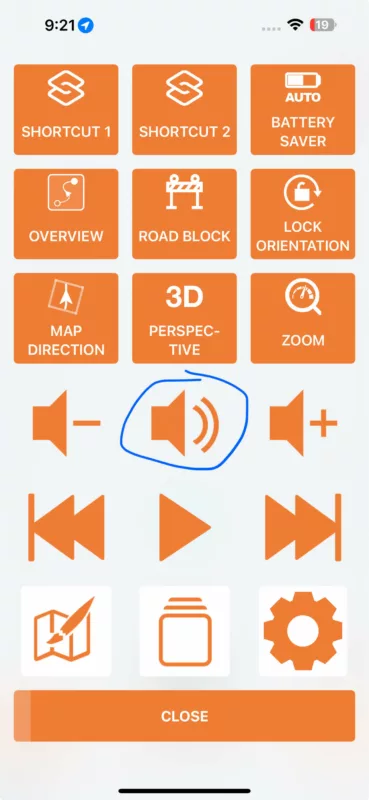
Turning all sounds off is already possible: Tap the speaker button in the navigation menu to cycle through "Sound ON", "Alerts only" (alerts include the recalcualting sound), "Sound OFF".
it didn’t seem to reroute me, maybe because I was on streets I technically shouldn’t be on
That could be. If the road you are on is not a mapped road, then it can't really reroute you... or perhaps you have recalculate on detour turned off? (Settings > Navigation & Tracking > Detour behaviour)
- clear direction cues - arrows for example that always appear on the portion of the route that’s visible on-screen
Working on that. Will be added later this year.
- if the way out and way back are visible on-screen at the same time, have them different colours
OK. Makes sense. I'll see if I can add that too, while I'm working on the direciton arrows.
- some way to permanently disable all and every sound. I have sounds disable in sounds and haptics setting yet it still made this terrible sound while trying to figure out where I needed to go and I couldn’t figure out how to stop it
Did you turn off the recalculate sound in Settings > Sounds & Haptics, and you were still hearing the recalculate sound?
Turning all sounds off is already possible: Tap the speaker button in the navigation menu to cycle through "Sound ON", "Alerts only" (alerts include the recalcualting sound), "Sound OFF".
Quote from Aging Bull on 03.06.2024, 13:34Thanks for the replies. Indeed, I hadn’t disabled the route recalculation sound. I would have thought the sound effects setting was a master setting, so maybe a little unintuitive.
Thanks again!
Thanks for the replies. Indeed, I hadn’t disabled the route recalculation sound. I would have thought the sound effects setting was a master setting, so maybe a little unintuitive.
Thanks again!


