
Detour behavior when following a Scenic-planned route

Quote from mattsz on 11.03.2024, 06:53In another recently active thread, users are having issues with Scenic not behaving as expected during a detour on a planned route. I thought to add to that thread, but I’m not sure my problem is quite the same.
I tried Scenic 3.5 on the go for the first time yesterday; I simply chose one of my saved locations in the “Where to?” window from the opening map screen, and Scenic immediately offered a route using the default “fast” routing. No power planner, no waypoints or stops.
I started on the route, but detoured from it pretty quickly, since experience tells me that in fact the offered route is NOT the fastest route. As I progressed further along my chosen detour, Scenic tried to get me to make a u-turn and go backwards… to what I assume was the location I left the suggested route? Even when there were other roads that would have gotten me back onto the route much more directly, all I got was a steady stream of directions to turn around and go back. I finally just turned it off.
What am I missing here? Why doesn’t Scenic recalculate a new “fast” route when I deviate from the original one? The “recalculate on detour” setting is “on.” I don’t remember seeing a “recalculate” button, which according to Scenic, appears when off route (doesn't mean it wasn't there, though!)...
In another recently active thread, users are having issues with Scenic not behaving as expected during a detour on a planned route. I thought to add to that thread, but I’m not sure my problem is quite the same.
I tried Scenic 3.5 on the go for the first time yesterday; I simply chose one of my saved locations in the “Where to?” window from the opening map screen, and Scenic immediately offered a route using the default “fast” routing. No power planner, no waypoints or stops.
I started on the route, but detoured from it pretty quickly, since experience tells me that in fact the offered route is NOT the fastest route. As I progressed further along my chosen detour, Scenic tried to get me to make a u-turn and go backwards… to what I assume was the location I left the suggested route? Even when there were other roads that would have gotten me back onto the route much more directly, all I got was a steady stream of directions to turn around and go back. I finally just turned it off.
What am I missing here? Why doesn’t Scenic recalculate a new “fast” route when I deviate from the original one? The “recalculate on detour” setting is “on.” I don’t remember seeing a “recalculate” button, which according to Scenic, appears when off route (doesn't mean it wasn't there, though!)...

Quote from Guido on 11.03.2024, 07:16You are not missing anything.
Even without waypoints, Scenic first tries to return you to the route keeping as much of the first calculated route in tact. When you keep going, eventually it will calculate a new route to your destination.
More technically… Scenic uses 2 recalculation methods.
The first one is “returnToRoute”, which is a lot faster as it doesn’t recalculate the entire route, just the little stretch to get you back to the route.
The second one is “recalculate”, which totally recalculates a new route from your current location to the destination.
Scenic will try the “returnToRoute” until it really doesn’t make any more sense.
I could change this so that it always uses the “recalculate” method. Perhaps that would be more logical / be more what one would expect?
You are not missing anything.
Even without waypoints, Scenic first tries to return you to the route keeping as much of the first calculated route in tact. When you keep going, eventually it will calculate a new route to your destination.
More technically… Scenic uses 2 recalculation methods.
The first one is “returnToRoute”, which is a lot faster as it doesn’t recalculate the entire route, just the little stretch to get you back to the route.
The second one is “recalculate”, which totally recalculates a new route from your current location to the destination.
Scenic will try the “returnToRoute” until it really doesn’t make any more sense.
I could change this so that it always uses the “recalculate” method. Perhaps that would be more logical / be more what one would expect?
Quote from mattsz on 11.03.2024, 08:06Thanks Guido!
I'm inclined to think that in this circumstance, when you're just trying to get directions to a destination via the fastest route, "recalculate" would be the better option. But I think that before I could form an opinion on whether such a change would be an improvement, I'd have to have a better understanding of what you mean by, "Scenic will try the "returnToRoute" until it really doesn't make any more sense." Any way you can provide some more detail on that decision-making parameter?
In my example, I was driving a route I am intimately familiar with, so I suppose you could say that what I was really doing was testing to see if Scenic would be "smart enough" to make the same "correct" decisions I would. I do know that eventually, making those u-turns would have made for a longer trip than a recalcuation, as there were navigable roads that could have been taken that would have avoided a lot of back-tracking...
Thanks Guido!
I'm inclined to think that in this circumstance, when you're just trying to get directions to a destination via the fastest route, "recalculate" would be the better option. But I think that before I could form an opinion on whether such a change would be an improvement, I'd have to have a better understanding of what you mean by, "Scenic will try the "returnToRoute" until it really doesn't make any more sense." Any way you can provide some more detail on that decision-making parameter?
In my example, I was driving a route I am intimately familiar with, so I suppose you could say that what I was really doing was testing to see if Scenic would be "smart enough" to make the same "correct" decisions I would. I do know that eventually, making those u-turns would have made for a longer trip than a recalcuation, as there were navigable roads that could have been taken that would have avoided a lot of back-tracking...
Quote from Guido on 11.03.2024, 08:40Sorry I can't be more precise about the "returnToRoute" method. It comes with the HERE framework. This is the description in their documentation:
Use the returnToRoute method when you want to keep the originally chosen route, and want to help the driver to navigate back to the route as quickly as possible.
In my personal testing I found that it tries around 3 to 4 times the returnToRoute, but if you keep ignoring this, eventually it will recalculate an entire new route to the destination from where you are at that moment. My guess is that this 3 to 4 times depends on how far away you are getting from the original route.
I can think of scenarios where you would want this behaviour, but I can also think of scenarios where you want a new route immediately. Perhaps a good implementation would be:
- When it's just a destination with fast or short routing, simply recalculate entirely (because someone just entered a destination and doesn't care how he/she gets there)
- When it's a pre-planned route, or a curvy generated route, use the "return to route" method, because in those cases someone spent time to carefully plan the roads to take, and one would want to keep as close to that route as possible, even if it requires backtracking.
How does that sound?
Sorry I can't be more precise about the "returnToRoute" method. It comes with the HERE framework. This is the description in their documentation:
Use the returnToRoute method when you want to keep the originally chosen route, and want to help the driver to navigate back to the route as quickly as possible.
In my personal testing I found that it tries around 3 to 4 times the returnToRoute, but if you keep ignoring this, eventually it will recalculate an entire new route to the destination from where you are at that moment. My guess is that this 3 to 4 times depends on how far away you are getting from the original route.
I can think of scenarios where you would want this behaviour, but I can also think of scenarios where you want a new route immediately. Perhaps a good implementation would be:
- When it's just a destination with fast or short routing, simply recalculate entirely (because someone just entered a destination and doesn't care how he/she gets there)
- When it's a pre-planned route, or a curvy generated route, use the "return to route" method, because in those cases someone spent time to carefully plan the roads to take, and one would want to keep as close to that route as possible, even if it requires backtracking.
How does that sound?
Quote from mattsz on 11.03.2024, 12:52Quote from Guido on 11.03.2024, 08:40Sorry I can't be more precise about the "returnToRoute" method. It comes with the HERE framework. This is the description in their documentation:
Use the returnToRoute method when you want to keep the originally chosen route, and want to help the driver to navigate back to the route as quickly as possible.
In my personal testing I found that it tries around 3 to 4 times the returnToRoute, but if you keep ignoring this, eventually it will recalculate an entire new route to the destination from where you are at that moment. My guess is that this 3 to 4 times depends on how far away you are getting from the original route.
I can think of scenarios where you would want this behaviour, but I can also think of scenarios where you want a new route immediately. Perhaps a good implementation would be:
- When it's just a destination with fast or short routing, simply recalculate entirely (because someone just entered a destination and doesn't care how he/she gets there)
- When it's a pre-planned route, or a curvy generated route, use the "return to route" method, because in those cases someone spent time to carefully plan the roads to take, and one would want to keep as close to that route as possible, even if it requires backtracking.
How does that sound?
Well, in my not-very-representative test sample of one single trip, I was given repetitive "return to route" directions in the form of u-turn instructions - probably 10 or 12 times in succession, over and over, until I tired of it and just turned it off. But perhaps I wasn't far enough away from the original route to warrant an automatic recalculation.
As for your suggested implementation, I think that sounds like a very good idea!
Quote from Guido on 11.03.2024, 08:40Sorry I can't be more precise about the "returnToRoute" method. It comes with the HERE framework. This is the description in their documentation:
Use the returnToRoute method when you want to keep the originally chosen route, and want to help the driver to navigate back to the route as quickly as possible.
In my personal testing I found that it tries around 3 to 4 times the returnToRoute, but if you keep ignoring this, eventually it will recalculate an entire new route to the destination from where you are at that moment. My guess is that this 3 to 4 times depends on how far away you are getting from the original route.
I can think of scenarios where you would want this behaviour, but I can also think of scenarios where you want a new route immediately. Perhaps a good implementation would be:
- When it's just a destination with fast or short routing, simply recalculate entirely (because someone just entered a destination and doesn't care how he/she gets there)
- When it's a pre-planned route, or a curvy generated route, use the "return to route" method, because in those cases someone spent time to carefully plan the roads to take, and one would want to keep as close to that route as possible, even if it requires backtracking.
How does that sound?
Well, in my not-very-representative test sample of one single trip, I was given repetitive "return to route" directions in the form of u-turn instructions - probably 10 or 12 times in succession, over and over, until I tired of it and just turned it off. But perhaps I wasn't far enough away from the original route to warrant an automatic recalculation.
As for your suggested implementation, I think that sounds like a very good idea!

Quote from mattsz on 11.03.2024, 13:47I'm always hesitant to make suggestions of this nature, since I don't think I have the brain to really think through all of the potential outcomes or pitfalls. But I know Guido does, so if he thinks its a good idea...
I'm always hesitant to make suggestions of this nature, since I don't think I have the brain to really think through all of the potential outcomes or pitfalls. But I know Guido does, so if he thinks its a good idea...

Quote from BikerMike on 11.03.2024, 13:57I pre plan most routes so I would be keen to preserved return to route. I would not want to be skipping waypoints unless I had chosen to do so. I find for planned routes it all is working very well.
I pre plan most routes so I would be keen to preserved return to route. I would not want to be skipping waypoints unless I had chosen to do so. I find for planned routes it all is working very well.
Quote from mattsz on 11.03.2024, 14:40Quote from BikerMike on 11.03.2024, 13:57I pre plan most routes so I would be keen to preserved return to route. I would not want to be skipping waypoints unless I had chosen to do so. I find for planned routes it all is working very well.
I feel the same for my pre-planned routes... not to worry, this is what Guido has suggested.
Quote from BikerMike on 11.03.2024, 13:57I pre plan most routes so I would be keen to preserved return to route. I would not want to be skipping waypoints unless I had chosen to do so. I find for planned routes it all is working very well.
I feel the same for my pre-planned routes... not to worry, this is what Guido has suggested.
Quote from Sampleman on 11.03.2024, 15:24Last weekend I used Scenic and a route which I had been planning with the powerplanner for a nice trip through Western Bavaria. However, right after a few kilometers, I encountered a road block and was forced to ride a detour. This was not that big of a problem because I know the vicinity pretty well. What I found annoying was this: After having passed the road block and riding on the planned route again, Scenic still insisted on leading me backwards to the point I had been missing. What shall I do in such a situation - stop right away and cancel the next three waypoints?
Best regards
Frank
Last weekend I used Scenic and a route which I had been planning with the powerplanner for a nice trip through Western Bavaria. However, right after a few kilometers, I encountered a road block and was forced to ride a detour. This was not that big of a problem because I know the vicinity pretty well. What I found annoying was this: After having passed the road block and riding on the planned route again, Scenic still insisted on leading me backwards to the point I had been missing. What shall I do in such a situation - stop right away and cancel the next three waypoints?
Best regards
Frank
Quote from mattsz on 11.03.2024, 15:37Hey Frank - this thread concerns routes that Scenic chooses for you, not made in the power planner - no waypoints to skip or ignore.
You might consider checking the following thread, which appears to be a better match for your question:
https://scenic.app/forum/topic/problem-in-new-calculation/
Hey Frank - this thread concerns routes that Scenic chooses for you, not made in the power planner - no waypoints to skip or ignore.
You might consider checking the following thread, which appears to be a better match for your question:
https://scenic.app/forum/topic/problem-in-new-calculation/

Quote from Marts on 11.03.2024, 16:47I'm new to Scenic. Was testing it over the weekend. A trip had me going down certain roads. I deliberately went "off course" to see how Scenic would handle it.
Once I passed the intersection where I had to turn (it was to exit a major freeway in Melbourne, Australia), it quickly recalculated the route to get off at the next intersection.
Then, on the way home I did a similar thing, going down another road. Again, it quickly re-calc'ed and got the correct route for the way that I was going.
For me at least, Scenic is working just fine, HEAPS better than some of the other bike-centric nav apps out there and in particular, my Garmin Zumo XT.
I'm new to Scenic. Was testing it over the weekend. A trip had me going down certain roads. I deliberately went "off course" to see how Scenic would handle it.
Once I passed the intersection where I had to turn (it was to exit a major freeway in Melbourne, Australia), it quickly recalculated the route to get off at the next intersection.
Then, on the way home I did a similar thing, going down another road. Again, it quickly re-calc'ed and got the correct route for the way that I was going.
For me at least, Scenic is working just fine, HEAPS better than some of the other bike-centric nav apps out there and in particular, my Garmin Zumo XT.
Quote from Guido on 11.03.2024, 18:02Quote from Sampleman on 11.03.2024, 15:24Last weekend I used Scenic and a route which I had been planning with the powerplanner for a nice trip through Western Bavaria. However, right after a few kilometers, I encountered a road block and was forced to ride a detour. This was not that big of a problem because I know the vicinity pretty well. What I found annoying was this: After having passed the road block and riding on the planned route again, Scenic still insisted on leading me backwards to the point I had been missing. What shall I do in such a situation - stop right away and cancel the next three waypoints?
Best regards
Frank
Hi Frank... also check out this new help article on the Detour Behaviour. https://scenic.app/help/detour-behaviour-scenic-v3-5-and-higher/
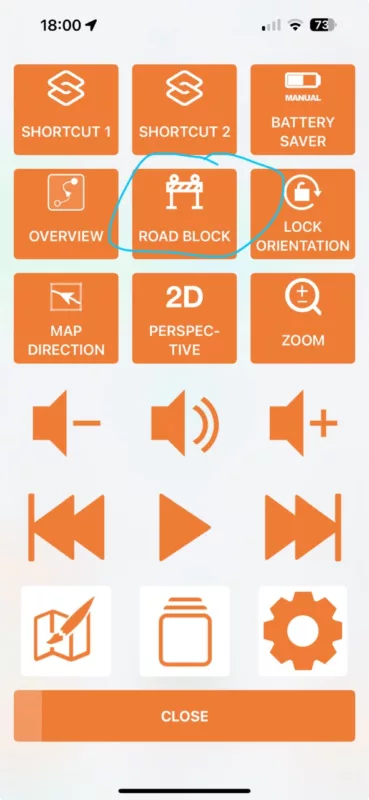
I think this will explain and give you some options. Additionally, Scenic has a "road block" feature in the navigation menu (see screenshot).
Cheers,
Guido
Quote from Sampleman on 11.03.2024, 15:24Last weekend I used Scenic and a route which I had been planning with the powerplanner for a nice trip through Western Bavaria. However, right after a few kilometers, I encountered a road block and was forced to ride a detour. This was not that big of a problem because I know the vicinity pretty well. What I found annoying was this: After having passed the road block and riding on the planned route again, Scenic still insisted on leading me backwards to the point I had been missing. What shall I do in such a situation - stop right away and cancel the next three waypoints?
Best regards
Frank
Hi Frank... also check out this new help article on the Detour Behaviour. https://scenic.app/help/detour-behaviour-scenic-v3-5-and-higher/
I think this will explain and give you some options. Additionally, Scenic has a "road block" feature in the navigation menu (see screenshot).
Cheers,
Guido
Quote from Guido on 11.03.2024, 18:05Quote from Guido on 11.03.2024, 08:40Sorry I can't be more precise about the "returnToRoute" method. It comes with the HERE framework. This is the description in their documentation:
Use the returnToRoute method when you want to keep the originally chosen route, and want to help the driver to navigate back to the route as quickly as possible.
In my personal testing I found that it tries around 3 to 4 times the returnToRoute, but if you keep ignoring this, eventually it will recalculate an entire new route to the destination from where you are at that moment. My guess is that this 3 to 4 times depends on how far away you are getting from the original route.
I can think of scenarios where you would want this behaviour, but I can also think of scenarios where you want a new route immediately. Perhaps a good implementation would be:
- When it's just a destination with fast or short routing, simply recalculate entirely (because someone just entered a destination and doesn't care how he/she gets there)
- When it's a pre-planned route, or a curvy generated route, use the "return to route" method, because in those cases someone spent time to carefully plan the roads to take, and one would want to keep as close to that route as possible, even if it requires backtracking.
How does that sound?
I'll try and implement this for the next update. See if that results in less or more confusion amongst the userbase🙂.
Quote from Guido on 11.03.2024, 08:40Sorry I can't be more precise about the "returnToRoute" method. It comes with the HERE framework. This is the description in their documentation:
Use the returnToRoute method when you want to keep the originally chosen route, and want to help the driver to navigate back to the route as quickly as possible.
In my personal testing I found that it tries around 3 to 4 times the returnToRoute, but if you keep ignoring this, eventually it will recalculate an entire new route to the destination from where you are at that moment. My guess is that this 3 to 4 times depends on how far away you are getting from the original route.
I can think of scenarios where you would want this behaviour, but I can also think of scenarios where you want a new route immediately. Perhaps a good implementation would be:
- When it's just a destination with fast or short routing, simply recalculate entirely (because someone just entered a destination and doesn't care how he/she gets there)
- When it's a pre-planned route, or a curvy generated route, use the "return to route" method, because in those cases someone spent time to carefully plan the roads to take, and one would want to keep as close to that route as possible, even if it requires backtracking.
How does that sound?
I'll try and implement this for the next update. See if that results in less or more confusion amongst the userbase🙂.


