
Day Mode v Night Mode Discrepancy?

Quote from Marts on 08.12.2024, 20:00This is Scenic with my Ford Ranger's CarPlay.
I was driving when the screen changed from light mode then to dark mode then back to light mode again. See attached images for what I mean.Why would it be doing this?
Note: it doesn't happen when connected to the Chigee AIO-5 Lite on the motorbike.
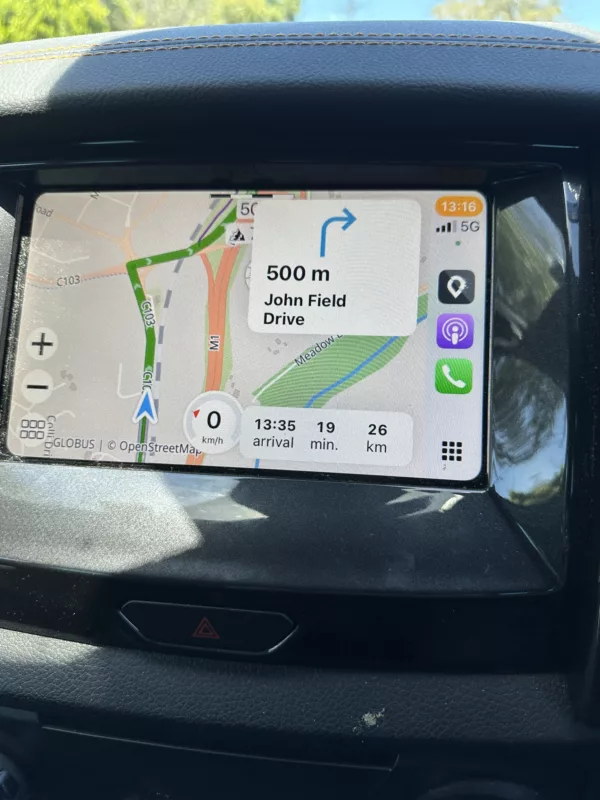
This is Scenic with my Ford Ranger's CarPlay.
I was driving when the screen changed from light mode then to dark mode then back to light mode again. See attached images for what I mean.
Why would it be doing this?
Note: it doesn't happen when connected to the Chigee AIO-5 Lite on the motorbike.
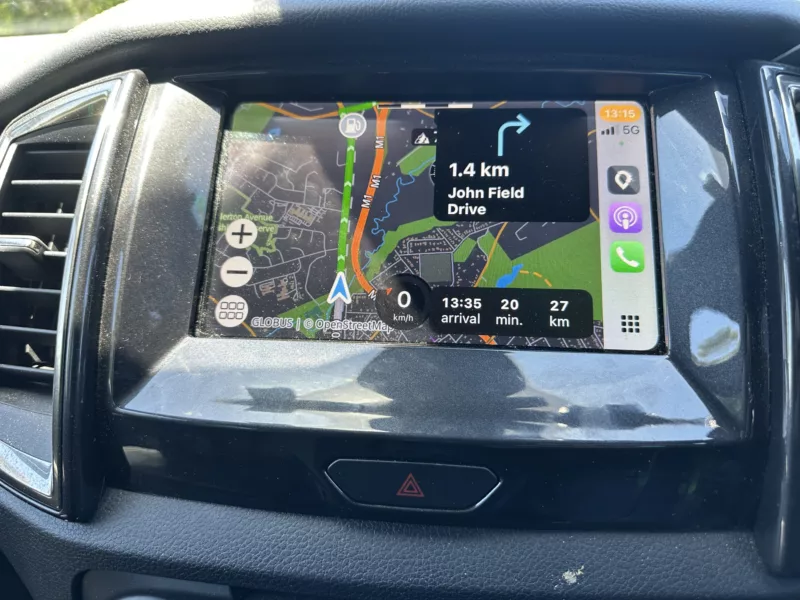

Quote from Guido on 09.12.2024, 16:38I have a Ford Ranger too. If I'm not mistaken, the CarPlay appearance is linked to the lights being on. If your lights are set to auto, and you drive into a dark place (tunnel, garage, etc.) your lights turn on automatically and also the CarPlay appearance changes automatically. Scenic will adjust to the CarPlay appearance setting. If you don't want this, you can look into the CarPlay settings to force it to dark mode and dark map.
I have a Ford Ranger too. If I'm not mistaken, the CarPlay appearance is linked to the lights being on. If your lights are set to auto, and you drive into a dark place (tunnel, garage, etc.) your lights turn on automatically and also the CarPlay appearance changes automatically. Scenic will adjust to the CarPlay appearance setting. If you don't want this, you can look into the CarPlay settings to force it to dark mode and dark map.
Quote from Marts on 09.12.2024, 16:42Hi Guido.
Yeah that was my first thought, except that I don't have the lights on auto. I've been having battery issues with it and that was the first thing that I did - to turn them off so they don't come on or stay on when I turn off the car.
In any case, as you can see in the images the changes happened on the open road and it was a sunny day.
I'll look at the carplay settings in the meantime. Probably a Ford thing.
Hi Guido.
Yeah that was my first thought, except that I don't have the lights on auto. I've been having battery issues with it and that was the first thing that I did - to turn them off so they don't come on or stay on when I turn off the car.
In any case, as you can see in the images the changes happened on the open road and it was a sunny day.
I'll look at the carplay settings in the meantime. Probably a Ford thing.
Quote from Guido on 09.12.2024, 16:45Strange. I'll have a look too next time I drive the Ranger. What year is your Ranger?
Strange. I'll have a look too next time I drive the Ranger. What year is your Ranger?
Quote from Marts on 09.12.2024, 17:00Quote from Guido on 09.12.2024, 16:45Strange. I'll have a look too next time I drive the Ranger. What year is your Ranger?
Mine is a 2019. I don't know if you guys have the same Rangers over there. Ours are built in Thailand. Mine has a 3.2l 5 cyl turbo-diesel engine and it's a PX-3 (model number).
Anyway, I'm not fussed. I didn't know what was causing this and thought I'd ask more out of curiosity than anything else.
Quote from Guido on 09.12.2024, 16:45Strange. I'll have a look too next time I drive the Ranger. What year is your Ranger?
Mine is a 2019. I don't know if you guys have the same Rangers over there. Ours are built in Thailand. Mine has a 3.2l 5 cyl turbo-diesel engine and it's a PX-3 (model number).
Anyway, I'm not fussed. I didn't know what was causing this and thought I'd ask more out of curiosity than anything else.
Quote from Marts on 09.12.2024, 19:53Just a quick update. When I went out earlier the carplay screen stayed in "daylight" mode. But after a stop and when I got back in the car and set off for the drive home, as soon as I plugged the phone in to the car and carplay started, Scenic popped up in "night" mode. It stayed like that til I got home.
Earlier on the drive I turned the car's headlights on and off. Scenic didn't change.
Don't know if this info is helpful or not. Whatever, it's not affecting the general usability of Scenic.
Just a quick update. When I went out earlier the carplay screen stayed in "daylight" mode. But after a stop and when I got back in the car and set off for the drive home, as soon as I plugged the phone in to the car and carplay started, Scenic popped up in "night" mode. It stayed like that til I got home.
Earlier on the drive I turned the car's headlights on and off. Scenic didn't change.
Don't know if this info is helpful or not. Whatever, it's not affecting the general usability of Scenic.
Quote from Guido on 09.12.2024, 20:02Ok. I’ll try the same things tomorrow. Thank you.
Ok. I’ll try the same things tomorrow. Thank you.


