
Dark Mode vs Day map colors

Quote from Lonestarr on 24.04.2022, 13:29Just started using Scenic today - LOVE IT!!! Coming from Calimoto and this app is SO much better!
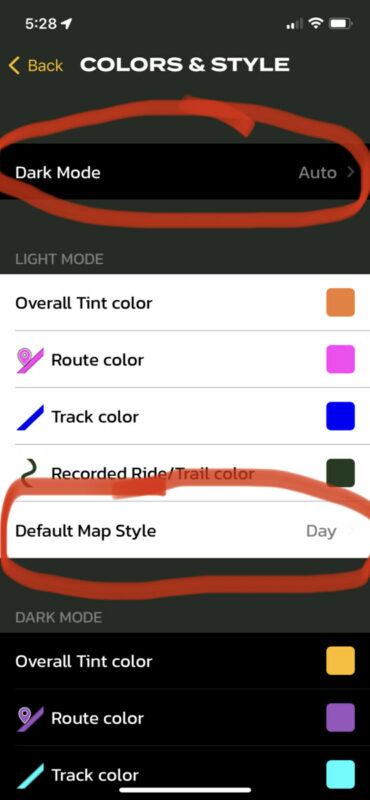
That said, I did notice what seems to be a bug. On iPhone 12, ios 15.2, phone is set to Dark Mode. App Dark Mode is set to Auto. Default Map Style is set to Day. It will stay like this for one trip, but when that trip is over and it goes back to the map, it's in Night mode. Have to manually change it back to Day mode. Yes I could change the app Dark Mode to Off, but I like the menus and such being dark, it's easier on the eyes - but then the map is hard to see in Night mode.
Just started using Scenic today - LOVE IT!!! Coming from Calimoto and this app is SO much better!
That said, I did notice what seems to be a bug. On iPhone 12, ios 15.2, phone is set to Dark Mode. App Dark Mode is set to Auto. Default Map Style is set to Day. It will stay like this for one trip, but when that trip is over and it goes back to the map, it's in Night mode. Have to manually change it back to Day mode. Yes I could change the app Dark Mode to Off, but I like the menus and such being dark, it's easier on the eyes - but then the map is hard to see in Night mode.

Quote from Guido on 24.04.2022, 14:04You can set default map style for light mode and for dark mode separately. You do this in Settings > Colors & Style.
You can set default map style for light mode and for dark mode separately. You do this in Settings > Colors & Style.
Quote from Lonestarr on 24.04.2022, 17:31I did see that, unfortunately Dark Mode overrides the Default Map Style. I want the app theme to be Dark Mode for the menus and such, but the map style to be Day so the map is bright when riding. However the map style is defaulting to Night despite the Day setting
I did see that, unfortunately Dark Mode overrides the Default Map Style. I want the app theme to be Dark Mode for the menus and such, but the map style to be Day so the map is bright when riding. However the map style is defaulting to Night despite the Day setting
Quote from Lonestarr on 24.04.2022, 17:33OOOOhhhhhhh, I'm a dummy!!!
After posting the above I noticed where it says Light Mode over the color schemes. Turns out if I scroll down a little further there are settings for Dark Mode, and it was set for Night. I changed it to Day and it fixed my problem!
OOOOhhhhhhh, I'm a dummy!!!
After posting the above I noticed where it says Light Mode over the color schemes. Turns out if I scroll down a little further there are settings for Dark Mode, and it was set for Night. I changed it to Day and it fixed my problem!
Quote from Guido on 24.04.2022, 19:25👍 Happy you found the solution.
👍 Happy you found the solution.


