
consideration for the speed limit/traveling visual and rankings numbers

Quote from Boodah on 21.05.2024, 14:57Hello Guido. Still loving your app and since you have this forum for feedback, I thought I'd offer up a few thoughts for your consideration. One being the speedometer and speed limit that shows on the screen. They way you have it, they look so much alike, it can be a bit confusing upon a quick glance. I don't know what speed limit signs look like in other countries, but in the US, they look about like this (see pic attached) and this is what we are used to seeing and I thought that might be easier so separate the two just enough. You could even have the speedometer overlapping the speed limit, like I show in the first altered option attached. Or raise it above and separate like the 2nd one. And if you felt like it, could incorporate the red or green stroke around it. Could even make the transparency level an option in settings or by touching it and dragging up or down. Just something to consider. Then below that images, I have a second question...
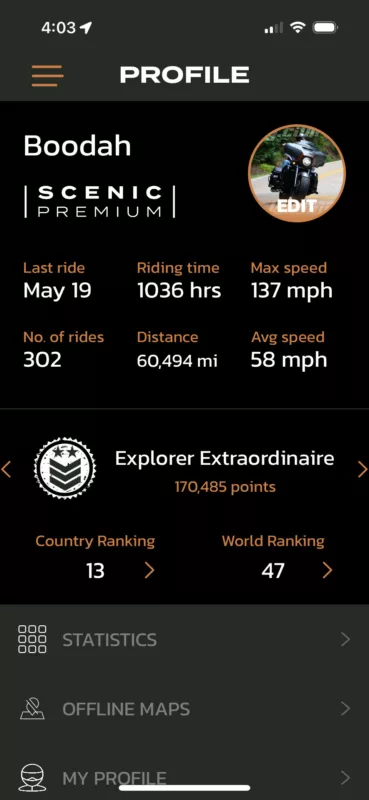
2nd question... as I see myself rising in the ranks, I can't help but wonder how many are in the ranks, is it 1000's, 100k's, millions? Might be cool to see the ranking out of 'x' number.
Then lastly, I'm the one who mentioned before about having a auto-updating, simplified overlay of roads already traveled that can be on the main screen while riding so we can find new untraveled roads while wondering the highways. Still really hoping you can make that happen since it is/was my favorite and most used feature that I can no longer use. Really hope to find a way to get that back. Hope these are good things for you to consider. As always, you are much appreciated.
Hello Guido. Still loving your app and since you have this forum for feedback, I thought I'd offer up a few thoughts for your consideration. One being the speedometer and speed limit that shows on the screen. They way you have it, they look so much alike, it can be a bit confusing upon a quick glance. I don't know what speed limit signs look like in other countries, but in the US, they look about like this (see pic attached) and this is what we are used to seeing and I thought that might be easier so separate the two just enough. You could even have the speedometer overlapping the speed limit, like I show in the first altered option attached. Or raise it above and separate like the 2nd one. And if you felt like it, could incorporate the red or green stroke around it. Could even make the transparency level an option in settings or by touching it and dragging up or down. Just something to consider. Then below that images, I have a second question...
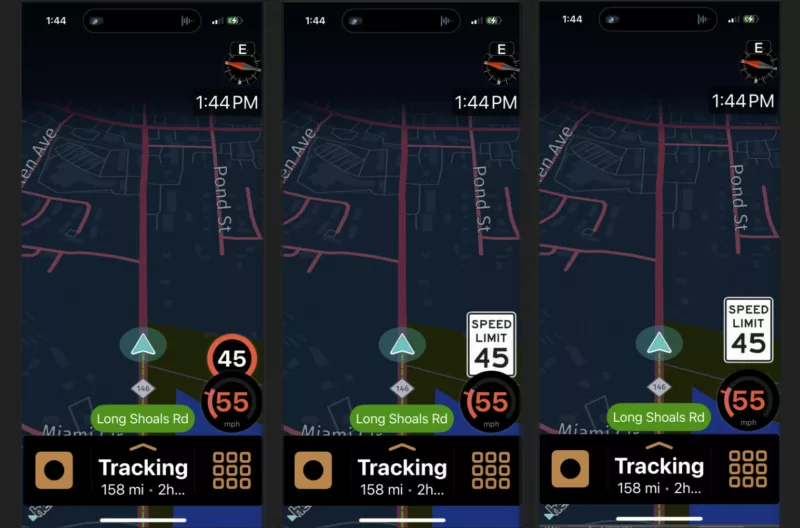
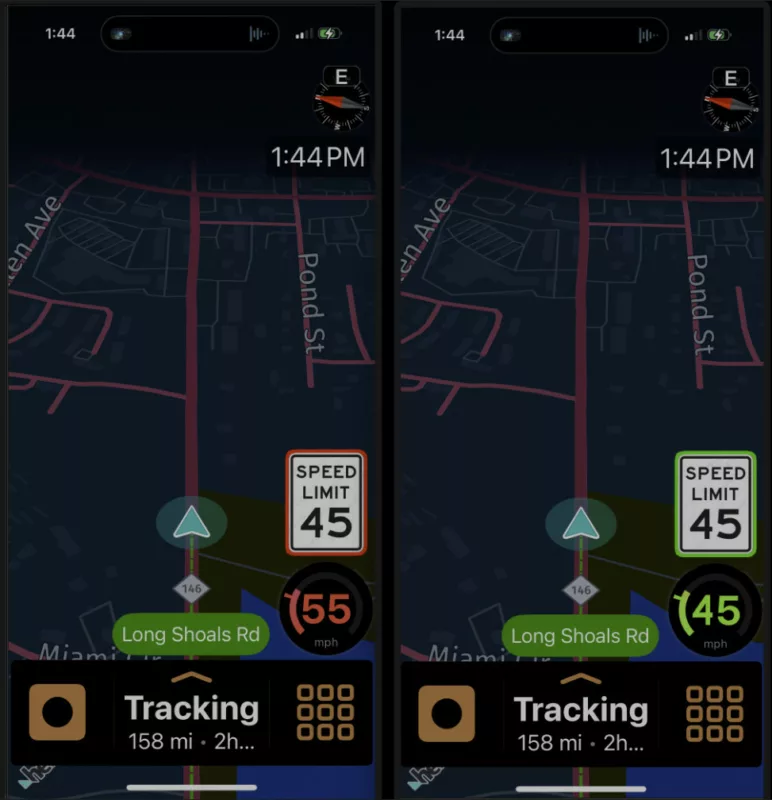
2nd question... as I see myself rising in the ranks, I can't help but wonder how many are in the ranks, is it 1000's, 100k's, millions? Might be cool to see the ranking out of 'x' number.
Then lastly, I'm the one who mentioned before about having a auto-updating, simplified overlay of roads already traveled that can be on the main screen while riding so we can find new untraveled roads while wondering the highways. Still really hoping you can make that happen since it is/was my favorite and most used feature that I can no longer use. Really hope to find a way to get that back. Hope these are good things for you to consider. As always, you are much appreciated.

Quote from Mex on 21.05.2024, 22:54Hi Boodah,
to answer your second question, first one is Guido‘s job, you can already do this.
while on the map, tap the third button from above, select the layers you want to see while planing.
Afterwards you have all driven routes on the screen. Like this (just an example).
Hope this is what you were looking for.
Small mistake on my side. Instead of routes you should select: recorded tracks.Looks like this:
Regards, Mex
Hi Boodah,
to answer your second question, first one is Guido‘s job, you can already do this.
while on the map, tap the third button from above, select the layers you want to see while planing.
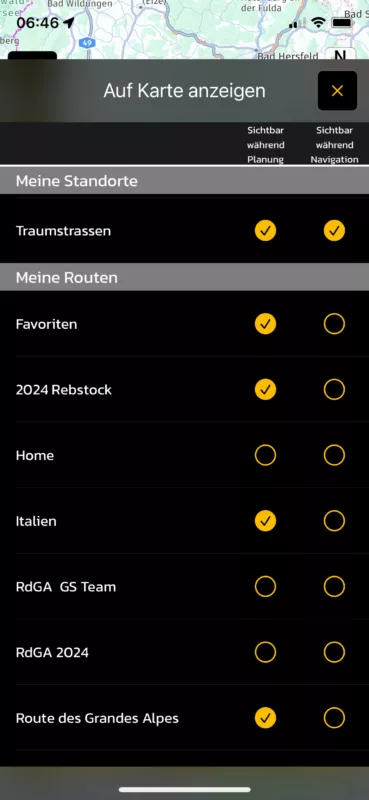
Afterwards you have all driven routes on the screen. Like this (just an example).
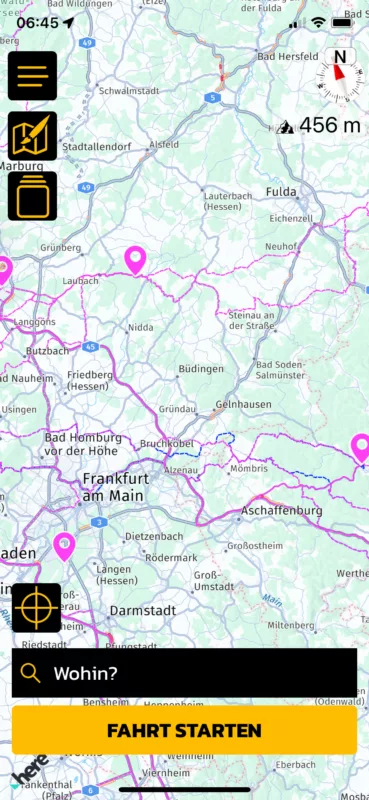
Hope this is what you were looking for.
Small mistake on my side. Instead of routes you should select: recorded tracks.
Looks like this:
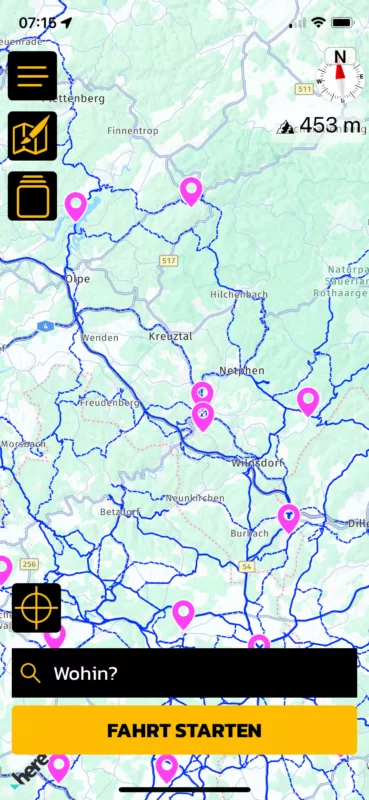
Regards, Mex
Quote from Boodah on 22.05.2024, 05:12thanks Mex. but you'd need to look at this particular post for a better understanding of what I was talking about (unless I'm misunderstanding your response)... https://scenic.app/forum/topic/fix-overlay-of-saved-trips-while-riding-please/
thanks Mex. but you'd need to look at this particular post for a better understanding of what I was talking about (unless I'm misunderstanding your response)... https://scenic.app/forum/topic/fix-overlay-of-saved-trips-while-riding-please/

Quote from Guido on 22.05.2024, 08:40Hi @boodah,
Thanks very much for the screenshots. I can imagine it was quite a bit of work to make those.
So, the first thing to mention is that speed limit road signs in Europe look exactly like Scenic displays them (round, with a red border and speed limit displayed in the center). So I believe for the European users there is less confusion about this. They recognize the speed limit sign as it looks like the road signs. In the US, they indeed look like your images. I've had a request once before to display the speed limit more like that. At least when riding in the US. I'm planning a small redesign of the navigation screen for later this year and will take your recommendations with me for this. Thank you again.
as I see myself rising in the ranks, I can't help but wonder how many are in the ranks, is it 1000's, 100k's, millions? Might be cool to see the ranking out of 'x' number.
I don't want to display the 'x', because then it would become public knowledge how many users Scenic has. This might sound 'stupid' but there are many reasons why this is not a good idea, including that the 'competition' is watching.
simplified overlay of roads already traveled
I haven't forgotten. It's still on the list, but as mentioned, not so easy to implement, and more high prio things are on the list too. I'll see if I can incorporate this during my redesign mentioned above.
Hi @boodah,
Thanks very much for the screenshots. I can imagine it was quite a bit of work to make those.
So, the first thing to mention is that speed limit road signs in Europe look exactly like Scenic displays them (round, with a red border and speed limit displayed in the center). So I believe for the European users there is less confusion about this. They recognize the speed limit sign as it looks like the road signs. In the US, they indeed look like your images. I've had a request once before to display the speed limit more like that. At least when riding in the US. I'm planning a small redesign of the navigation screen for later this year and will take your recommendations with me for this. Thank you again.
as I see myself rising in the ranks, I can't help but wonder how many are in the ranks, is it 1000's, 100k's, millions? Might be cool to see the ranking out of 'x' number.
I don't want to display the 'x', because then it would become public knowledge how many users Scenic has. This might sound 'stupid' but there are many reasons why this is not a good idea, including that the 'competition' is watching.
simplified overlay of roads already traveled
I haven't forgotten. It's still on the list, but as mentioned, not so easy to implement, and more high prio things are on the list too. I'll see if I can incorporate this during my redesign mentioned above.

Quote from johansw on 22.05.2024, 08:46Hi. As to adding text to clearify speed limit, I would prefer not to have that. The reason is very simple: there are so many things which could be added to the screen to make functions easier to access or see or understand, but that would totally clutter the screen and you would not be able to see your route…😳 Therefore, removing things is a better suggestion I think, for example it would be nice to also be able to switch off the name of the upcomeing road when you drive places where you don’t need it (most places in my case). That would give you quite a few percent more visible creen for roads 😊
Hi. As to adding text to clearify speed limit, I would prefer not to have that. The reason is very simple: there are so many things which could be added to the screen to make functions easier to access or see or understand, but that would totally clutter the screen and you would not be able to see your route…😳 Therefore, removing things is a better suggestion I think, for example it would be nice to also be able to switch off the name of the upcomeing road when you drive places where you don’t need it (most places in my case). That would give you quite a few percent more visible creen for roads 😊
Quote from Guido on 22.05.2024, 08:51Yes. Screen size and "cluttering" are considerations, too. On the smaller iPhones space is limited and addtional (or bigger) elements on the screen can cover the route).
@johansw... you can turn off the "current road name" in Settings > Navitation & Tracking > Show current street name
You can also turn off speed limit in the same menu > 'Show Speed Limit'.
Yes. Screen size and "cluttering" are considerations, too. On the smaller iPhones space is limited and addtional (or bigger) elements on the screen can cover the route).
@johansw... you can turn off the "current road name" in Settings > Navitation & Tracking > Show current street name
You can also turn off speed limit in the same menu > 'Show Speed Limit'.
Quote from johansw on 22.05.2024, 09:08Yes Guido, I am aware of these two options and normally have them both turned off 😊.
I am thinking of likewise being able to turn off the name of next road on the very top of the screen.
Yes Guido, I am aware of these two options and normally have them both turned off 😊.
I am thinking of likewise being able to turn off the name of next road on the very top of the screen.
Quote from Mex on 22.05.2024, 09:08@ boodah,
your right i read your post in april, but didnt connect it to this post you made. You already did what i recomnended. And your right, i tried to see all my recorded rides and routes at once. Brings Scenic to the limit.
Maybe a workaround could be to save them in folders like: north-east, north-west, ….
Before you start a trip just use the folder of the direction you want to go, as overlay.
Maybe Scenic will handle this without crashing.
Ride safe, Mex
@ boodah,
your right i read your post in april, but didnt connect it to this post you made. You already did what i recomnended. And your right, i tried to see all my recorded rides and routes at once. Brings Scenic to the limit.
Maybe a workaround could be to save them in folders like: north-east, north-west, ….
Before you start a trip just use the folder of the direction you want to go, as overlay.
Maybe Scenic will handle this without crashing.
Ride safe, Mex

Quote from Alastair58 on 24.05.2024, 12:39Is it possible to increase the size of the speed and speed limit icons please, they are very small on a 7 inch car-play screen for 65 year old eyes (even with glasses), at least double the size would be ideal.
Is it possible to increase the size of the speed and speed limit icons please, they are very small on a 7 inch car-play screen for 65 year old eyes (even with glasses), at least double the size would be ideal.
Quote from Mex on 24.05.2024, 13:57Hi Alistair.
Great idea. But it should be as a option, so the young riders can keep it as it is.
Red an black color combination doesnt work well with older eyes. Yellow an black is better to read/recognize.
Regards, Mex
Hi Alistair.
Great idea. But it should be as a option, so the young riders can keep it as it is.
Red an black color combination doesnt work well with older eyes. Yellow an black is better to read/recognize.
Regards, Mex
Quote from Guido on 24.05.2024, 14:10Thanks for the suggestions guys. I’m working on a small redesign and will keep this under consideration.
Thanks for the suggestions guys. I’m working on a small redesign and will keep this under consideration.
Quote from Dae on 25.05.2024, 00:55Quote from Boodah on 21.05.2024, 14:57And if you felt like it, could incorporate the red or green stroke around it.
Red/green isn’t a good choice for the colourblind amongst us
Quote from Boodah on 21.05.2024, 14:57And if you felt like it, could incorporate the red or green stroke around it.
Red/green isn’t a good choice for the colourblind amongst us
Quote from Alastair58 on 26.05.2024, 10:15personally, I have no issues with colours or format, just the size. 🙂
personally, I have no issues with colours or format, just the size. 🙂
Quote from Alastair58 on 30.05.2024, 13:05Hi Guido, just a thought, perhaps a workable solution would be to offer the speedometer with and without the graphic ring-dial device?
The “without” option could then employ a larger font size but still stay within the allocated circle without disturbing the overall layout.
regards
Hi Guido, just a thought, perhaps a workable solution would be to offer the speedometer with and without the graphic ring-dial device?
The “without” option could then employ a larger font size but still stay within the allocated circle without disturbing the overall layout.
regards


