comment forcer scenic à "supprimer" une boucle inutile ?

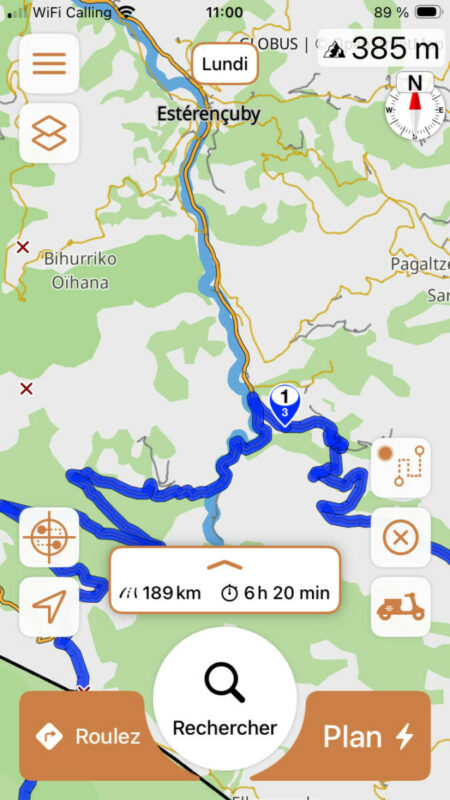
Quote from tcherpeti on 29.03.2026, 02:38Bonjour, comment supprimer une boucle de route ? Scenic me dirige dans un village ou je n'ai pas mis de via ni de stop,
En mode plein écran, le trajet est bon, on reste dans la montagne.
Mais en mode édition ou roulage, il me renvoie systématiquement faire une boucle plus bas. Bien sûr le tournant est serré, mais je suis bien en mode moto, standard, aventureux pour ce trajet. Des idées ? merci. PierreHello, how do I remove a loop from the route? Scenic is directing me into a village where I didn't set any “via” or “stop” points.
In full-screen mode, the route is fine; it stays in the mountains.
But in edit or ride mode, it consistently sends me back to make a loop further down. Of course, the turn is tight, but I'm set to motorcycle, standard, and adventurous modes for this route.
Any ideas? Thanks. Pierre
Translated with DeepL.com (free version)
Bonjour, comment supprimer une boucle de route ? Scenic me dirige dans un village ou je n'ai pas mis de via ni de stop,
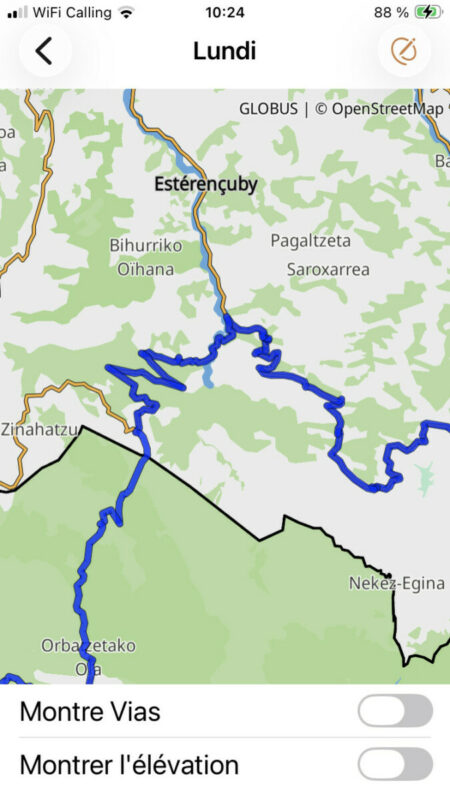
En mode plein écran, le trajet est bon, on reste dans la montagne.
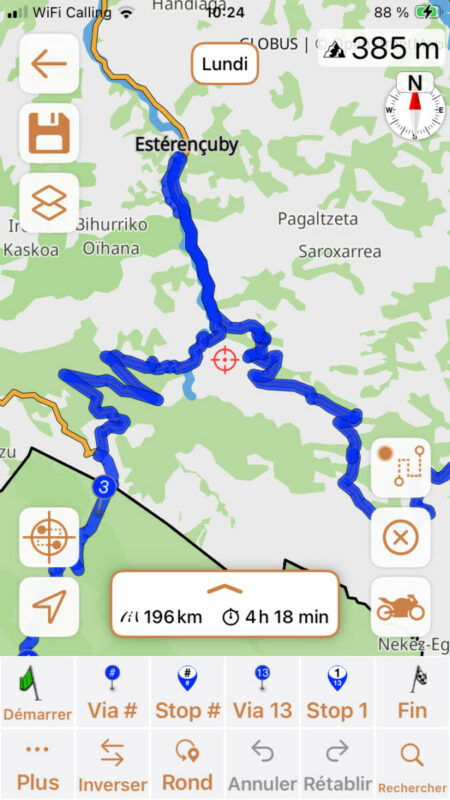
Mais en mode édition ou roulage, il me renvoie systématiquement faire une boucle plus bas. Bien sûr le tournant est serré, mais je suis bien en mode moto, standard, aventureux pour ce trajet. Des idées ? merci. Pierre
Hello, how do I remove a loop from the route? Scenic is directing me into a village where I didn't set any “via” or “stop” points.
In full-screen mode, the route is fine; it stays in the mountains.
But in edit or ride mode, it consistently sends me back to make a loop further down. Of course, the turn is tight, but I'm set to motorcycle, standard, and adventurous modes for this route.
Any ideas? Thanks. Pierre
Translated with DeepL.com (free version)

Quote from Guido on 29.03.2026, 14:41**** FRENCH (translated) ****
Bonjour Pierre,
Quand avez-vous créé cet itinéraire ? Il semble que les données cartographiques ont changé entre le moment où vous avez créé la route et maintenant. Avant, lors de la création, le demi-tour serré était autorisé, mais aujourd'hui il ne l'est plus selon la carte, donc Scenic vous envoie plus bas dans le village pour faire le demi-tour.
Vous pouvez faire plusieurs choses : 1) Ne rien faire. Prenez simplement le virage serré. Après un court moment, Scenic reconnaîtra que vous l'avez fait et vous guidera normalement. 2) Ajoutez un stop un peu avant. Nommez ce stop « Prendre le virage serré » (ou quelque chose comme ça). Vous serez ainsi rappelé pendant la navigation d'ignorer les instructions à cet endroit.
J'espère que cela aide et explique la situation. Si ce n'est pas le cas, n'hésitez pas à me faire savoir si vous avez d'autres questions. Je suis là pour aider.
Cordialement et bonne route, Guido
**** ENGLISH *****
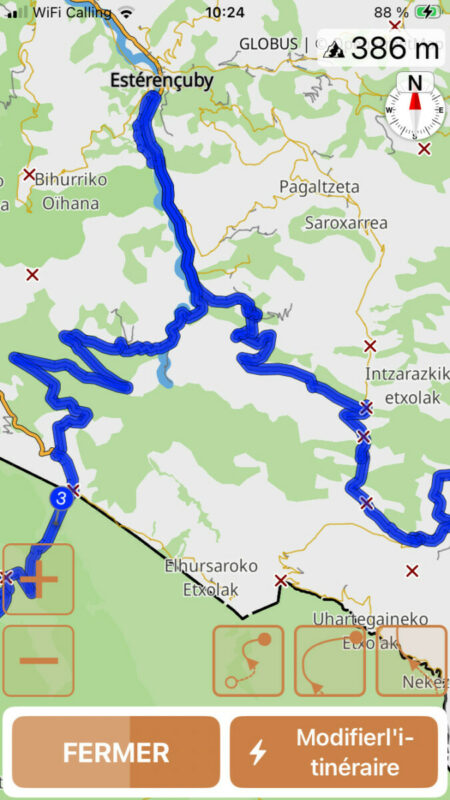
Hi Pierre,When did you create this route? It looks like the map data change between the moment of creating the route and now. Before, when creating the route, it let you do that tight U-turn, but now it seems that is not allowed according to the map, so it's send you further down to the village to do a U-Turn.
You can do a few things:
1) Do nothing. Simply make the tight turn. After a short while Scenic will recognize that you did that and will guide you normally.
2) Add a stop a little bit before. Name that stop "Take tight turn" (or something like that). Then you will be reminded during navigation to ignore the instructions there.Hope this helps/explains. If not, please let me know if you have other questions. Happy to help.
Best regards and ride safe,
Guido
**** FRENCH (translated) ****
Bonjour Pierre,
Quand avez-vous créé cet itinéraire ? Il semble que les données cartographiques ont changé entre le moment où vous avez créé la route et maintenant. Avant, lors de la création, le demi-tour serré était autorisé, mais aujourd'hui il ne l'est plus selon la carte, donc Scenic vous envoie plus bas dans le village pour faire le demi-tour.
Vous pouvez faire plusieurs choses : 1) Ne rien faire. Prenez simplement le virage serré. Après un court moment, Scenic reconnaîtra que vous l'avez fait et vous guidera normalement. 2) Ajoutez un stop un peu avant. Nommez ce stop « Prendre le virage serré » (ou quelque chose comme ça). Vous serez ainsi rappelé pendant la navigation d'ignorer les instructions à cet endroit.
J'espère que cela aide et explique la situation. Si ce n'est pas le cas, n'hésitez pas à me faire savoir si vous avez d'autres questions. Je suis là pour aider.
Cordialement et bonne route, Guido
**** ENGLISH *****
Hi Pierre,
When did you create this route? It looks like the map data change between the moment of creating the route and now. Before, when creating the route, it let you do that tight U-turn, but now it seems that is not allowed according to the map, so it's send you further down to the village to do a U-Turn.
You can do a few things:
1) Do nothing. Simply make the tight turn. After a short while Scenic will recognize that you did that and will guide you normally.
2) Add a stop a little bit before. Name that stop "Take tight turn" (or something like that). Then you will be reminded during navigation to ignore the instructions there.
Hope this helps/explains. If not, please let me know if you have other questions. Happy to help.
Best regards and ride safe,
Guido
Quote from tcherpeti on 29.03.2026, 15:18Hello guido, thanks for answers. I made the route this week. The travel’is forecast early june .
i will change and make a stop there as you suggest.but i think open maps imagine i am a campingcar and not on a bike 😉
Thank you Guido by the way for your work , happy to ride with scenic 👍
Hello guido, thanks for answers. I made the route this week. The travel’is forecast early june .
i will change and make a stop there as you suggest.
but i think open maps imagine i am a campingcar and not on a bike 😉
Thank you Guido by the way for your work , happy to ride with scenic 👍

Quote from Lo100469 on 30.03.2026, 02:30Hello,
why not just adding a via or 2 where you want to go and have Scenic recalculating? I always do that to fine-tune the itenery when required.
Hello,
why not just adding a via or 2 where you want to go and have Scenic recalculating? I always do that to fine-tune the itenery when required.
Quote from tcherpeti on 30.03.2026, 03:01Hello, I tried it several times, with 2 or 3 vias at this precise spot , it didnt work .
but I found a solution now , I put it in moped mode and it works 👍
Hello, I tried it several times, with 2 or 3 vias at this precise spot , it didnt work .
but I found a solution now , I put it in moped mode and it works 👍