Forum breadcrumbs - You are here:Scenic ForumUsing ScenicClearing "search history"
Please or Register to create posts and topics.

Clearing "search history"

When creating new routes, when I try to type in a new search, the list is starting to get long and it scrolls up as I type, making it impossible to see what I am typing.  Is there a way to clear past searches and start fresh?  Thanks!

That’s weird. It should not block the text field. Could you send me a screenshot of that? What device are you using?

If you're enjoying Scenic and are happy with the support, please leave a nice rating in the App Store. It would mean a lot to me ❤️

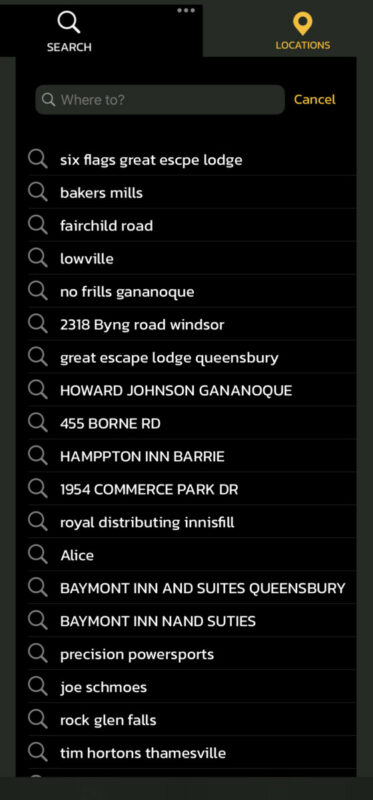
On my Iphone, when searching...all is well.  On my Ipad (my preferred method for creating routes) this is what happens.....

Typing in Windsor, the text field slowly disappears.....

I understand the the different "search" places disappearing as they don't fit the search parameters, but when none of them fit, the text field scrolls "off" the page.


Yeah. That's definitely a bug. Will have a look at that. Thanks for the screenshots. Very helpful!

If you're enjoying Scenic and are happy with the support, please leave a nice rating in the App Store. It would mean a lot to me ❤️

I did discover, that when this happened, 3 dots appeared at the top of the screen.  If I pulled down on them, I could then see the text box.  This just doesn't happen on the Iphone...just the Ipad.

OK. Sounds like it's making the list view higher, in stead of just moving it. Thanks for that additional info!
Will take a look. Will probably be fixed for the next update.

If you're enjoying Scenic and are happy with the support, please leave a nice rating in the App Store. It would mean a lot to me ❤️

Hi @windsortenor,

I've tried to reproduce, but it's working fine on my iPad here. What iOS version are you running? And I don't see a keyboard on the screenshot, so I'm guessing you have an external keyboard connected? (I tried with external keyboard as well, but also works fine). Do you have the same issue if you search in the main map screen?

Cheers,

Guido

If you're enjoying Scenic and are happy with the support, please leave a nice rating in the App Store. It would mean a lot to me ❤️

OK. My iPad was running iPadOS 15.3. After upgrading to iPadOS 15.6.1 I can reproduce the problem. I will look into it!
Thank you!

RumHam has reacted to this post.
RumHam
If you're enjoying Scenic and are happy with the support, please leave a nice rating in the App Store. It would mean a lot to me ❤️