
CarPlay: Night and Day mode

Quote from Sampleman on 05.11.2024, 10:46Today I tried to use Scenic 4.04 with CarPlay on my Honda Africa Twin. I use an iPhone SE with iOS 17.6.1.
I encountered some problems:
1. I travelled under a bridge and the map changed from day mode to night mode. But when I was travelling under the open sky again, the map did not change back. This happened twice.
2. When I changed between Scenic and another app, Scenic crashed.
3. Maybe I am stupid, but I miss a way to simply search for a destination. Scenic offers me routes, favourites and POIs, but no simple "Go to Munich". Where can I find this (it was possible in 3.X)?
4. Maybe it is a matter of getting used to it, but I think that the new map has too many details. I'd love to have it more simplified. When riding I do not need to see the numbers of the houses I pass. I liked the graphics of the old version better.
I hope you find these remarks helpful.
All the best from Augsburg/Germany
Today I tried to use Scenic 4.04 with CarPlay on my Honda Africa Twin. I use an iPhone SE with iOS 17.6.1.
I encountered some problems:
1. I travelled under a bridge and the map changed from day mode to night mode. But when I was travelling under the open sky again, the map did not change back. This happened twice.
2. When I changed between Scenic and another app, Scenic crashed.
3. Maybe I am stupid, but I miss a way to simply search for a destination. Scenic offers me routes, favourites and POIs, but no simple "Go to Munich". Where can I find this (it was possible in 3.X)?
4. Maybe it is a matter of getting used to it, but I think that the new map has too many details. I'd love to have it more simplified. When riding I do not need to see the numbers of the houses I pass. I liked the graphics of the old version better.
I hope you find these remarks helpful.
All the best from Augsburg/Germany
Quote from Dae on 05.11.2024, 12:52For “3”
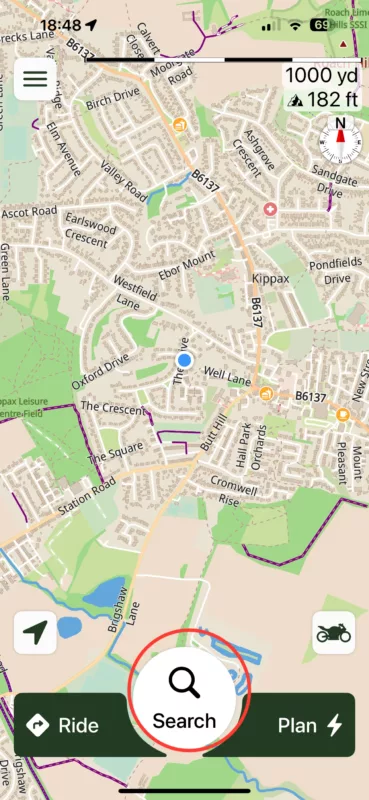
- Click on “search”
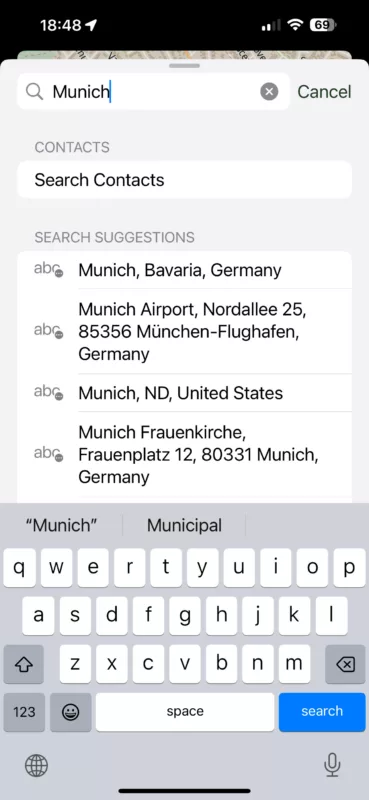
- Type Munich and hit “search”
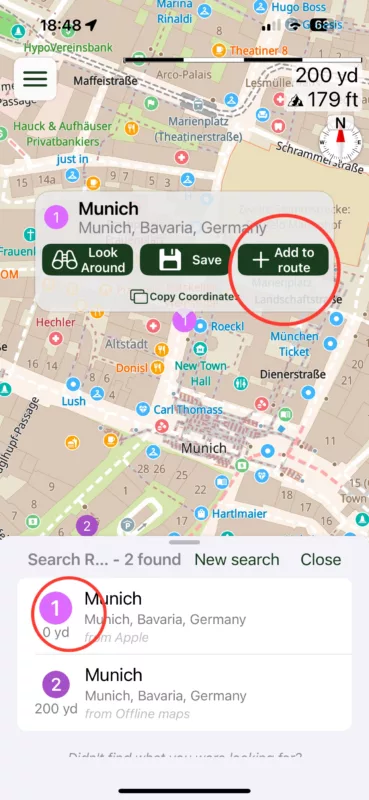
- Click on the numbered list to find the most appropriate destination
- Click “add to route”
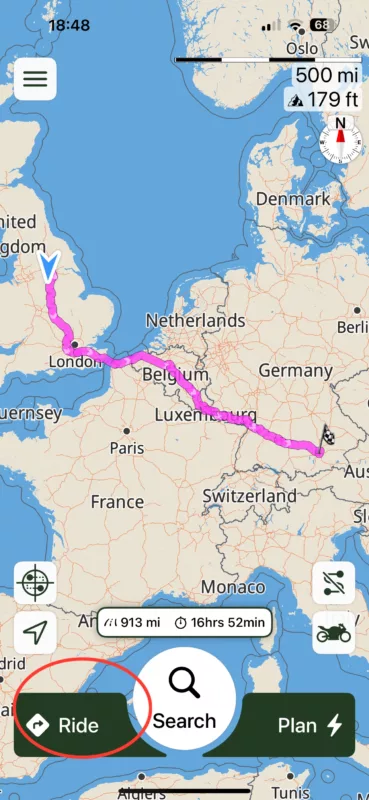
- Click “Ride”
For “3”
- Click on “search”
- Type Munich and hit “search”
- Click on the numbered list to find the most appropriate destination
- Click “add to route”
- Click “Ride”
Quote from Sampleman on 06.11.2024, 05:45Hi Dae,
it isn't that simple. You are describing the use of the iPhone screen. However, I use Apple CarPlay. Usually, my phone is securely stored in my jacket. And I have not found an universal search slot in Apple CarPlay.
Hi Dae,
it isn't that simple. You are describing the use of the iPhone screen. However, I use Apple CarPlay. Usually, my phone is securely stored in my jacket. And I have not found an universal search slot in Apple CarPlay.
Quote from Dae on 06.11.2024, 06:06Apologies. I completely missed that you were referring to CarPlay.
I exclusively use Scenic in CarPlay and have my phone stored away and I start routes using CarPlay. However, I would not be searching for a destination using CarPlay as I imagine it would be very clunky trying to type the address in, so I thought you would be doing that on the phone. I don’t even type in destinations using the CarPlay screen on my phone (Google maps), and that’s 12 inches and I’m not wearing gloves🤣
Apologies for missing that.
I should have also said that 2 is a bug that Guido is already working on fixing.
Apologies. I completely missed that you were referring to CarPlay.
I exclusively use Scenic in CarPlay and have my phone stored away and I start routes using CarPlay. However, I would not be searching for a destination using CarPlay as I imagine it would be very clunky trying to type the address in, so I thought you would be doing that on the phone. I don’t even type in destinations using the CarPlay screen on my phone (Google maps), and that’s 12 inches and I’m not wearing gloves🤣
Apologies for missing that.
I should have also said that 2 is a bug that Guido is already working on fixing.
Quote from Sampleman on 06.11.2024, 10:09When sitting on my motorcycle two things have to be regarded:
1. I don't have my phone at hand.
2. I am wearing gloves, so it won't react to finger touches anyway.
I don't think that it is necessary to be able to operate all Scenic functions on the CarPlay screen. When planning a detailed route, I would not do that sitting on my bike with my gloves on. And I probably would also set all the settings on my phone, before I store it away. But being able to enter a brief search command on the ACP screen, that would be fantastic. I can do that in Google Maps, no problem.
When sitting on my motorcycle two things have to be regarded:
1. I don't have my phone at hand.
2. I am wearing gloves, so it won't react to finger touches anyway.
I don't think that it is necessary to be able to operate all Scenic functions on the CarPlay screen. When planning a detailed route, I would not do that sitting on my bike with my gloves on. And I probably would also set all the settings on my phone, before I store it away. But being able to enter a brief search command on the ACP screen, that would be fantastic. I can do that in Google Maps, no problem.


