
CarPlay Nearby POI Map Icon Missing During Navigation

Quote from blackhawk1618 on 14.09.2025, 14:18Hi @guidomm,
First, I would like to thank you for bringing back one of the most important features in CarPlay the Search option during navigation.
While searching for nearby POIs like fuel stations from the list, I noticed that the map icon is missing during navigation. Interestingly, it is visible when recording a ride.
As shown in the first screenshot, the Map icon appears alongside the nearby POI list during ride recording. However, in the second screenshot, taken during navigation, the map icon is not visible
[caption id="attachment_9628" align="alignnone" width="624"]
Screenshot[/caption]
Hi @guidomm,
First, I would like to thank you for bringing back one of the most important features in CarPlay the Search option during navigation.
While searching for nearby POIs like fuel stations from the list, I noticed that the map icon is missing during navigation. Interestingly, it is visible when recording a ride.
As shown in the first screenshot, the Map icon appears alongside the nearby POI list during ride recording. However, in the second screenshot, taken during navigation, the map icon is not visible
[caption id="attachment_9628" align="alignnone" width="624"] Screenshot[/caption]

Quote from blackhawk1618 on 15.09.2025, 14:53Quote from blackhawk1618 on 14.09.2025, 14:18Hi @guidomm,
First, I would like to thank you for bringing back one of the most important features in CarPlay the Search option during navigation.
While searching for nearby POIs like fuel stations from the list, I noticed that the map icon is missing during navigation. Interestingly, it is visible when recording a ride.
As shown in the first screenshot, the Map icon appears alongside the nearby POI list during ride recording. However, in the second screenshot, taken during navigation, the map icon is not visible
[caption id="attachment_9628" align="alignnone" width="624"]
Hi Guido,
Let me know if you need more information.
Quote from blackhawk1618 on 14.09.2025, 14:18Hi @guidomm,
First, I would like to thank you for bringing back one of the most important features in CarPlay the Search option during navigation.
While searching for nearby POIs like fuel stations from the list, I noticed that the map icon is missing during navigation. Interestingly, it is visible when recording a ride.
As shown in the first screenshot, the Map icon appears alongside the nearby POI list during ride recording. However, in the second screenshot, taken during navigation, the map icon is not visible
[caption id="attachment_9628" align="alignnone" width="624"]
Hi Guido,
Let me know if you need more information.

Quote from Guido on 16.09.2025, 08:35Yes. I'm aware. I need a bit more time to showing search results on the map during navigation.
Yes. I'm aware. I need a bit more time to showing search results on the map during navigation.
Quote from blackhawk1618 on 26.02.2026, 13:00Quote from Guido on 16.09.2025, 08:35Yes. I'm aware. I need a bit more time to showing search results on the map during navigation.
Hello @guidomm
I am just checking to see if there are any updates on adding this option.
I understand you have been busy with some major updates but I would really appreciate it if you could consider prioritizing it.
Quote from Guido on 16.09.2025, 08:35Yes. I'm aware. I need a bit more time to showing search results on the map during navigation.
Hello @guidomm
I am just checking to see if there are any updates on adding this option.
I understand you have been busy with some major updates but I would really appreciate it if you could consider prioritizing it.
Quote from blackhawk1618 on 04.03.2026, 15:40@guidomm
would you mind providing an update on request on this as it’s been pending since a long time.
would you mind providing an update on request on this as it’s been pending since a long time.
Quote from Guido on 04.03.2026, 16:36I’ll try to fix for the next update
I’ll try to fix for the next update
Quote from Guido on 04.03.2026, 17:33Now I remember why it took me so long to start on this.
I cannot follow the same approach that we use for “just tracking.” When you tap the “Show on Map” button while only tracking, a panel appears that lets you cycle through the search results. That panel is actually a CarPlay navigation template used to start navigation to a destination, which works because no navigation session is active yet.
However, once navigation is already running, CarPlay does not allow that template to be shown again. This is a CarPlay system restriction. Because of that, it’s not possible to display the panel and cycle through search results in the same way.
There is another limitation as well. CarPlay does not provide any information about where on the map the user taps. That means it’s not possible to detect taps on map markers. (If I could detect that, then I could just show the map markers without a panel)
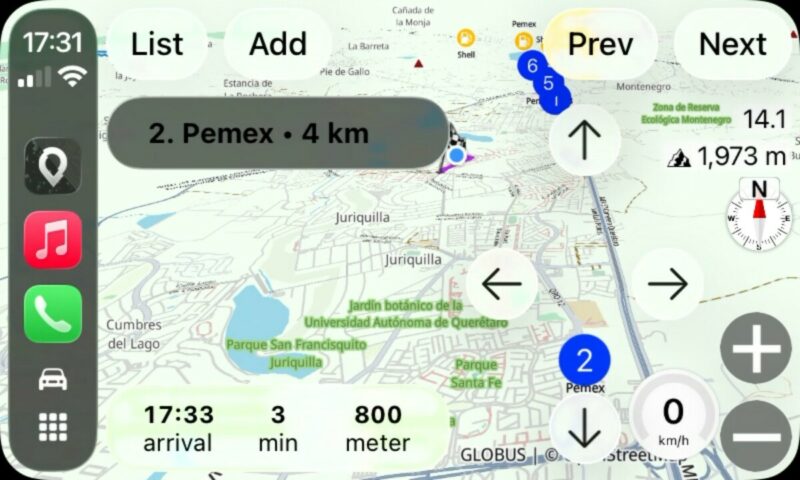
The only option is to implement a workaround. It’s not ideal, but it would achieve a similar result by repurposing other available CarPlay components. Here is how it will look and how I plan to implement it, since I agree that this is a useful feature to have.
Now I remember why it took me so long to start on this.
I cannot follow the same approach that we use for “just tracking.” When you tap the “Show on Map” button while only tracking, a panel appears that lets you cycle through the search results. That panel is actually a CarPlay navigation template used to start navigation to a destination, which works because no navigation session is active yet.
However, once navigation is already running, CarPlay does not allow that template to be shown again. This is a CarPlay system restriction. Because of that, it’s not possible to display the panel and cycle through search results in the same way.
There is another limitation as well. CarPlay does not provide any information about where on the map the user taps. That means it’s not possible to detect taps on map markers. (If I could detect that, then I could just show the map markers without a panel)
The only option is to implement a workaround. It’s not ideal, but it would achieve a similar result by repurposing other available CarPlay components. Here is how it will look and how I plan to implement it, since I agree that this is a useful feature to have.
Quote from blackhawk1618 on 04.03.2026, 21:11@guidomm
thank you for the explanation. I guess the workaround option looks good than nothing during navigation.
thank you for the explanation. I guess the workaround option looks good than nothing during navigation.


