
CarPlay issues/bugs

Quote from rmjw on 18.02.2024, 12:54I see 4 issues with CarPlay.
- 3D mode doesn't work. No difference between 2D and 3D.
- Overview doesn't work. If you click on overview the zoom isn't the complete route, but it just zooms out a little.
- When driving a route, you can't search for another thing. I would like to search for fuel for instance as I run empty.
- In dark mode some items are white. Which is very annoying. Please change to a different color like black as with Waze.
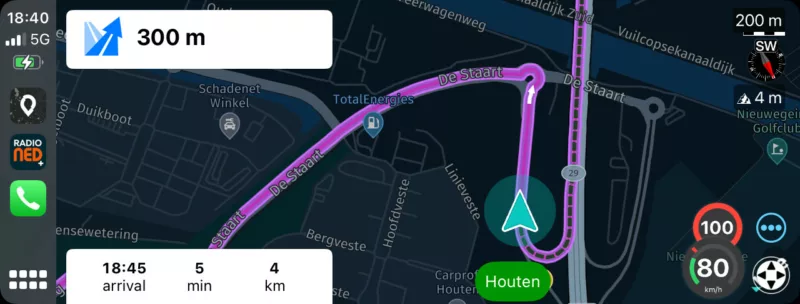
I see 4 issues with CarPlay.
- 3D mode doesn't work. No difference between 2D and 3D.
- Overview doesn't work. If you click on overview the zoom isn't the complete route, but it just zooms out a little.
- When driving a route, you can't search for another thing. I would like to search for fuel for instance as I run empty.
- In dark mode some items are white. Which is very annoying. Please change to a different color like black as with Waze.
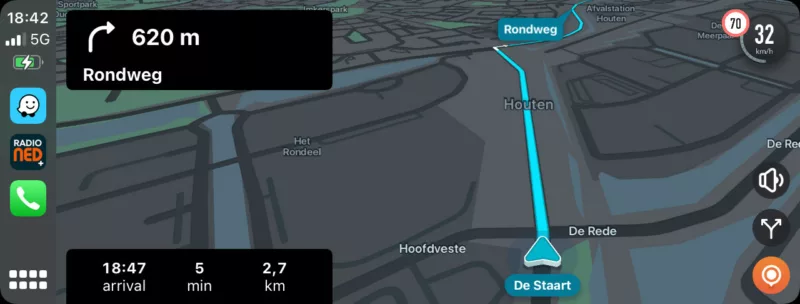

Quote from Guido on 19.02.2024, 08:45Thanks for the feedback. Here my inline comments:
3D mode doesn't work. No difference between 2D and 3D.
This is actually a "feature" of "turn based zoom". Turn based zoom changes, not only the zoom level, but also the 3D camera angle depending on how close you are to a turn instruction.
Overview doesn't work. If you click on overview the zoom isn't the complete route, but it just zooms out a little.
I'll fix that for the v3.53 update that will be released this week. On the iPhone there are three pre-defined zoom buttons. Zoom around current location, Zoom on the entire route, Zoom around the remainder or the route. CarPlay can't have those 3 buttons (Apple CarPlay template restriction) and at the moment it's doing the the "zoom around current location". I'll change that so that it uses "zoom on remainder of route".
When driving a route, you can't search for another thing. I would like to search for fuel for instance as I run empty.
I'll add that for the v3.53 update as well.
In dark mode some items are white. Which is very annoying. Please change to a different color like black as with Waze.
I'll try and correct that as well in the v3.53 update. If not, in the next one.
Thanks for the feedback. Here my inline comments:
3D mode doesn't work. No difference between 2D and 3D.
This is actually a "feature" of "turn based zoom". Turn based zoom changes, not only the zoom level, but also the 3D camera angle depending on how close you are to a turn instruction.
Overview doesn't work. If you click on overview the zoom isn't the complete route, but it just zooms out a little.
I'll fix that for the v3.53 update that will be released this week. On the iPhone there are three pre-defined zoom buttons. Zoom around current location, Zoom on the entire route, Zoom around the remainder or the route. CarPlay can't have those 3 buttons (Apple CarPlay template restriction) and at the moment it's doing the the "zoom around current location". I'll change that so that it uses "zoom on remainder of route".
When driving a route, you can't search for another thing. I would like to search for fuel for instance as I run empty.
I'll add that for the v3.53 update as well.
In dark mode some items are white. Which is very annoying. Please change to a different color like black as with Waze.
I'll try and correct that as well in the v3.53 update. If not, in the next one.

Quote from Karlchen on 25.02.2024, 00:55Guten morgen,
Ich habe die Karten auf dem iPhone immer auf dunkel gestellt
mir ist gestern unter 3,53 aufgefallen, das Scenic unter Carplay von 4 versuchen
- die Karte hell war
- die Karte wie auf dem iPhone dunkel war
- die Karte dunkel, aber die Streckenführung die Farbe aus der Einstellung hell hatte
- gleich wie 3.
Guten morgen,
Ich habe die Karten auf dem iPhone immer auf dunkel gestellt
mir ist gestern unter 3,53 aufgefallen, das Scenic unter Carplay von 4 versuchen
- die Karte hell war
- die Karte wie auf dem iPhone dunkel war
- die Karte dunkel, aber die Streckenführung die Farbe aus der Einstellung hell hatte
- gleich wie 3.
Quote from Guido on 25.02.2024, 03:57Welcher Kartenstil ist Ihre Standardeinstellung für den "Hell"-Modus?
Welcher Kartenstil ist Ihre Standardeinstellung für den "Hell"-Modus?
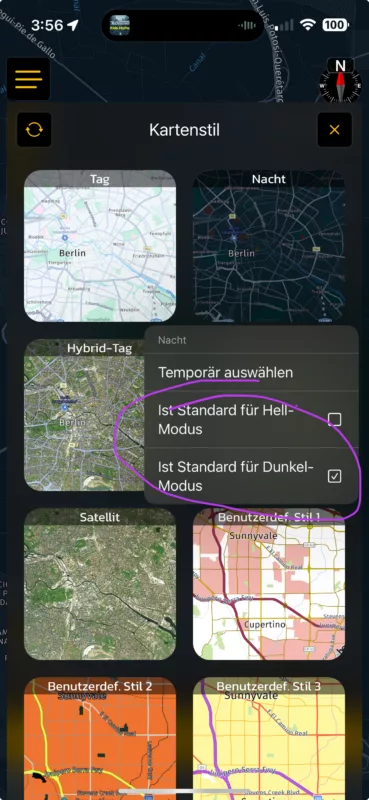
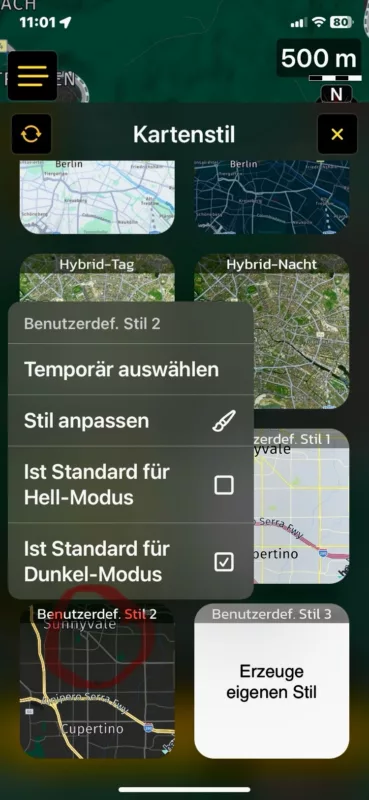
Quote from Guido on 25.02.2024, 04:20Wenn Sie möchten, dass dieser Stil auch im Hell-modus verwendet wird, müssen Sie auch das checkmark für den Hell-modus platzieren.
CarPlay hat einen seperaten Dunkel- und Hellmodus von Ihrem Telefon. Es wird vom Auto angeordnet (kann davon abhängen, ob Ihre Scheinwerfer eingeschaltet sind, ein Umgebungslichtsensor oder eine manuelle Einstellung in Ihrem Autosystem).
CarPlay und damit auch Scenic, folgt diesem Dunkel-/Hell-Modus. Sie können dies auch mit Einstellungen (auf CarPlay nicht auf Ihrem Telefon) > Aussehen überschreiben.
Wenn Sie möchten, dass dieser Stil auch im Hell-modus verwendet wird, müssen Sie auch das checkmark für den Hell-modus platzieren.
CarPlay hat einen seperaten Dunkel- und Hellmodus von Ihrem Telefon. Es wird vom Auto angeordnet (kann davon abhängen, ob Ihre Scheinwerfer eingeschaltet sind, ein Umgebungslichtsensor oder eine manuelle Einstellung in Ihrem Autosystem).
CarPlay und damit auch Scenic, folgt diesem Dunkel-/Hell-Modus. Sie können dies auch mit Einstellungen (auf CarPlay nicht auf Ihrem Telefon) > Aussehen überschreiben.
Quote from Guido on 25.02.2024, 04:40die Karte dunkel, aber die Streckenführung die Farbe aus der Einstellung hell hatte
Das ist ein Fehler. Ich werde mir das ansehen.
die Karte dunkel, aber die Streckenführung die Farbe aus der Einstellung hell hatte
Das ist ein Fehler. Ich werde mir das ansehen.


