
Carplay experience

Quote from GHJ on 29.04.2024, 06:29Hi Guido,
I recently linked my first Carplay to Scenic 3.59. As an fanatic Scenic-iPhone user, I am pleasantly surprised by this experience. Because I am used to the iPhone capabilities, I noticed a number of things.
1] I missed the stats along the way.
2] Something went wrong while closing. The ride had many interruptions and adjustments which I wanted to review. I think I saved the first trip via Carplay or iPhone, but it cannot be found. Still, I have alert on shutdown turned on. Is it a bug or did I do something wrong?
3] The overview options on the iPhone are now very nice. I miss this on the carplay. Zooming in is way too fast and shows the entire country. It's hard to use.
4] During a detour on the highway I heard Scenic recalculate, but it only showed a line behind me. It did not give a new line to the next exit. You can't turn there. The line only appeared shortly before the next exit.
Request:
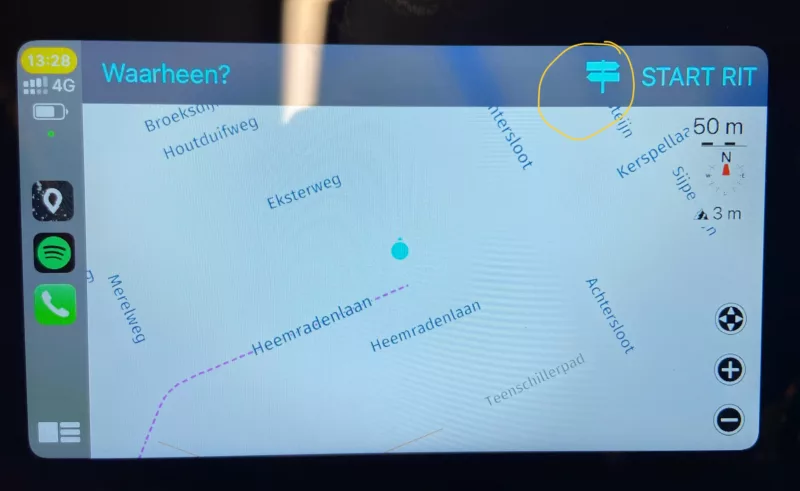
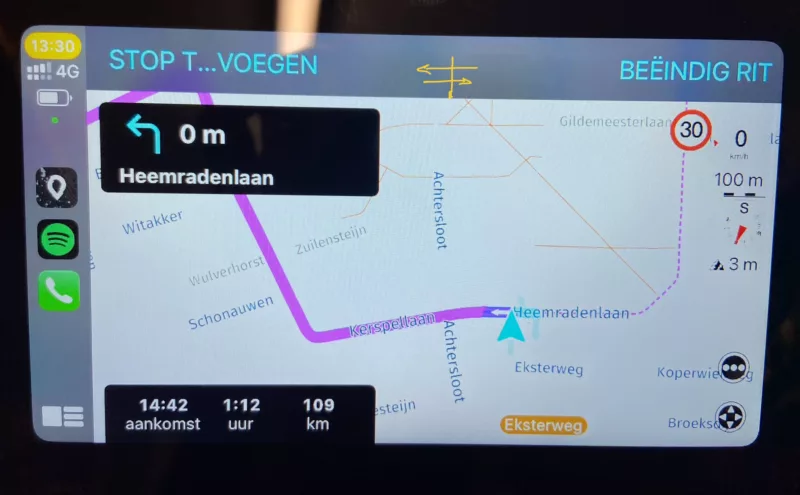
4] What I missed most was the ability to change the route options along the way. Is it possible to also add button options on the page with change/stop? (see pictures)
Greeting,
Geert-Henk
Hi Guido,
I recently linked my first Carplay to Scenic 3.59. As an fanatic Scenic-iPhone user, I am pleasantly surprised by this experience. Because I am used to the iPhone capabilities, I noticed a number of things.
1] I missed the stats along the way.
2] Something went wrong while closing. The ride had many interruptions and adjustments which I wanted to review. I think I saved the first trip via Carplay or iPhone, but it cannot be found. Still, I have alert on shutdown turned on. Is it a bug or did I do something wrong?
3] The overview options on the iPhone are now very nice. I miss this on the carplay. Zooming in is way too fast and shows the entire country. It's hard to use.
4] During a detour on the highway I heard Scenic recalculate, but it only showed a line behind me. It did not give a new line to the next exit. You can't turn there. The line only appeared shortly before the next exit.
Request:
4] What I missed most was the ability to change the route options along the way. Is it possible to also add button options on the page with change/stop? (see pictures)
Greeting,
Geert-Henk

Quote from Guido on 29.04.2024, 09:08Hi Geert-Henk,
Thanks for your feedback. As always, I appreciate you taking the time. Before I comment on your points, one general remark regarding CarPlay. The CarPlay user interface is limited by templates. All 3rd party apps have to use CarPlay templates that are made available by Apple. Part of these templates are the toolbar at the top, the panel where you see the next turn instruction, the panel where you see the time/distance to destination, and the buttons (max 4) at the bottom right. App developers can put more elements on the screen, but these are not touchable/selectable.
With this in mind, apps (especially navigation apps) are also limited in what they can show on screen and how.
1] I missed the stats along the way.
Do you mean the route timeline and the trip duration, etc. The things you see on iPhone when you tap the "ETA bar"?
2] Something went wrong while closing. The ride had many interruptions and adjustments which I wanted to review. I think I saved the first trip via Carplay or iPhone, but it cannot be found. Still, I have alert on shutdown turned on. Is it a bug or did I do something wrong?
Typically, the ride should be saved. Whether you save it on CarPlay or the iPhone should not matter. If you are 100% sure you saved it, there could be a bug. I have not received other feedback on this, though. If this happens again, please let me know.
3] The overview options on the iPhone are now very nice. I miss this on the carplay. Zooming in is way too fast and shows the entire country. It's hard to use.
Here's where the limitations of CarPlay templates sets in. There are only a few buttons I can show on CarPlay. The zooming to entire country is strange though. When exactly did that happen? Were you following a route? When you tap the 'overview' button the map on CarPlay should zoom out to the remainder of the route (the part of the route you did not ride yet).
4] During a detour on the highway I heard Scenic recalculate, but it only showed a line behind me. It did not give a new line to the next exit. You can't turn there. The line only appeared shortly before the next exit.
I'm not sure what you saw exactly. It could be that Scenic thought you were on the other side of the highways (due to GPS inaccuracy) and was sending you back to the next waypoint.
4] What I missed most was the ability to change the route options along the way. Is it possible to also add button options on the page with change/stop? (see pictures)
OK. Should be possible to add that. I'll add it to the list.
Hi Geert-Henk,
Thanks for your feedback. As always, I appreciate you taking the time. Before I comment on your points, one general remark regarding CarPlay. The CarPlay user interface is limited by templates. All 3rd party apps have to use CarPlay templates that are made available by Apple. Part of these templates are the toolbar at the top, the panel where you see the next turn instruction, the panel where you see the time/distance to destination, and the buttons (max 4) at the bottom right. App developers can put more elements on the screen, but these are not touchable/selectable.
With this in mind, apps (especially navigation apps) are also limited in what they can show on screen and how.
1] I missed the stats along the way.
Do you mean the route timeline and the trip duration, etc. The things you see on iPhone when you tap the "ETA bar"?
2] Something went wrong while closing. The ride had many interruptions and adjustments which I wanted to review. I think I saved the first trip via Carplay or iPhone, but it cannot be found. Still, I have alert on shutdown turned on. Is it a bug or did I do something wrong?
Typically, the ride should be saved. Whether you save it on CarPlay or the iPhone should not matter. If you are 100% sure you saved it, there could be a bug. I have not received other feedback on this, though. If this happens again, please let me know.
3] The overview options on the iPhone are now very nice. I miss this on the carplay. Zooming in is way too fast and shows the entire country. It's hard to use.
Here's where the limitations of CarPlay templates sets in. There are only a few buttons I can show on CarPlay. The zooming to entire country is strange though. When exactly did that happen? Were you following a route? When you tap the 'overview' button the map on CarPlay should zoom out to the remainder of the route (the part of the route you did not ride yet).
4] During a detour on the highway I heard Scenic recalculate, but it only showed a line behind me. It did not give a new line to the next exit. You can't turn there. The line only appeared shortly before the next exit.
I'm not sure what you saw exactly. It could be that Scenic thought you were on the other side of the highways (due to GPS inaccuracy) and was sending you back to the next waypoint.
4] What I missed most was the ability to change the route options along the way. Is it possible to also add button options on the page with change/stop? (see pictures)
OK. Should be possible to add that. I'll add it to the list.
Quote from GHJ on 29.04.2024, 13:33Quote from Guido on 29.04.2024, 09:08Hi Guido,
As always, thanks for your quick response.1] I missed the stats along the way.
Do you mean the route timeline and the trip duration, etc. The things you see on iPhone when you tap the "ETA bar"?
- That's right. The timeline with stops in particular is very valuable.
2] Something went wrong while closing. The ride had many interruptions and adjustments which I wanted to review. I think I saved the first trip via Carplay or iPhone, but it cannot be found. Still, I have alert on shutdown turned on. Is it a bug or did I do something wrong?
Typically, the ride should be saved. Whether you save it on CarPlay or the iPhone should not matter. If you are 100% sure you saved it, there could be a bug. I have not received other feedback on this, though. If this happens again, please let me know.
- I must have made a mistake.
3] The overview options on the iPhone are now very nice. I miss this on the carplay. Zooming in is way too fast and shows the entire country. It's hard to use.
Here's where the limitations of CarPlay templates sets in. There are only a few buttons I can show on CarPlay. The zooming to entire country is strange though. When exactly did that happen? Were you following a route? When you tap the 'overview' button the map on CarPlay should zoom out to the remainder of the route (the part of the route you did not ride yet).
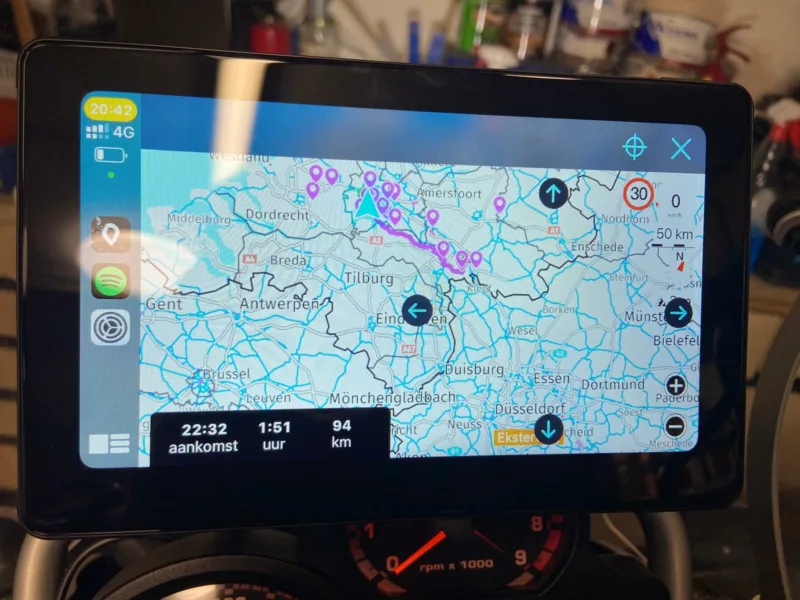
- I will send a photo. I have loaded a route and started navigation. Then immediately request an overview via the menu. The route only takes up a small part of the screen.
4] During a detour on the highway I heard Scenic recalculate, but it only showed a line behind me. It did not give a new line to the next exit. You can't turn there. The line only appeared shortly before the next exit.
I'm not sure what you saw exactly. It could be that Scenic thought you were on the other side of the highways (due to GPS inaccuracy) and was sending you back to the next waypoint.
- GPS inaccuracy is a possible explanation. Since 3.5 I've seen strange things more often.
4] What I missed most was the ability to change the route options along the way. Is it possible to also add button options on the page with change/stop? (see pictures)
OK. Should be possible to add that. I'll add it to the list.
- Thank you for putting the option button on the list.
6] I realize one more point. I miss jumping back to the navigation screen after a few seconds after a menu operation. Is that not possible on carplay?
Quote from Guido on 29.04.2024, 09:08Hi Guido,
As always, thanks for your quick response.1] I missed the stats along the way.
Do you mean the route timeline and the trip duration, etc. The things you see on iPhone when you tap the "ETA bar"?
- That's right. The timeline with stops in particular is very valuable.
2] Something went wrong while closing. The ride had many interruptions and adjustments which I wanted to review. I think I saved the first trip via Carplay or iPhone, but it cannot be found. Still, I have alert on shutdown turned on. Is it a bug or did I do something wrong?
Typically, the ride should be saved. Whether you save it on CarPlay or the iPhone should not matter. If you are 100% sure you saved it, there could be a bug. I have not received other feedback on this, though. If this happens again, please let me know.
- I must have made a mistake.
3] The overview options on the iPhone are now very nice. I miss this on the carplay. Zooming in is way too fast and shows the entire country. It's hard to use.
Here's where the limitations of CarPlay templates sets in. There are only a few buttons I can show on CarPlay. The zooming to entire country is strange though. When exactly did that happen? Were you following a route? When you tap the 'overview' button the map on CarPlay should zoom out to the remainder of the route (the part of the route you did not ride yet).
- I will send a photo. I have loaded a route and started navigation. Then immediately request an overview via the menu. The route only takes up a small part of the screen.
4] During a detour on the highway I heard Scenic recalculate, but it only showed a line behind me. It did not give a new line to the next exit. You can't turn there. The line only appeared shortly before the next exit.
I'm not sure what you saw exactly. It could be that Scenic thought you were on the other side of the highways (due to GPS inaccuracy) and was sending you back to the next waypoint.
- GPS inaccuracy is a possible explanation. Since 3.5 I've seen strange things more often.
4] What I missed most was the ability to change the route options along the way. Is it possible to also add button options on the page with change/stop? (see pictures)
OK. Should be possible to add that. I'll add it to the list.
- Thank you for putting the option button on the list.
6] I realize one more point. I miss jumping back to the navigation screen after a few seconds after a menu operation. Is that not possible on carplay?
Quote from Guido on 30.04.2024, 08:33Hi @ghj,
I'm putting the route timeline on CarPlay on the feature request list.
The picture was very helpfull. In the latest version this problem also occured on iPhone in landscape mode. Not sure why this suddenly appeared by I will look into it
I'll also look at auto-closing the navigation menu. Not sure if it's possible but if it is, I'll add it.
Cheers and thanks for your comments,
Guido
Hi @ghj,
I'm putting the route timeline on CarPlay on the feature request list.
The picture was very helpfull. In the latest version this problem also occured on iPhone in landscape mode. Not sure why this suddenly appeared by I will look into it
I'll also look at auto-closing the navigation menu. Not sure if it's possible but if it is, I'll add it.
Cheers and thanks for your comments,
Guido

Quote from Marts on 02.05.2024, 23:44Had an interesting one today. Running Scenic on the iPhone 14 Pro Max and via USB connection to the Kia Sorento's CarPlay. (I had it connected to listen to podcasts). The Scenic app was selected and I wanted to see how it appeared in the Kia's CarPlay as previous versions had issues.
Screen looked fine. I selected "Home" to navigate to and started off.
I then noticed that guidance (turn left in 100 metres) wasn't working. But in the bottom right it said, time to home and distance to home which were correct.
As I drove black dashes ie. ------- appeared on the map as I progressed showing where I'd come from, like a breadcrumb trail. I haven't seen this before.
Any ideas?
Had an interesting one today. Running Scenic on the iPhone 14 Pro Max and via USB connection to the Kia Sorento's CarPlay. (I had it connected to listen to podcasts). The Scenic app was selected and I wanted to see how it appeared in the Kia's CarPlay as previous versions had issues.
Screen looked fine. I selected "Home" to navigate to and started off.
I then noticed that guidance (turn left in 100 metres) wasn't working. But in the bottom right it said, time to home and distance to home which were correct.
As I drove black dashes ie. ------- appeared on the map as I progressed showing where I'd come from, like a breadcrumb trail. I haven't seen this before.
Any ideas?
Quote from Guido on 03.05.2024, 13:15Hi Marts,
The breadcrumb trail has always been there. Strange that the guidance instructions did not update though. Did you see the route on the screen?
Best regards,
Guido
Hi Marts,
The breadcrumb trail has always been there. Strange that the guidance instructions did not update though. Did you see the route on the screen?
Best regards,
Guido
Quote from Marts on 03.05.2024, 17:50Quote from Guido on 03.05.2024, 13:15Hi Marts,
The breadcrumb trail has always been there. Strange that the guidance instructions did not update though. Did you see the route on the screen?
Best regards,
Guido
No, the route wasn't displayed. Today I'll test it again and make sure that I am not doing something wrong. I'll update what I find, this time with photos.
Quote from Guido on 03.05.2024, 13:15Hi Marts,
The breadcrumb trail has always been there. Strange that the guidance instructions did not update though. Did you see the route on the screen?
Best regards,
Guido
No, the route wasn't displayed. Today I'll test it again and make sure that I am not doing something wrong. I'll update what I find, this time with photos.
Quote from Marts on 03.05.2024, 23:32Update. I did the same route again today. Was at a hardware store, set "Home" as my destination and it worked as it should - routes, turn guidance, distance and time to destination.
So, I don't know what happened yesterday.
And today I went for another drive, this time just telling it that I was going for a drive. It traced the route and I saved it when I got home. That is one handy feature.
Update. I did the same route again today. Was at a hardware store, set "Home" as my destination and it worked as it should - routes, turn guidance, distance and time to destination.
So, I don't know what happened yesterday.
And today I went for another drive, this time just telling it that I was going for a drive. It traced the route and I saved it when I got home. That is one handy feature.
Quote from Guido on 04.05.2024, 06:09The technical term for this is a “glitch” 🙂.
If it happens again please let me know of course.
The technical term for this is a “glitch” 🙂.
If it happens again please let me know of course.
Quote from GHJ on 04.05.2024, 06:59Hi Guido,
I m very enthusiastic about Scenic in combination with Carplay.
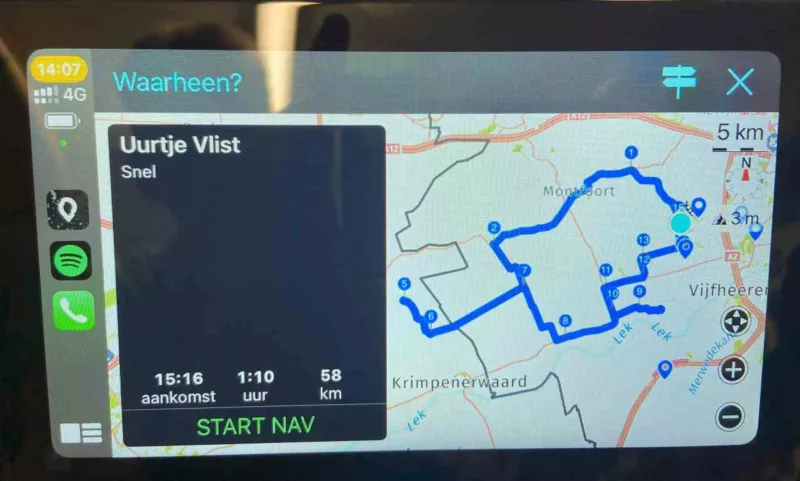
Today something remarkable happened. For a drive in the area, I made a simple route to test the carplay. For this I chose the route option "curvy fast".
The route appears as expected on the iPhone. This is where you normaly check te route. On the Carplay the route is changed to a completely different one. Unexpected recalculations are performed and it seems that Carplay cannot handle the selected option. A problem is that you cannot change the route option of an existing route on the Carplay.
To investigate this I made a second version with more vias. Carplay does follow this as intended.
Can this difference between iPhone and Carplay be prevented? Can you otherwise indicate what should we take into account to avoid surprises on holiday routes?
Greetings, Geert-Henk
Hi Guido,
I m very enthusiastic about Scenic in combination with Carplay.
Today something remarkable happened. For a drive in the area, I made a simple route to test the carplay. For this I chose the route option "curvy fast".
The route appears as expected on the iPhone. This is where you normaly check te route. On the Carplay the route is changed to a completely different one. Unexpected recalculations are performed and it seems that Carplay cannot handle the selected option. A problem is that you cannot change the route option of an existing route on the Carplay.
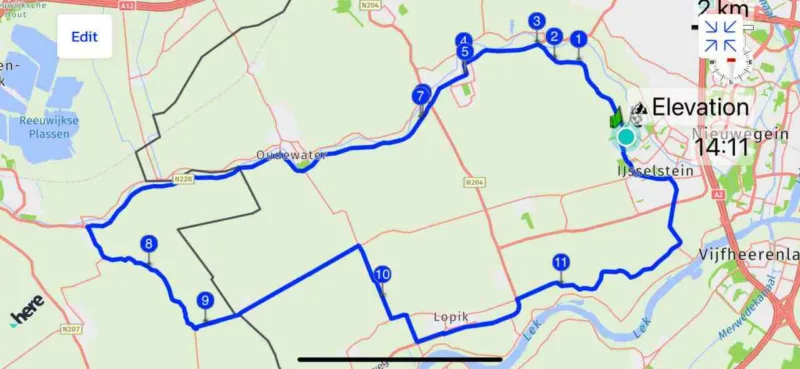
To investigate this I made a second version with more vias. Carplay does follow this as intended.
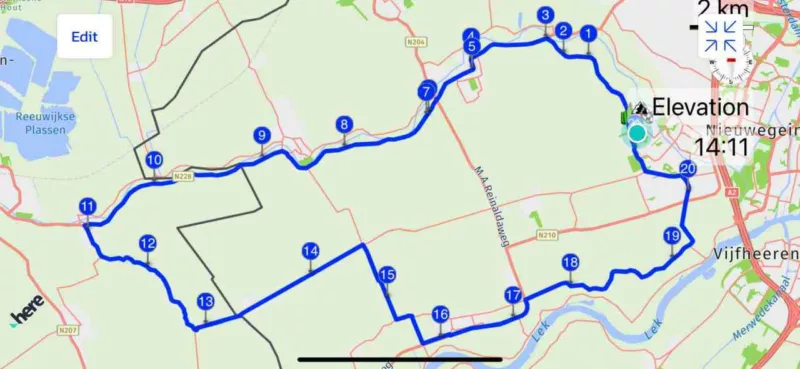
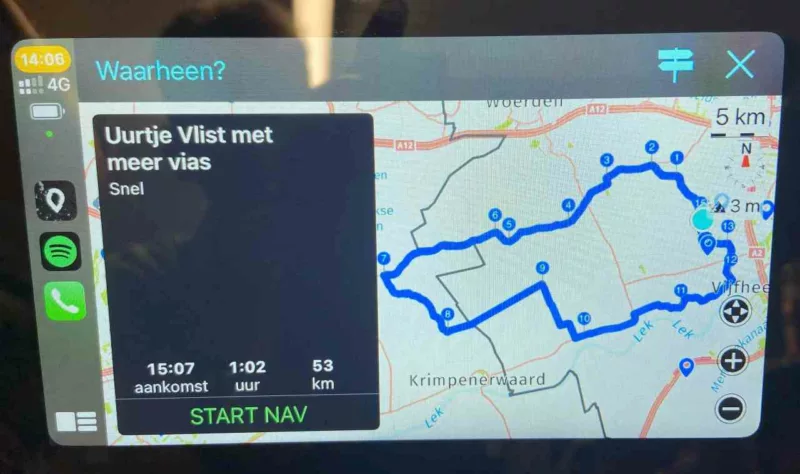
Can this difference between iPhone and Carplay be prevented? Can you otherwise indicate what should we take into account to avoid surprises on holiday routes?
Greetings, Geert-Henk
Quote from Guido on 04.05.2024, 08:39Hi Geert-Henk,
Definitely something strange going on. I see that it's also removing via points. This shouldn't happen at all. I'll have a detailed look in the coming week and report back.
Best regards,
Guido
Hi Geert-Henk,
Definitely something strange going on. I see that it's also removing via points. This shouldn't happen at all. I'll have a detailed look in the coming week and report back.
Best regards,
Guido
Quote from Guido on 06.05.2024, 12:24Found the bug. It was resending the route for Kurviger to generate the route again. This is not necessary for pre-saved routes.
As a result, Kurviger returned a different route this time (as there is always a "random" factor applied by Kurviger to not always create the same routes).
I'm aiming to release a Scenic update with fix before the weekend.
Found the bug. It was resending the route for Kurviger to generate the route again. This is not necessary for pre-saved routes.
As a result, Kurviger returned a different route this time (as there is always a "random" factor applied by Kurviger to not always create the same routes).
I'm aiming to release a Scenic update with fix before the weekend.

Quote from mattsz on 06.05.2024, 12:54Quote from Guido on 06.05.2024, 12:24Found the bug. It was resending the route for Kurviger to generate the route again. This is not necessary for pre-saved routes.
As a result, Kurviger returned a different route this time (as there is always a "random" factor applied by Kurviger to not always create the same routes).
I'm aiming to release a Scenic update with fix before the weekend.Here is a perfect example of why Scenic isn't just one of the best navigation apps available, but one of the best apps available... of any type!
Quote from Guido on 06.05.2024, 12:24Found the bug. It was resending the route for Kurviger to generate the route again. This is not necessary for pre-saved routes.
As a result, Kurviger returned a different route this time (as there is always a "random" factor applied by Kurviger to not always create the same routes).
I'm aiming to release a Scenic update with fix before the weekend.
Here is a perfect example of why Scenic isn't just one of the best navigation apps available, but one of the best apps available... of any type!

Quote from Michel on 08.05.2024, 02:35I‘m using Carplay/ Scenic with ny BMW i4 and BMW R1300GS with a Carpuride screen. My pet hate is that I can only choose from fast or short routing options. Is that a carplay restriction ?
I‘m using Carplay/ Scenic with ny BMW i4 and BMW R1300GS with a Carpuride screen. My pet hate is that I can only choose from fast or short routing options. Is that a carplay restriction ?
Quote from Guido on 08.05.2024, 05:53Quote from Michel on 08.05.2024, 02:35I‘m using Carplay/ Scenic with ny BMW i4 and BMW R1300GS with a Carpuride screen. My pet hate is that I can only choose from fast or short routing options. Is that a carplay restriction ?
Yes. Curvy route generation sometimes requires manually correcting the generated routes (move or deleted added via points) which can’t be done on CarPlay as you can’t touch a pin/marker and bring up a callout bubble.
Quote from Michel on 08.05.2024, 02:35I‘m using Carplay/ Scenic with ny BMW i4 and BMW R1300GS with a Carpuride screen. My pet hate is that I can only choose from fast or short routing options. Is that a carplay restriction ?
Yes. Curvy route generation sometimes requires manually correcting the generated routes (move or deleted added via points) which can’t be done on CarPlay as you can’t touch a pin/marker and bring up a callout bubble.
Quote from Tomppa65 on 11.06.2024, 14:48Hello, when I use the splitscreen mode with Carpuride W702 and I push "Fahrt starten" there is no map available. In full screen mode everyting works well.
Regards
Thomas
Hello, when I use the splitscreen mode with Carpuride W702 and I push "Fahrt starten" there is no map available. In full screen mode everyting works well.
Regards
Thomas


