Quote from
Lo100469 on 31.10.2024, 13:01
Thanks Guido,
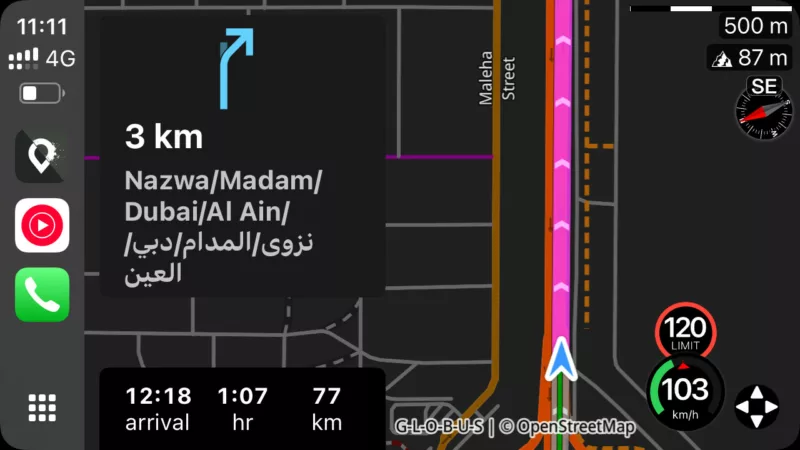
i agree the box is too big, but i did face another issue after deconnecting and reconnecting CarPlay. The arrow moved from the right side of the screen (as the screenshot above) to the middle which made that the arrow was hidden behind the box most of the time. I guess it has to do with portrait/landscape mode ? I disconnected the phone, switched off Scenic, reconnected and reopened Scenic in CarPlay and all was fine.
600kms without any major issue today. Just this and the speed not displayed, but all the guidance was spot on.
Laurent
Thanks Guido,
i agree the box is too big, but i did face another issue after deconnecting and reconnecting CarPlay. The arrow moved from the right side of the screen (as the screenshot above) to the middle which made that the arrow was hidden behind the box most of the time. I guess it has to do with portrait/landscape mode ? I disconnected the phone, switched off Scenic, reconnected and reopened Scenic in CarPlay and all was fine.
600kms without any major issue today. Just this and the speed not displayed, but all the guidance was spot on.
Laurent