
can't add picture manually

Quote from satmax on 18.04.2022, 09:14HI,
i hade made some pictures via DJI Action 2. Now I would add some of this pictures to Scenic, Button "Bild hinzufügen" (add picture). But nothing happened, no image is added, no message displayed. The same images are accepted in Relive with no problems. The date/timestamp must be correct.
HI,
i hade made some pictures via DJI Action 2. Now I would add some of this pictures to Scenic, Button "Bild hinzufügen" (add picture). But nothing happened, no image is added, no message displayed. The same images are accepted in Relive with no problems. The date/timestamp must be correct.

Quote from Guido on 18.04.2022, 09:20The pictures should be in your photo library / albums. If you choose ‘add picture’ tap this button, which will take you to the photo library. Is that not happening?
The pictures should be in your photo library / albums. If you choose ‘add picture’ tap this button, which will take you to the photo library. Is that not happening?
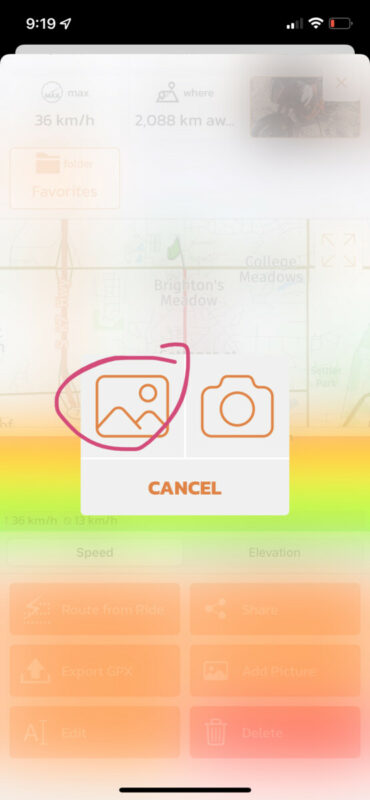
Quote from satmax on 18.04.2022, 09:24yes, this works, i can choose a picture and press add, but no image is added, nothing happens. Last year this feature works fine.
yes, this works, i can choose a picture and press add, but no image is added, nothing happens. Last year this feature works fine.
Quote from Guido on 18.04.2022, 09:29Weird. Just tried and it works for me. Here's a short video: https://share.icloud.com/photos/0f87iJ2uLKbiaJ2T1HtkHvhXg
Are you doing anything different?
Weird. Just tried and it works for me. Here's a short video: https://share.icloud.com/photos/0f87iJ2uLKbiaJ2T1HtkHvhXg
Are you doing anything different?
Quote from satmax on 18.04.2022, 09:47Same as I do it! Maybe there is anything wrong in the picture? Timezone...?
But I had to change the original time before. open picture in photos, scroll up, click "Anpassen" then press "Zurücksetzen". Now the picture time has changed from 15:51 to 10:51 (I started the trip at ~10:10-15:56), when I do this in Relive it works, but in Scenic not
here is the picture
Photo_6553612_DJI_12_dng_18814348_0_202241711828_photo_original
Same as I do it! Maybe there is anything wrong in the picture? Timezone...?
But I had to change the original time before. open picture in photos, scroll up, click "Anpassen" then press "Zurücksetzen". Now the picture time has changed from 15:51 to 10:51 (I started the trip at ~10:10-15:56), when I do this in Relive it works, but in Scenic not
here is the picture
Photo_6553612_DJI_12_dng_18814348_0_202241711828_photo_original
Quote from Guido on 18.04.2022, 09:58I have made changes to this a few months ago. Before Scenic didn't use metadata from the picture (location, timezone, tags) correct. Now it does, but maybe something is not completely right. Could you share the picture with me that is in your photo library? (Use the 'share iCloud link'). Then I can add it exactly as is to my own photo library and try to reproduce it.
Will be later this week before I have time for this though. Most likely there's a bug in there somewhere indeed. If should at least give you a warning if not able to import.
I have made changes to this a few months ago. Before Scenic didn't use metadata from the picture (location, timezone, tags) correct. Now it does, but maybe something is not completely right. Could you share the picture with me that is in your photo library? (Use the 'share iCloud link'). Then I can add it exactly as is to my own photo library and try to reproduce it.
Will be later this week before I have time for this though. Most likely there's a bug in there somewhere indeed. If should at least give you a warning if not able to import.
Quote from Guido on 18.04.2022, 10:12Ah. I can. I tried to drag drop it in the photo app but that didn't work. But when using 'import' in the photo app it did work.
Ah. I can. I tried to drag drop it in the photo app but that didn't work. But when using 'import' in the photo app it did work.
Quote from Guido on 18.04.2022, 10:27OK. Quick first analyses: RAW images are not supported (yet).
Previous version of Scenic did support RAW because the 'old' iOS components supported RAW out of the box. This 'old' component was deprecated by Apple. But the new component doesn't support RAW out of the box. It will take me some time to add this.
Workaround for the time being: add jpg version to your photo library and import that.
Once supported, Scenic will convert to jpg too, because RAW images are just too big (and images are also stored on the Scenic server).
OK. Quick first analyses: RAW images are not supported (yet).
Previous version of Scenic did support RAW because the 'old' iOS components supported RAW out of the box. This 'old' component was deprecated by Apple. But the new component doesn't support RAW out of the box. It will take me some time to add this.
Workaround for the time being: add jpg version to your photo library and import that.
Once supported, Scenic will convert to jpg too, because RAW images are just too big (and images are also stored on the Scenic server).


