Bluetooth remote keymap to function

Quote from M600 on 23.05.2023, 00:40Hello,
I'm fairly new as a Scenic App user but for a big upcoming roadtrip I've to find a suitable GPX navigation app that work and the early tests show that Scenic is an excellent choice! I've also been in a search for a remote control and it look like Scenic support WunderLinQ and MotiveMonkey.
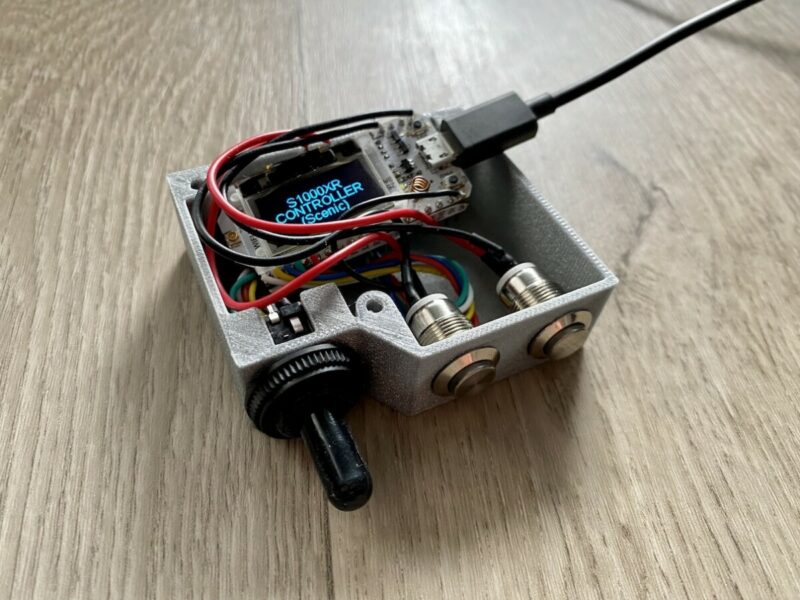
Since I'm a die hard nerd, I prefer doing my thing and found BarButtons ( https://jaxeadv.com/barbuttons/ ) by JaxeADV which mimic a BLE keyboard and he kindly provide the sourcecode/STL/Instructions for whoever want to build one. I made my own derivated version from it and it work as intended in OsmAnd.
Is there a list of recognized input keypress such as OsmAnd published? https://docs.osmand.net/docs/user/map/interact-with-map/#external-input-device-buttons
Is there a reason why the support present in the App seems to be "locked down" to WunderLinQ (I've read that if you broadcast the right name, it work. Not yet tested)?
Cheers!
Hello,
I'm fairly new as a Scenic App user but for a big upcoming roadtrip I've to find a suitable GPX navigation app that work and the early tests show that Scenic is an excellent choice! I've also been in a search for a remote control and it look like Scenic support WunderLinQ and MotiveMonkey.
Since I'm a die hard nerd, I prefer doing my thing and found BarButtons ( https://jaxeadv.com/barbuttons/ ) by JaxeADV which mimic a BLE keyboard and he kindly provide the sourcecode/STL/Instructions for whoever want to build one. I made my own derivated version from it and it work as intended in OsmAnd.
Is there a list of recognized input keypress such as OsmAnd published? https://docs.osmand.net/docs/user/map/interact-with-map/#external-input-device-buttons
Is there a reason why the support present in the App seems to be "locked down" to WunderLinQ (I've read that if you broadcast the right name, it work. Not yet tested)?
Cheers!

Quote from Guido on 23.05.2023, 09:02OK. First of all, I recommend using Scenic v3.50 or higher for this, which is currently in beta test. If you send me a separate email (use email button at bottom of HELP page), then I can give you access to the beta.
Indeed Scenic checks for the Peripheral Name. It needs to be "WunderLINQ" or "MotiveMonkey". (Scenic v3.19 also checks for Service ID & characteristic ID, that's why it's better to use v3.50)
Scenic listens to 6 KeyCommands:
- LeftArrow
- RightArrow
- UpArrow
- DownArrow
- Escape
- EnterThe WunderLINQ as well as the MotiveMonkey implemented the 'Escape' and 'Enter' commands with a wheel-long-press (left or right) or a button-long-press respectively. Of course that's up to you. You could also add 2 separate buttons for this. If you want to go for the 'long-press' then I recommend sending the command automatically after the button has been held for x amount of milliseconds. So, don't wait with sending the command until button release after x time. This is far more intuitive.
Let me know if you have any other questions.
Cheers,
Guido
OK. First of all, I recommend using Scenic v3.50 or higher for this, which is currently in beta test. If you send me a separate email (use email button at bottom of HELP page), then I can give you access to the beta.
Indeed Scenic checks for the Peripheral Name. It needs to be "WunderLINQ" or "MotiveMonkey". (Scenic v3.19 also checks for Service ID & characteristic ID, that's why it's better to use v3.50)
Scenic listens to 6 KeyCommands:
- LeftArrow
- RightArrow
- UpArrow
- DownArrow
- Escape
- Enter
The WunderLINQ as well as the MotiveMonkey implemented the 'Escape' and 'Enter' commands with a wheel-long-press (left or right) or a button-long-press respectively. Of course that's up to you. You could also add 2 separate buttons for this. If you want to go for the 'long-press' then I recommend sending the command automatically after the button has been held for x amount of milliseconds. So, don't wait with sending the command until button release after x time. This is far more intuitive.
Let me know if you have any other questions.
Cheers,
Guido
Quote from M600 on 24.05.2023, 03:50Hello,
Thanks for your answer, I've added a profile on my device accordingly and yes, it support uninterrupting longpress on all inputs! I've sent you an email to test the upcoming version too.
To better see what I'm doing, here is the current PoC version: 2 axis joystick with center push and rotary encoder along with two momentary buttons (one is currently switching between keymapping for OsmAnd, Scenic, Spotify...)
Hello,
Thanks for your answer, I've added a profile on my device accordingly and yes, it support uninterrupting longpress on all inputs! I've sent you an email to test the upcoming version too.
To better see what I'm doing, here is the current PoC version: 2 axis joystick with center push and rotary encoder along with two momentary buttons (one is currently switching between keymapping for OsmAnd, Scenic, Spotify...)