
better visual order

Quote from JFE on 08.04.2024, 04:09Hi, first of all thank you and congratulations for the wonderful app, I use it on my Mac, iPhone and iPad.
With the new update, in landscape mode, the signaling of the road / street on which we circulate, is too close to the arrow location, so navigation is a bit confusing.
The solution could be to place it to the right which is a totally clean area and so everything would be clearer.
Hi, first of all thank you and congratulations for the wonderful app, I use it on my Mac, iPhone and iPad.
With the new update, in landscape mode, the signaling of the road / street on which we circulate, is too close to the arrow location, so navigation is a bit confusing.
The solution could be to place it to the right which is a totally clean area and so everything would be clearer.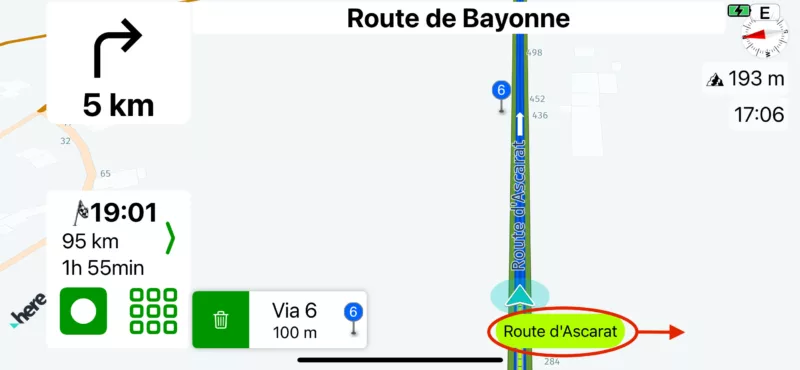

Quote from johansw on 08.04.2024, 05:58I had more or less the same problem once, but also in portrait mode.
Guido moved the marker a bit higher and made an option to remove the street name: Settings / Navigation and Tracking / Show current street name
Very often, this name is of little use to me as I am in unknown territory anyway and navigate by instructions. I normally therefore have it turned off 🙂
I had more or less the same problem once, but also in portrait mode.
Guido moved the marker a bit higher and made an option to remove the street name: Settings / Navigation and Tracking / Show current street name
Very often, this name is of little use to me as I am in unknown territory anyway and navigate by instructions. I normally therefore have it turned off 🙂

Quote from Guido on 08.04.2024, 08:29I'll also move the current position up a bit for landscape mode. @jfe, what iPhone model is the screenshot taken with?
Moving the street name to the right is not a good solution, because, (1) if the street name is very long, this label becomes wider and might still be under the current position indicator. And (2), if someone has the speedometer enabled, it will show on the right side next to the street name label.
I'll also move the current position up a bit for landscape mode. @jfe, what iPhone model is the screenshot taken with?
Moving the street name to the right is not a good solution, because, (1) if the street name is very long, this label becomes wider and might still be under the current position indicator. And (2), if someone has the speedometer enabled, it will show on the right side next to the street name label.
Quote from JFE on 08.04.2024, 08:31Quote from Guido on 08.04.2024, 08:29I'll also move the current position up a bit for landscape mode. @jfe, what iPhone model is the screenshot taken with?
Moving the street name to the right is not a good solution, because, (1) if the street name is very long, this label becomes wider and might still be under the current position indicator. And (2), if someone has the speedometer enabled, it will show on the right side next to the street name label.
thank you very much for this comment. I didn't know that the street name could be switched off.
thank you very much
Quote from Guido on 08.04.2024, 08:29I'll also move the current position up a bit for landscape mode. @jfe, what iPhone model is the screenshot taken with?
Moving the street name to the right is not a good solution, because, (1) if the street name is very long, this label becomes wider and might still be under the current position indicator. And (2), if someone has the speedometer enabled, it will show on the right side next to the street name label.
thank you very much for this comment. I didn't know that the street name could be switched off.
thank you very much
Quote from CHEJULIO on 10.04.2024, 04:22The name of the street you are traveling on (phosphor green balloon) appears in white letters and is not read well. Could the letters be changed to black? Thank you very much, great app
The name of the street you are traveling on (phosphor green balloon) appears in white letters and is not read well. Could the letters be changed to black? Thank you very much, great app
Quote from CHEJULIO on 10.04.2024, 04:23Quote from JFE on 08.04.2024, 04:09Hi, first of all thank you and congratulations for the wonderful app, I use it on my Mac, iPhone and iPad.
With the new update, in landscape mode, the signaling of the road / street on which we circulate, is too close to the arrow location, so navigation is a bit confusing.
The solution could be to place it to the right which is a totally clean area and so everything would be clearer.Make it appear the same as the image sent by the colleague.
Quote from JFE on 08.04.2024, 04:09Hi, first of all thank you and congratulations for the wonderful app, I use it on my Mac, iPhone and iPad.
With the new update, in landscape mode, the signaling of the road / street on which we circulate, is too close to the arrow location, so navigation is a bit confusing.
The solution could be to place it to the right which is a totally clean area and so everything would be clearer.
Make it appear the same as the image sent by the colleague.
Quote from Guido on 10.04.2024, 07:01The background color is the color you set as recorded ride/trail color in Settings > Colors & Style. The text color is black or white, depending on which has most contrast with the background color.
The background color is the color you set as recorded ride/trail color in Settings > Colors & Style. The text color is black or white, depending on which has most contrast with the background color.


