
Arrow position on screen, bulk track import, no via/stop view

Quote from Neo9686 on 09.07.2024, 15:54Hello Guido, I’m an early scenic user and I’m very happy with it but I am waiting for a feature to show from some time now, so I’d like to check in to ask you about it 🙂. I’ll ask a couple other things, since I remember it was different before the latest updates but maybe I’m wrong:
- Arrow position on screen. I remember that the arrow (or pointer) was slightly lower during the vertical navigation. I find it a bit hard to look forward on the curves even at medium zoom since the display is not incredibly big on my iPhone SE 3rd gen, but is is mainly because of the centered position of the arrow that reduces the view on the upcoming road by half. I’m not completely sure but I think it was possibile to adjust it in the past with fine tuning, but I didn’t manage to do it with the latest version. The size of the upper floating panels further reduce the available space on screen in the riding direction, so the logical solution would be to lower the arrow/pointer quite a bit, at least in the riding direction as north mode. Why do we need to see the road we just rode on anyway? Don’t you agree 🙂 ?
- I only recently saw the vias toggle in the planner route’s preview. I think it is brilliant, wouldn’t it be useful to have it in the planner menu too?
- The big one: in the past I proposed to think about the possibility to bulk import at least the tracks, since I generally use a layering system to build my routes and working with gpx files. I have several short tracks that indicates me if that road will be pleasant to ride on, or if it will be especially panoramic or maybe if it is better to avoid it. Scenic is already ready for this thanks to folders system, customisable track/route/map color schemes and the recent change in the layering system in the planner, but it still lacks the possibility to bulk import your own tracks “database” in bulk or at least save them in the app folder via files or pc. AFAIK it is not possibile to import a non-continuous track in the app either, and it is really impossible to manually import them singularly (they are all over Italy where roads types and conditions change very rapidly in a handful of kms, hundreds of short tracks or more). This really is the last feature I personally wait for, I hope that something helpful is coming this way somehow. In the screenshots below I imported a single long track and it really is pleasant and easy to build the route this way thanks to colors and layering, but I’d really need to distinguish the various little parts and segments and not have a single long track like this. I hope I explained myself well 🙂
thank you very much Guido for your work, this is a beautiful app to use and it is getting better and better 👍
Hello Guido, I’m an early scenic user and I’m very happy with it but I am waiting for a feature to show from some time now, so I’d like to check in to ask you about it 🙂. I’ll ask a couple other things, since I remember it was different before the latest updates but maybe I’m wrong:
- Arrow position on screen. I remember that the arrow (or pointer) was slightly lower during the vertical navigation. I find it a bit hard to look forward on the curves even at medium zoom since the display is not incredibly big on my iPhone SE 3rd gen, but is is mainly because of the centered position of the arrow that reduces the view on the upcoming road by half. I’m not completely sure but I think it was possibile to adjust it in the past with fine tuning, but I didn’t manage to do it with the latest version. The size of the upper floating panels further reduce the available space on screen in the riding direction, so the logical solution would be to lower the arrow/pointer quite a bit, at least in the riding direction as north mode. Why do we need to see the road we just rode on anyway? Don’t you agree 🙂 ?
- I only recently saw the vias toggle in the planner route’s preview. I think it is brilliant, wouldn’t it be useful to have it in the planner menu too?
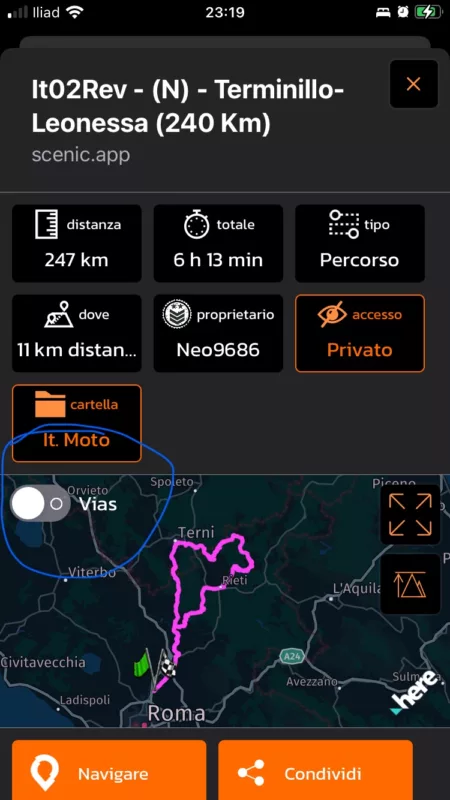
- The big one: in the past I proposed to think about the possibility to bulk import at least the tracks, since I generally use a layering system to build my routes and working with gpx files. I have several short tracks that indicates me if that road will be pleasant to ride on, or if it will be especially panoramic or maybe if it is better to avoid it. Scenic is already ready for this thanks to folders system, customisable track/route/map color schemes and the recent change in the layering system in the planner, but it still lacks the possibility to bulk import your own tracks “database” in bulk or at least save them in the app folder via files or pc. AFAIK it is not possibile to import a non-continuous track in the app either, and it is really impossible to manually import them singularly (they are all over Italy where roads types and conditions change very rapidly in a handful of kms, hundreds of short tracks or more). This really is the last feature I personally wait for, I hope that something helpful is coming this way somehow. In the screenshots below I imported a single long track and it really is pleasant and easy to build the route this way thanks to colors and layering, but I’d really need to distinguish the various little parts and segments and not have a single long track like this. I hope I explained myself well 🙂
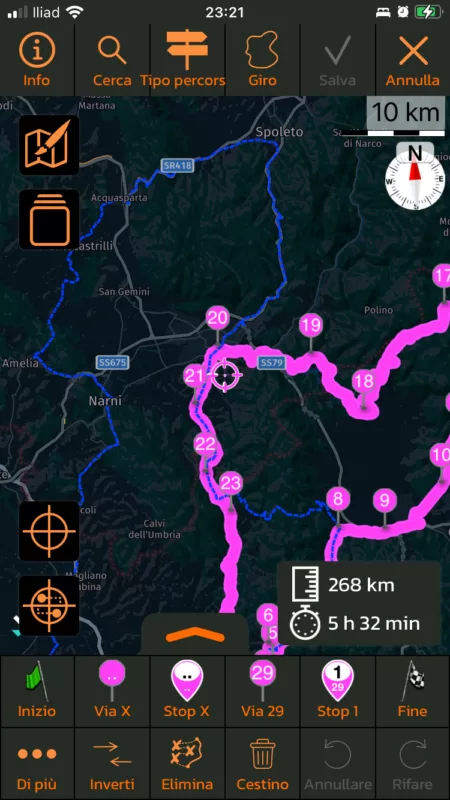
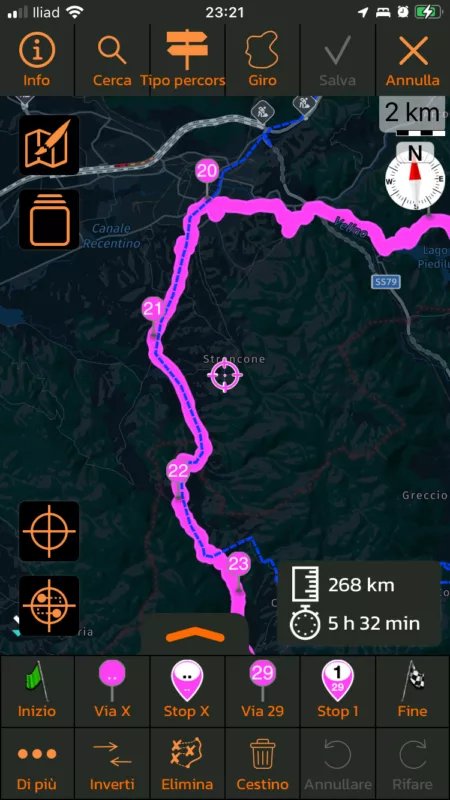
thank you very much Guido for your work, this is a beautiful app to use and it is getting better and better 👍

Quote from Guido on 09.07.2024, 16:00Thanks for the feedback Neo.
Arrow position on screen. I remember that the arrow (or pointer) was slightly lower during the vertical navigation.
Yes. It should still be lower in portrait mode (and also landscape mode). Is it not? (This was never adjustable in finetuning).
I only recently saw the vias toggle in the planner route’s preview. I think it is brilliant, wouldn’t it be useful to have it in the planner menu too?
Working on a bigger redesign for the fall of this year and will add this to the list.
Bulk/batch import tracks
I'll add it to the list too. This is a bigger item to implement though, and not requested very often, so this will get a bit lower priority. Hope you understand.
Thanks for the feedback Neo.
Arrow position on screen. I remember that the arrow (or pointer) was slightly lower during the vertical navigation.
Yes. It should still be lower in portrait mode (and also landscape mode). Is it not? (This was never adjustable in finetuning).
I only recently saw the vias toggle in the planner route’s preview. I think it is brilliant, wouldn’t it be useful to have it in the planner menu too?
Working on a bigger redesign for the fall of this year and will add this to the list.
Bulk/batch import tracks
I'll add it to the list too. This is a bigger item to implement though, and not requested very often, so this will get a bit lower priority. Hope you understand.
Quote from Neo9686 on 09.07.2024, 16:21thank you for your fast reply guido, I was still revisioning the post, don’t know if you read the latest version of it.
I totally understand your point, I just wanted to check in since the last time I asked for it since it was a year ago or so, maybe more.
for the first point, I can’t start the navigation at the moment in my home but the arrow/pointer is more or less in the middle of my screen. In this screenshot there are not the upper panels too:
Regarding the second point, I can’t wait to see the new design!
for the last point, wouldn’t it be simple/faster to grant access to a folder where you could drop the files? Just suggesting because the simplest way to achieve the goal would be the better way if not so many people ask about it. Thank you again for your time 🙂
thank you for your fast reply guido, I was still revisioning the post, don’t know if you read the latest version of it.
I totally understand your point, I just wanted to check in since the last time I asked for it since it was a year ago or so, maybe more.
for the first point, I can’t start the navigation at the moment in my home but the arrow/pointer is more or less in the middle of my screen. In this screenshot there are not the upper panels too: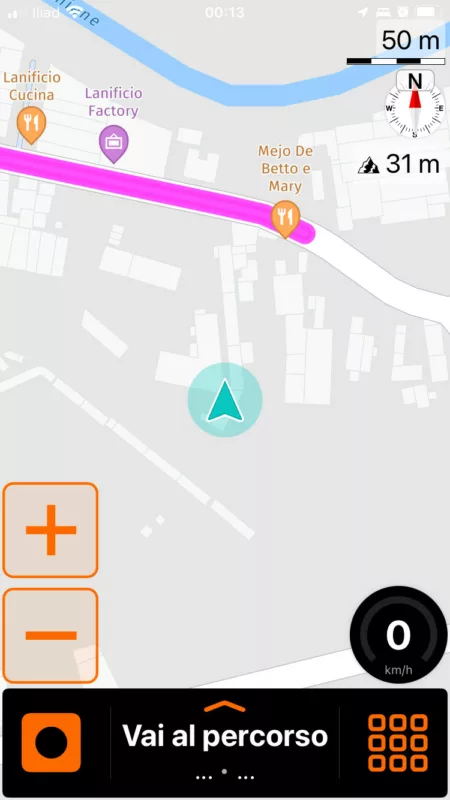
Regarding the second point, I can’t wait to see the new design!
for the last point, wouldn’t it be simple/faster to grant access to a folder where you could drop the files? Just suggesting because the simplest way to achieve the goal would be the better way if not so many people ask about it. Thank you again for your time 🙂
Quote from Guido on 09.07.2024, 16:27OK. Let me see if I can move the arrow down a bit more for the smaller devices.
Regarding the track import... unfortunately, it's not so easy as drag and dropping files. Scenic doesn't store GPX files. It processes them, and then puts all the information in its database. At the moment, the assumption was that someone would like to review the route and possibly make some changes, before actually saving it to the database. If you are importing tracks... and want to save as tracks...the review step can be skipped, but it would still need to be saved to the database. So... this is a change in the user flow (needs to be a specific option to batch import), and some server code will need to be changed as well.
OK. Let me see if I can move the arrow down a bit more for the smaller devices.
Regarding the track import... unfortunately, it's not so easy as drag and dropping files. Scenic doesn't store GPX files. It processes them, and then puts all the information in its database. At the moment, the assumption was that someone would like to review the route and possibly make some changes, before actually saving it to the database. If you are importing tracks... and want to save as tracks...the review step can be skipped, but it would still need to be saved to the database. So... this is a change in the user flow (needs to be a specific option to batch import), and some server code will need to be changed as well.


