
Apple CarPlay

Quote from lex franks on 18.01.2025, 03:01Hi
I have installed an apple carplay screen to my dashboard which I use Scenic navigation on.
However I am only seeing limited information fields on my screen,not a replica of what I see on my iPhone in my pocket.
Am I missing a critical setting or is this a compromise enforced by the use of CarPlay.
Thanks for any advice
Lex Franks
Australia
Hi
I have installed an apple carplay screen to my dashboard which I use Scenic navigation on.
However I am only seeing limited information fields on my screen,not a replica of what I see on my iPhone in my pocket.
Am I missing a critical setting or is this a compromise enforced by the use of CarPlay.
Thanks for any advice
Lex Franks
Australia

Quote from Guido on 18.01.2025, 03:32Hi Lex,
CarPlay is limited by Apple enforcing the use of “templates”. The thought behind these templates is that a arPlay system should be operable by physical controls in a car / motorcycle and not only rely on the touch screen.
I will expand / adjust CarPlay features a bit in the future, but it will never be an exact copy of your iPhone screen.
If you search for “CarPlay” in the forum you will find many threads with more info.
Hope this helps/explains. If not, please let me know if you have other questions. Happy to help.
Best regards and ride safe,
Guido
Hi Lex,
CarPlay is limited by Apple enforcing the use of “templates”. The thought behind these templates is that a arPlay system should be operable by physical controls in a car / motorcycle and not only rely on the touch screen.
I will expand / adjust CarPlay features a bit in the future, but it will never be an exact copy of your iPhone screen.
If you search for “CarPlay” in the forum you will find many threads with more info.
Hope this helps/explains. If not, please let me know if you have other questions. Happy to help.
Best regards and ride safe,
Guido
Quote from bertjan on 18.01.2025, 12:08Ik gebruik de AIO-5 van Chigee op mijn gs1250 .
de bediening in carplay werkt perfect met de stuurwiel bediening .
alleen ben ik sinds de update van scenic de zoom knoppen in beeld kwijt.
graag hoor ik of er een oplossing voor is?
we rijden met de motorclub altijd gpx routes. ik heb herberekenen altijd uit staan, als er een wegafsluiting is zoom ik uit en zoek ik het spoor weer op.
het zou pretttig zijn als de zoom functie in carplay weer te bedienen is met de stuurwiel bediening.
Ik gebruik de AIO-5 van Chigee op mijn gs1250 .
de bediening in carplay werkt perfect met de stuurwiel bediening .
alleen ben ik sinds de update van scenic de zoom knoppen in beeld kwijt.
graag hoor ik of er een oplossing voor is?
we rijden met de motorclub altijd gpx routes. ik heb herberekenen altijd uit staan, als er een wegafsluiting is zoom ik uit en zoek ik het spoor weer op.
het zou pretttig zijn als de zoom functie in carplay weer te bedienen is met de stuurwiel bediening.
Quote from Guido on 19.01.2025, 10:38Hoi @bertjan,
Als je zoom op "handmatig" zet dan worden er zoom knoppen op het scherm geplaatst, die je kan bedienen met de stuurwiel bediening.
Groeten,
Guido
Hoi @bertjan,
Als je zoom op "handmatig" zet dan worden er zoom knoppen op het scherm geplaatst, die je kan bedienen met de stuurwiel bediening.
Groeten,
Guido

Quote from Marts on 23.01.2025, 23:21Just a quick question regarding CarPlay.
See attached photo. It's the Chigee AIO-5 Lite display and with Scenic running, not tracking or on a route.
What does that 5km in the top right indicate? It seems to change too.
Thanks.
[caption id="attachment_8629" align="alignnone" width="800"]
What is that 5km telling me?[/caption]
Just a quick question regarding CarPlay.
See attached photo. It's the Chigee AIO-5 Lite display and with Scenic running, not tracking or on a route.
What does that 5km in the top right indicate? It seems to change too.
Thanks.
[caption id="attachment_8629" align="alignnone" width="800"] What is that 5km telling me?[/caption]
Quote from Guido on 24.01.2025, 06:11It’s the map scale. The black and white bar above the 5km is 5km in real life at this zoom level.
You can turn this off in Settings > Map Settings.
It’s the map scale. The black and white bar above the 5km is 5km in real life at this zoom level.
You can turn this off in Settings > Map Settings.
Quote from Marts on 24.01.2025, 14:33Quote from Guido on 24.01.2025, 06:11It’s the map scale.
Ah, of course it is. Doh!
Anyway, off on a big ride for 2 days in a few minutes. This will be the first chance of testing Scenic 4 since back in December when I did one or two small rides.
Quote from Guido on 24.01.2025, 06:11It’s the map scale.
Ah, of course it is. Doh!
Anyway, off on a big ride for 2 days in a few minutes. This will be the first chance of testing Scenic 4 since back in December when I did one or two small rides.
Quote from Marts on 26.01.2025, 17:26Here's what Scenic looks like on the CarPlay device called the Chigee AIO-5 Lite.
It displays correctly. In the two cars, though, some of the right side of the map and info is cut off by the Carplay menu. But that's no big deal for me personally, as Scenic is meant for use mainly on the bike and with the Chigee. I don't know how CarPlay is meant to work, but in the car the menu is displayed on the right side of the screen. Below, as you can see, it's on the left.
Here's what Scenic looks like on the CarPlay device called the Chigee AIO-5 Lite.
It displays correctly. In the two cars, though, some of the right side of the map and info is cut off by the Carplay menu. But that's no big deal for me personally, as Scenic is meant for use mainly on the bike and with the Chigee. I don't know how CarPlay is meant to work, but in the car the menu is displayed on the right side of the screen. Below, as you can see, it's on the left.
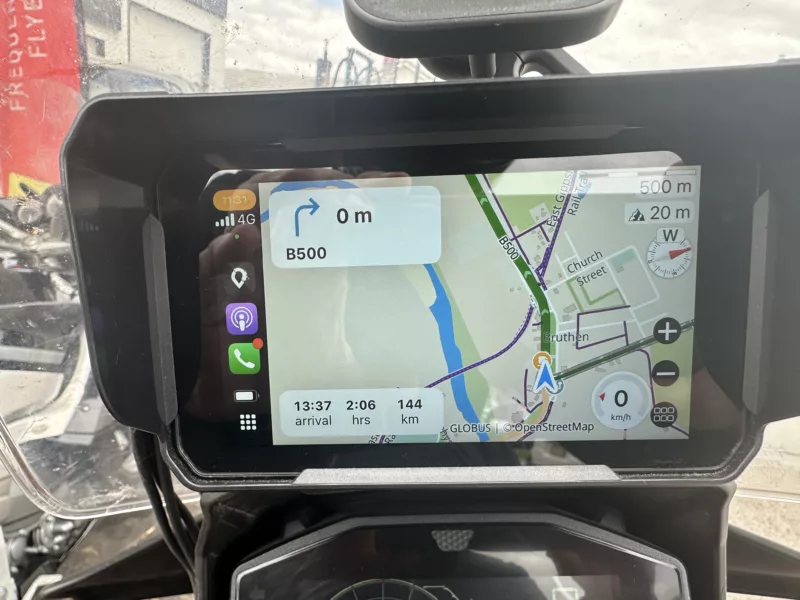
Quote from Guido on 27.01.2025, 09:29Yes... I'm aware of some display issues on right-hand-drive CarPlay systems (where the CarPlay menu is on the right). It's on the list to fix that.
Yes... I'm aware of some display issues on right-hand-drive CarPlay systems (where the CarPlay menu is on the right). It's on the list to fix that.


