
App usage with poor network connection

Quote from marcom on 20.07.2022, 16:01Hi Guido,
love your app! I've purchased the premium version and I'm using offline maps.
Sometimes I drive in areas with poor mobile network connection (welcome to Germany) and I'm finding the usage of the app to be difficult:
- searching addresses will spin the wait icon, hindering me from using the app. This happens in areas where only EDGE is available. It would be good, if offline results would show up immediately - online results could still be tried to be fetched in the background as and if they become available.
- similarly, trying to load a previously saved route results in the same behavior. I understand scenic also stores the data on the cloud, but probably locally as well...?
Thanks
Mark
Hi Guido,
love your app! I've purchased the premium version and I'm using offline maps.
Sometimes I drive in areas with poor mobile network connection (welcome to Germany) and I'm finding the usage of the app to be difficult:
- searching addresses will spin the wait icon, hindering me from using the app. This happens in areas where only EDGE is available. It would be good, if offline results would show up immediately - online results could still be tried to be fetched in the background as and if they become available.
- similarly, trying to load a previously saved route results in the same behavior. I understand scenic also stores the data on the cloud, but probably locally as well...?
Thanks
Mark

Quote from Guido on 20.07.2022, 16:18Hmmm. That’s strange. It should work as you are expecting. (Using offline results and offline data). Let me see if something is wrong with the mechanism.
meanwhile, as a workaround, you could disable cellular data for scenic. (This will not give you online search results at all though).
Hmmm. That’s strange. It should work as you are expecting. (Using offline results and offline data). Let me see if something is wrong with the mechanism.
meanwhile, as a workaround, you could disable cellular data for scenic. (This will not give you online search results at all though).
Quote from David_G on 21.07.2022, 10:48I discovered the same.
Loading a previously saved route with bad cellular connection only results in a spinning wait symbol.
Going to flight mode immediately leads to results, so offline search does work but it seems the timeout for online search also prevents the offline search.
I discovered the same.
Loading a previously saved route with bad cellular connection only results in a spinning wait symbol.
Going to flight mode immediately leads to results, so offline search does work but it seems the timeout for online search also prevents the offline search.
Quote from dasherpr on 08.08.2022, 06:51I have seen the same. I have offline maps downloaded for my areas ( yes fully updated) and get the spinning wait icon. Will try airplane mode next time. Thanks.
I have seen the same. I have offline maps downloaded for my areas ( yes fully updated) and get the spinning wait icon. Will try airplane mode next time. Thanks.
Quote from Guido on 09.08.2022, 18:41Hi Guys,
I have a fix for the slow loading of search results (it will show offline search results first in the list, even while online results are still being retrieved). Will be in the next update.
@david_g & @marcom - You are mentioning that loading a previously saved route is slow as well when on a poor connection. Could you give this another try in v3.12 (the version currently in App Store, which was released after your first post July 20. https://apps.apple.com/app/id1089668246 ).
v3.12 will prefer offline calculation. Only if not all required map data is on the device it will go online for calculation. (or if you turn off 'prefer offline calculation' in Settings > Finetuning).
If it's still slow with this version, could you check if you have the offline maps installed? If you have, could you let me know what exactly is slow? What spinner are you seeing and where (maybe a screenshot?).
Thank you and best regards,
Guido
Hi Guys,
I have a fix for the slow loading of search results (it will show offline search results first in the list, even while online results are still being retrieved). Will be in the next update.
@david_g & @marcom - You are mentioning that loading a previously saved route is slow as well when on a poor connection. Could you give this another try in v3.12 (the version currently in App Store, which was released after your first post July 20. https://apps.apple.com/app/id1089668246 ).
v3.12 will prefer offline calculation. Only if not all required map data is on the device it will go online for calculation. (or if you turn off 'prefer offline calculation' in Settings > Finetuning).
If it's still slow with this version, could you check if you have the offline maps installed? If you have, could you let me know what exactly is slow? What spinner are you seeing and where (maybe a screenshot?).
Thank you and best regards,
Guido
Quote from David_G on 11.08.2022, 13:29Hi Guido,
I tried it with v3.12 today. Loading previously saved routes works well now with bad cellular connection.
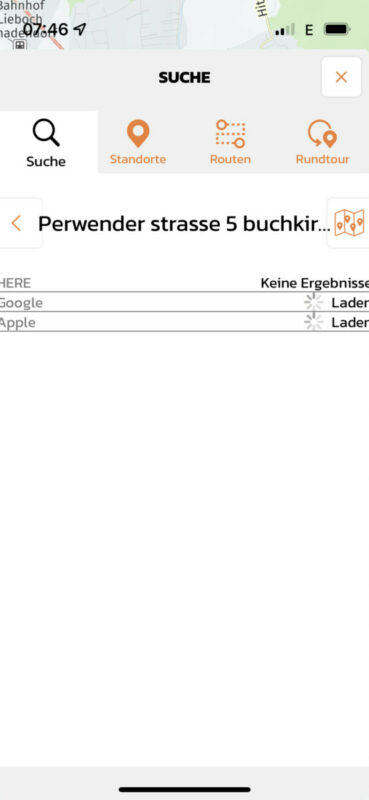
However, when searching for a new destination, I still do not get search results. It seems like the "here" results are prioritized since the other sources are still searching, but this does not help since I am not getting any results 😉
And you can also see that the displayed screen width is cut down slightly...
This is on an iPhone 13mini
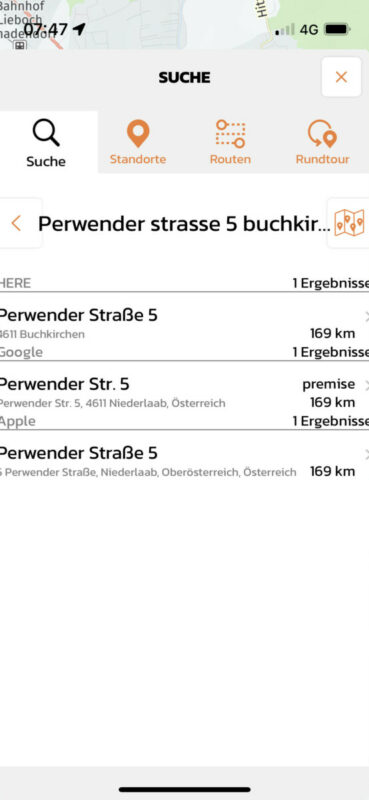
As you can see, with a bit better cellular connection, i do get "here" search results.
Hi Guido,
I tried it with v3.12 today. Loading previously saved routes works well now with bad cellular connection.
However, when searching for a new destination, I still do not get search results. It seems like the "here" results are prioritized since the other sources are still searching, but this does not help since I am not getting any results 😉
And you can also see that the displayed screen width is cut down slightly...
This is on an iPhone 13mini
As you can see, with a bit better cellular connection, i do get "here" search results.
Quote from Guido on 11.08.2022, 13:36Ok. Thanks. Good to know that routes load normal now.
The fix for searching will be in the upcoming update.
Ok. Thanks. Good to know that routes load normal now.
The fix for searching will be in the upcoming update.


