
Another jump on saved ride

Quote from botzko on 11.11.2021, 13:00Hi Guido,
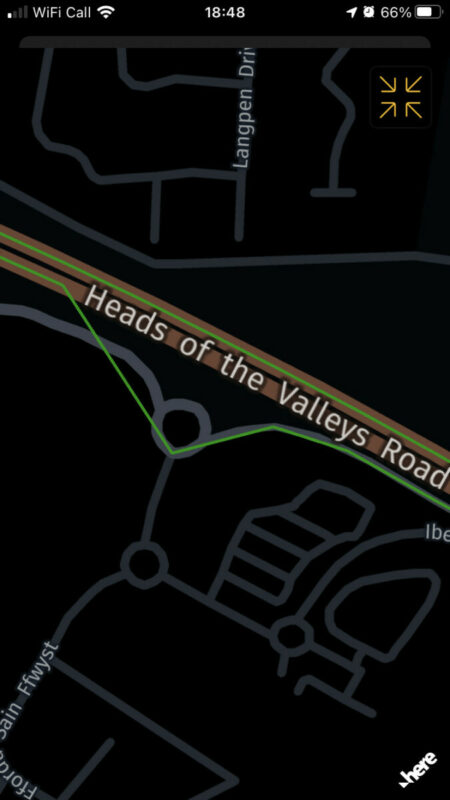
This is another kind of jump. So I have created a router for my ride today but the leader was a friend of mine, so we didn’t use my original route. I have deleted the original route and have replaced it with one from the original ride but I believe the instruction was to turn left but we kept forward. This means that even the stick to the road algorithm didn’t work properly or the nav has recorded the points and route it expected me to follow and at some point it just realised I have chosen another route.
This is not a big problem for me, so if you are pissed by me reporting jumps let me know.
Hi Guido,
This is another kind of jump. So I have created a router for my ride today but the leader was a friend of mine, so we didn’t use my original route. I have deleted the original route and have replaced it with one from the original ride but I believe the instruction was to turn left but we kept forward. This means that even the stick to the road algorithm didn’t work properly or the nav has recorded the points and route it expected me to follow and at some point it just realised I have chosen another route.
This is not a big problem for me, so if you are pissed by me reporting jumps let me know.

Quote from Guido on 11.11.2021, 13:05Not pissed 🙂. All feedback is welcome and helps me improve the app.
In this case though, I don't think I can do anything about this. The 'snapping' is done by the map framework. How the snapping works exactly I don't know (don't have access to that code), but I know it also includes if you are following a route. If you are following a route and the raw GPS location is not exactly on the road nor the route, it will make assumptions. The first assumption (I imagine) is that you are still on route. Only if you are further then x distance away from the route it will snap you to a road that is not on the route.
What you could try is to turn 'Position to log' to 'Raw' (Unders Settings > Finetuning). Then it won't snap the green line at all. It will record the raw position. Please note that raw position often times is not exactly on the road where you are (due to GPS inaccuracy and map inaccuracy).
Not pissed 🙂. All feedback is welcome and helps me improve the app.
In this case though, I don't think I can do anything about this. The 'snapping' is done by the map framework. How the snapping works exactly I don't know (don't have access to that code), but I know it also includes if you are following a route. If you are following a route and the raw GPS location is not exactly on the road nor the route, it will make assumptions. The first assumption (I imagine) is that you are still on route. Only if you are further then x distance away from the route it will snap you to a road that is not on the route.
What you could try is to turn 'Position to log' to 'Raw' (Unders Settings > Finetuning). Then it won't snap the green line at all. It will record the raw position. Please note that raw position often times is not exactly on the road where you are (due to GPS inaccuracy and map inaccuracy).
Quote from Joerg400 on 11.11.2021, 13:54It took a time until I understood, that diffrent maps are not absolutly identical. When I send routes to my friends some of them told me, that there are "waypoint-warnings", other said that all is ok. First i thought, that this is a diffrence between itn, gpx and so on fileformats. But this changed also often.
One time I had the difference, that my imported route choosed a street in a town, very, very closed to the road i planed. => Diffrences in gps-calculations added with diffrences in map-coordinates ... I am realy often surprised that the navigation even works :))
Long text, less sense? No! The better we tell our experiences, the better Scenic will becomes. (And I have the same "probleme", not to nerve Guido, because I was used using an other navigation very(!) long and I could follow them save even only by speach.)
In addition, in Germany the weather and its temperatures are no more realy inviting making grate tours to test Scenic 3. => Each other test is for me welcome, becoming a again better Scenic 3.
It took a time until I understood, that diffrent maps are not absolutly identical. When I send routes to my friends some of them told me, that there are "waypoint-warnings", other said that all is ok. First i thought, that this is a diffrence between itn, gpx and so on fileformats. But this changed also often.
One time I had the difference, that my imported route choosed a street in a town, very, very closed to the road i planed. => Diffrences in gps-calculations added with diffrences in map-coordinates ... I am realy often surprised that the navigation even works :))
Long text, less sense? No! The better we tell our experiences, the better Scenic will becomes. (And I have the same "probleme", not to nerve Guido, because I was used using an other navigation very(!) long and I could follow them save even only by speach.)
In addition, in Germany the weather and its temperatures are no more realy inviting making grate tours to test Scenic 3. => Each other test is for me welcome, becoming a again better Scenic 3.
Quote from Guido on 11.11.2021, 13:57Indeed Joerg. Thanks 🙂
Indeed Joerg. Thanks 🙂
Quote from botzko on 11.11.2021, 14:14I prefer to stick to the “Snapped” option than the “Raw” one. Have tried crating a tracker a long time ago and I’m familiar with the “jumps” in the raw gps coordinates.
If you do not have control over this functionality, may be you can report it to the map framework developers. I know they will do nothing before there are a lot of complaints because it’s very minor issue but will not hurt them to know about it.Thank you for all your work.
I prefer to stick to the “Snapped” option than the “Raw” one. Have tried crating a tracker a long time ago and I’m familiar with the “jumps” in the raw gps coordinates.
If you do not have control over this functionality, may be you can report it to the map framework developers. I know they will do nothing before there are a lot of complaints because it’s very minor issue but will not hurt them to know about it.
Thank you for all your work.
Quote from Guido on 11.11.2021, 14:24Just so that I have the correct understanding: So, the route you created and was following took the gray road with the roundabout, taking a left at the roundabout, but your buddy took you over the brown "Heads of the valley" road, correct?
If so, I don't really think there is an issue. It's more the case of finding a threshold value that works in most cases. With threshold being the max distance that the RAW GPS position can be away from the road in order to 'snap' the position on the road. In other words... if the raw GPS position is not on the route or the road, until what distance will the algorithm still consider it to be on the road / route? Decrease this distance and you can't cover up the bigger inaccuracies in GPS position, and possibly get a lot of inputs route recalculations, because framework thinks you are not on route anymore. Increase this value and you'll get into problems where roads are very close to eachother and might snap to the wrong road (like in this case).
Just so that I have the correct understanding: So, the route you created and was following took the gray road with the roundabout, taking a left at the roundabout, but your buddy took you over the brown "Heads of the valley" road, correct?
If so, I don't really think there is an issue. It's more the case of finding a threshold value that works in most cases. With threshold being the max distance that the RAW GPS position can be away from the road in order to 'snap' the position on the road. In other words... if the raw GPS position is not on the route or the road, until what distance will the algorithm still consider it to be on the road / route? Decrease this distance and you can't cover up the bigger inaccuracies in GPS position, and possibly get a lot of inputs route recalculations, because framework thinks you are not on route anymore. Increase this value and you'll get into problems where roads are very close to eachother and might snap to the wrong road (like in this case).
Quote from botzko on 11.11.2021, 14:47Yes you get it correctly.
I understand what you are saying and do not see a reason to investigate further.
Yes you get it correctly.
I understand what you are saying and do not see a reason to investigate further.
Quote from Joerg400 on 11.11.2021, 15:36Quote from botzko on 11.11.2021, 14:47Yes you get it correctly.
I understand what you are saying and do not see a reason to investigate further.
No! There ara working algorithms to navigate on only one road, therfor it must be possible to save a route without parallel tracks. But in the current situation of a very new (and very well) Scenic perhaps it might be not the first priority.
Meantime (Guido, I beg your pardon!) I really think that Guido makes a unbelievable great job! Thanks again!
Quote from botzko on 11.11.2021, 14:47Yes you get it correctly.
I understand what you are saying and do not see a reason to investigate further.
No! There ara working algorithms to navigate on only one road, therfor it must be possible to save a route without parallel tracks. But in the current situation of a very new (and very well) Scenic perhaps it might be not the first priority.
Meantime (Guido, I beg your pardon!) I really think that Guido makes a unbelievable great job! Thanks again!
Quote from Guido on 11.11.2021, 15:59There ara working algorithms to navigate on only one road, therfor it must be possible to save a route without parallel tracks.
I think there might be a misunderstanding. The specific situation we are talking about here is when navigating a route (the magenta line). In those scenarios, if you are not following the route in some moment, then the algorithm has to choose: snap the raw position to the closest road, or snap the raw position to the route. What to do if the raw position is exactly between the route and the road?
There ara working algorithms to navigate on only one road, therfor it must be possible to save a route without parallel tracks.
I think there might be a misunderstanding. The specific situation we are talking about here is when navigating a route (the magenta line). In those scenarios, if you are not following the route in some moment, then the algorithm has to choose: snap the raw position to the closest road, or snap the raw position to the route. What to do if the raw position is exactly between the route and the road?
Quote from Joerg400 on 12.11.2021, 03:21Sorry Guido! You are right! I hadn't understood that recording a route has the function to save the "real" positions and is totaly independent from navigation.
Sorry Guido! You are right! I hadn't understood that recording a route has the function to save the "real" positions and is totaly independent from navigation.
Quote from Guido on 12.11.2021, 03:24Exactly yes. That’s a key point in fact. I should have mentioned that 🙂
Exactly yes. That’s a key point in fact. I should have mentioned that 🙂


