
Another case import route from kurviger

Quote from GruenesZimmerhuhn on 15.04.2024, 10:55

Hello Guido,
I know about the traps importing routes from kurviger and I understand the most cases and how to avoid them. But todayI am faced with a case, which I do not understand and therefore I need your opinion and advice.
I have planned a twelve-day trip through south england and want to transfer the routes from kurviger to scenic using the magic "transfer to scenic" button 😀
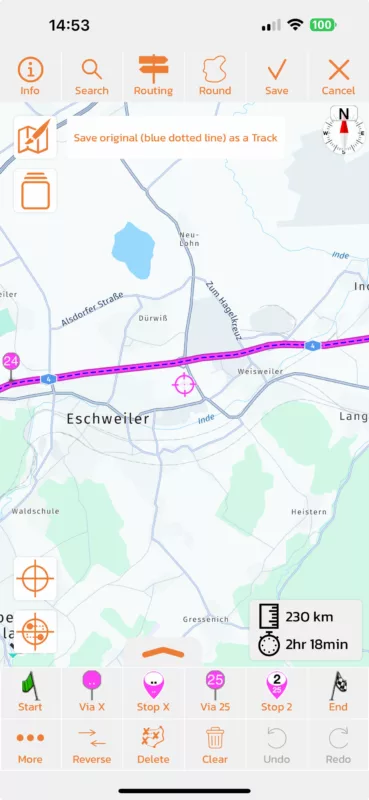
The first route is a very simple example, as this is leading from my hometown 200km via the highway (Autobahn) to an intermediate stop. At a first glance everything seems ok, but then I notice some strange points, where the route is leaving the highway, and with a little roundabout returning back to the highway. This happens several times on this route. The route has in total 19 via Points, almost all on the highway, the routing mode is fast. Why does scenic leave the highway and return back, that makes absolutely no sense. See the screenshots, close to Eschweiler, there is such a case. There is no via point around which could force the generation to leave the highway.
This case is very simple to clear, as I have only to delete the unnecessary via points from scenic and the result will be as expected, but then I have to import the next 10 routes and every route is going 200km on small streets and shortcuts. To check these will be a hard work.
Is this an issue of scenic or of the export data of kurviger.
Thanks Frank
Hello Guido,
I know about the traps importing routes from kurviger and I understand the most cases and how to avoid them. But todayI am faced with a case, which I do not understand and therefore I need your opinion and advice.
I have planned a twelve-day trip through south england and want to transfer the routes from kurviger to scenic using the magic "transfer to scenic" button 😀
The first route is a very simple example, as this is leading from my hometown 200km via the highway (Autobahn) to an intermediate stop. At a first glance everything seems ok, but then I notice some strange points, where the route is leaving the highway, and with a little roundabout returning back to the highway. This happens several times on this route. The route has in total 19 via Points, almost all on the highway, the routing mode is fast. Why does scenic leave the highway and return back, that makes absolutely no sense. See the screenshots, close to Eschweiler, there is such a case. There is no via point around which could force the generation to leave the highway.
This case is very simple to clear, as I have only to delete the unnecessary via points from scenic and the result will be as expected, but then I have to import the next 10 routes and every route is going 200km on small streets and shortcuts. To check these will be a hard work.
Is this an issue of scenic or of the export data of kurviger.
Thanks Frank

Quote from Guido on 15.04.2024, 11:31Hi Frank,
I see that even the blue dotted line is showing this. This means something is going wrong in the communication between Kurviger and Scenic. Perhaps Kurviger added some new routing options that I'm not aware of. Would you mind sending the link to your Kurviger route? (That opens your route on Kurviger.de). Then I can have a detailed look and try to reproduce it. If you prefer not to post it here, you can send it to me via the email button at the bottom of https://scenic.app/help.
Best regards,
Guido
Hi Frank,
I see that even the blue dotted line is showing this. This means something is going wrong in the communication between Kurviger and Scenic. Perhaps Kurviger added some new routing options that I'm not aware of. Would you mind sending the link to your Kurviger route? (That opens your route on Kurviger.de). Then I can have a detailed look and try to reproduce it. If you prefer not to post it here, you can send it to me via the email button at the bottom of https://scenic.app/help.
Best regards,
Guido
Quote from Guido on 15.04.2024, 14:55Thanks for the link you sent me Frank.
I found the issue. It's related to using the "Fastest" routing mode in Kurviger.
I’m unsure if Kurviger changed something or if this bug has always been there.In any case, I was able to fix it (see screenshot). The fix will be in the next update, v3.59 (probably next week somewhere).
Thanks for the link you sent me Frank.
I found the issue. It's related to using the "Fastest" routing mode in Kurviger.
I’m unsure if Kurviger changed something or if this bug has always been there.
In any case, I was able to fix it (see screenshot). The fix will be in the next update, v3.59 (probably next week somewhere).
Quote from GruenesZimmerhuhn on 16.04.2024, 00:37Hey Guido, sounds perfect. So I can go on with the next routes, as there Of course I have used the curvy mode 😁.
I did not find a hint of the actual version in scenic. I never thought about it, does the iphone makes all updates automatically? How do I know when the update is activ?
Greetings Frank
Hey Guido, sounds perfect. So I can go on with the next routes, as there Of course I have used the curvy mode 😁.
I did not find a hint of the actual version in scenic. I never thought about it, does the iphone makes all updates automatically? How do I know when the update is activ?
Greetings Frank
Quote from GruenesZimmerhuhn on 16.04.2024, 00:47Short hint, it happens also with the „fast and curvy“ mode from curviger.
Greetings Frank
Short hint, it happens also with the „fast and curvy“ mode from curviger.
Greetings Frank
Quote from Guido on 16.04.2024, 05:46Maybe I was mistaken by saying only Fastest was impacted. In any case my fix should work for all routing modes. Just to be sure I’ll check with Kurviger what they changed.
Current Scenic version is 3.58 You can see version number at the bottom of Settings. If you have “automatic updates” turned on (iOS Settings > App Store) your apps incl Scenic will update automatically.
You can also manually check if an update is available: https://apps.apple.com/app/id1089668246
I’m expecting to release 3.59 (with this fix) to be released somewhere next week.
Maybe I was mistaken by saying only Fastest was impacted. In any case my fix should work for all routing modes. Just to be sure I’ll check with Kurviger what they changed.
Current Scenic version is 3.58 You can see version number at the bottom of Settings. If you have “automatic updates” turned on (iOS Settings > App Store) your apps incl Scenic will update automatically.
You can also manually check if an update is available: https://apps.apple.com/app/id1089668246
I’m expecting to release 3.59 (with this fix) to be released somewhere next week.


