An Extended Review of Scenic

Quote from Marts on 06.09.2024, 18:43Since installing the Chigee AIO-5 carplay unit and trialling different nav apps, I settled on Scenic.
This past week I did a 7 day, 4,000 km (about 2,485 miles for those who still measure things in cubits) around southern Australia. Weeks prior to the ride I had planned many of the expected routes and saved them to the app. Most of them were done in the desktop (Mac Mini) which then syncs with the Apple iPhone version.
Of course, no matter how much planning you do, invariably something crops up and your expected routes are no longer relevant such as on Day One of the trip. Bad weather forced me to take a different route but Scenic quickly adapted to it.
Pretty much the same thing happened for the rest of the trip, so in the end all I did was to enter in the final destination for each leg of the trip and let the app recalculate the route as we went along.
Once or twice it got itself confused with where it wanted to take me, insisting that I do a U-turn and head back to a road that I wasn't going down, but it did sort itself out in the end.
What I love about the app is that it records your ride if you have an active route or destination or if you just tap on "Start Riding". I did the "start riding" option on one day when we did a lap of the region where we were staying. Got stats for the ride, total distance, ride time, overall time, max speed, average speed and even altitude changes.
The saved ride info is detailed when looked at more closely. Attached image is an overall view of one of the rides. In this case it was from the "start riding" one.
For those interested we were at a place in South Australia called Peterborough which is close to the Spencer Gulf. It is starting to get into "outback" country, flat, straight roads and quite frankly, mostly boring. There were about 40 of us, all riding Suzuki V-Stroms from early 650s to current 1050 models.
Socially, it was a great weekend.
Only letdown was on my way home. I stopped in a town (still 8hrs from home) where friends live. Scenic couldn't locate their address. That is, I had it entered but it kept taking me around in circles. So I fired up Google Maps. It did it a bit differently but still couldn't point me to their house. I rode past it twice not knowing. Third time my friend was out the front and waved me down.
What I'd love to see as features on the app are:
- Traffic alerts
- Speed camera locations
Overall, a complete and extremely useful package.
Since installing the Chigee AIO-5 carplay unit and trialling different nav apps, I settled on Scenic.
This past week I did a 7 day, 4,000 km (about 2,485 miles for those who still measure things in cubits) around southern Australia. Weeks prior to the ride I had planned many of the expected routes and saved them to the app. Most of them were done in the desktop (Mac Mini) which then syncs with the Apple iPhone version.
Of course, no matter how much planning you do, invariably something crops up and your expected routes are no longer relevant such as on Day One of the trip. Bad weather forced me to take a different route but Scenic quickly adapted to it.
Pretty much the same thing happened for the rest of the trip, so in the end all I did was to enter in the final destination for each leg of the trip and let the app recalculate the route as we went along.
Once or twice it got itself confused with where it wanted to take me, insisting that I do a U-turn and head back to a road that I wasn't going down, but it did sort itself out in the end.
What I love about the app is that it records your ride if you have an active route or destination or if you just tap on "Start Riding". I did the "start riding" option on one day when we did a lap of the region where we were staying. Got stats for the ride, total distance, ride time, overall time, max speed, average speed and even altitude changes.
The saved ride info is detailed when looked at more closely. Attached image is an overall view of one of the rides. In this case it was from the "start riding" one.
For those interested we were at a place in South Australia called Peterborough which is close to the Spencer Gulf. It is starting to get into "outback" country, flat, straight roads and quite frankly, mostly boring. There were about 40 of us, all riding Suzuki V-Stroms from early 650s to current 1050 models.
Socially, it was a great weekend.
Only letdown was on my way home. I stopped in a town (still 8hrs from home) where friends live. Scenic couldn't locate their address. That is, I had it entered but it kept taking me around in circles. So I fired up Google Maps. It did it a bit differently but still couldn't point me to their house. I rode past it twice not knowing. Third time my friend was out the front and waved me down.
What I'd love to see as features on the app are:
- Traffic alerts
- Speed camera locations
Overall, a complete and extremely useful package.


Quote from Guido on 07.09.2024, 07:54Hi Martz,
Thanks for this extensive review. I appreciate you taking the time for that.
To address your last points:
Not able to find the address:... it seems this is a map data issue... in other words, where Scenic (but also Google Maps if I understand correctly?) can't find the correct way to get to this specific address
Traffic Alerts:...indeed there are no traffic alerts, nor does Scenic take traffic into account in the route calculation. You can make traffic visible on the map through the "layers" button (3rd button top left in main screen).
Speed Cameras:...Scenic has speed cameras integrated and also a warning system for it. To enable it, go to Settings > Navigation and Tracking > Speed Camera Warnings. I don't know how good the speed cam data is in Australia, though.Best regards,
Guido
Hi Martz,
Thanks for this extensive review. I appreciate you taking the time for that.
To address your last points:
Not able to find the address:... it seems this is a map data issue... in other words, where Scenic (but also Google Maps if I understand correctly?) can't find the correct way to get to this specific address
Traffic Alerts:...indeed there are no traffic alerts, nor does Scenic take traffic into account in the route calculation. You can make traffic visible on the map through the "layers" button (3rd button top left in main screen).
Speed Cameras:...Scenic has speed cameras integrated and also a warning system for it. To enable it, go to Settings > Navigation and Tracking > Speed Camera Warnings. I don't know how good the speed cam data is in Australia, though.
Best regards,
Guido
Quote from Marts on 07.09.2024, 19:40Quote from Guido on 07.09.2024, 07:54Hi Martz,
Thanks for this extensive review. I appreciate you taking the time for that.
To address your last points:
Not able to find the address:... it seems this is a map data issue... in other words, where Scenic (but also Google Maps if I understand correctly?) can't find the correct way to get to this specific address
Traffic Alerts:...indeed there are no traffic alerts, nor does Scenic take traffic into account in the route calculation. You can make traffic visible on the map through the "layers" button (3rd button top left in main screen).
Speed Cameras:...Scenic has speed cameras integrated and also a warning system for it. To enable it, go to Settings > Navigation and Tracking > Speed Camera Warnings. I don't know how good the speed cam data is in Australia, though.
Yes, that's correct. Both Scenic and Google had me going around the block and recalculating the route. So, yeah, something with the friends' address.
Mobile Speed cameras can be set up anywhere here. Waze is one app that shows them but relies on user input in real time. fixed cameras should be on some sort of database somewhere. I've never used this service but on the trip home where I was going I saw a few camera cars and was told of at least one red light camera by my friends. We also have what they call "point-to-point" cameras where they'll snap you at point A, snap again at point B and if your average speed exceeds the limit then you get a fine. I saw overhead cameras on one road but I didn't know if they were for traffic monitoring or for speed detection. Maybe both.
As for traffic alerts as I was travelling through Melbourne during what we call peak hour (no way of avoiding it), I was relying on local radio and their traffic alert bulletins. I think that Google does have something like this but for me, I rarely travel through the big cities and on the bike I avoid them like the plague. Would've been handy though if there were any issues.
As an aside, shortly after I passed through one of the tunnels an incident occured which held up traffic for over an hour. I was lucky there.
Anyway, as we all are, I look forward to the big update.
Quote from Guido on 07.09.2024, 07:54Hi Martz,
Thanks for this extensive review. I appreciate you taking the time for that.
To address your last points:
Not able to find the address:... it seems this is a map data issue... in other words, where Scenic (but also Google Maps if I understand correctly?) can't find the correct way to get to this specific address
Traffic Alerts:...indeed there are no traffic alerts, nor does Scenic take traffic into account in the route calculation. You can make traffic visible on the map through the "layers" button (3rd button top left in main screen).
Speed Cameras:...Scenic has speed cameras integrated and also a warning system for it. To enable it, go to Settings > Navigation and Tracking > Speed Camera Warnings. I don't know how good the speed cam data is in Australia, though.
Yes, that's correct. Both Scenic and Google had me going around the block and recalculating the route. So, yeah, something with the friends' address.
Mobile Speed cameras can be set up anywhere here. Waze is one app that shows them but relies on user input in real time. fixed cameras should be on some sort of database somewhere. I've never used this service but on the trip home where I was going I saw a few camera cars and was told of at least one red light camera by my friends. We also have what they call "point-to-point" cameras where they'll snap you at point A, snap again at point B and if your average speed exceeds the limit then you get a fine. I saw overhead cameras on one road but I didn't know if they were for traffic monitoring or for speed detection. Maybe both.
As for traffic alerts as I was travelling through Melbourne during what we call peak hour (no way of avoiding it), I was relying on local radio and their traffic alert bulletins. I think that Google does have something like this but for me, I rarely travel through the big cities and on the bike I avoid them like the plague. Would've been handy though if there were any issues.
As an aside, shortly after I passed through one of the tunnels an incident occured which held up traffic for over an hour. I was lucky there.
Anyway, as we all are, I look forward to the big update.
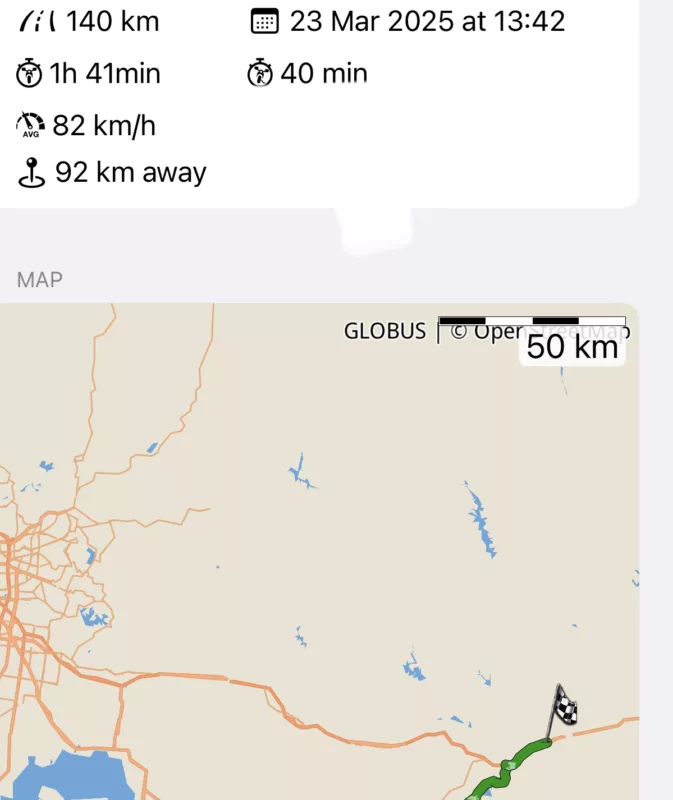
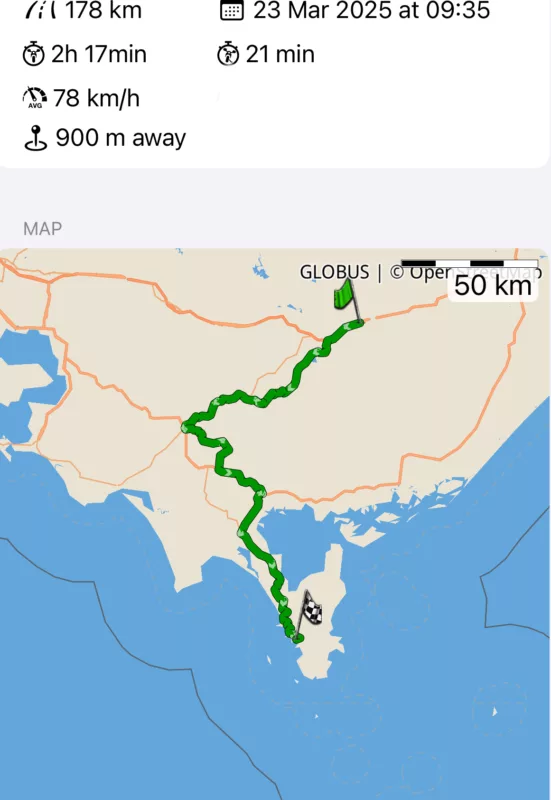
Quote from Marts on 23.03.2025, 15:34Yesterday I went on a ride. Total distance of only 330 km.
I live in Victoria, a southern state of Australia.
I planned the ride with 2 via points starting from home. I used the desktop version of Scenic on the Mac to do the planning.
When I set off I forgot to start the guidance. I did, however, commence it at our meet-up point.
Of course, no ride EVER goes to plan, does it? So, I think that after about 5 km it all went out the window. But Scenic recalculated the route and was pretty much on track after that.
The ride home was a simple matter of tapping on the "Home" icon in the "where to" page and it did the rest. Any deviation from Scenic's calculated route was quickly re-calced.
I use Scenic on an iPhone 14 Pro Max. It has a wireless connection to a CarPlay unit - the Chigee AIO-5 Lite.
One of the more recent updates is the Arrived at Destination" alert and the option on the screen to either continue or to finish the ride. Tap on "Finish" and you get asked to save the route, which I did.
I like the stats that it generated, too.
Next time I do this ride I can simply load it and off I go and I'll go the same way each time if I so desire.
Yesterday I went on a ride. Total distance of only 330 km.
I live in Victoria, a southern state of Australia.
I planned the ride with 2 via points starting from home. I used the desktop version of Scenic on the Mac to do the planning.
When I set off I forgot to start the guidance. I did, however, commence it at our meet-up point.
Of course, no ride EVER goes to plan, does it? So, I think that after about 5 km it all went out the window. But Scenic recalculated the route and was pretty much on track after that.
The ride home was a simple matter of tapping on the "Home" icon in the "where to" page and it did the rest. Any deviation from Scenic's calculated route was quickly re-calced.
I use Scenic on an iPhone 14 Pro Max. It has a wireless connection to a CarPlay unit - the Chigee AIO-5 Lite.
One of the more recent updates is the Arrived at Destination" alert and the option on the screen to either continue or to finish the ride. Tap on "Finish" and you get asked to save the route, which I did.
I like the stats that it generated, too.
Next time I do this ride I can simply load it and off I go and I'll go the same way each time if I so desire.