
Allow users to define a new default rides folder

Quote from CMagnuson on 06.02.2022, 17:21Opening the Recorded Rides screen in the Scenic app reveals that there is a single folder titled 'Favorites'. All new rides recorded with the Scenic app are automatically placed into the Favorites folder when they are saved. I can create new folders to move rides into, but I cannot delete the Favorites folder nor find a setting which allows me to define a different folder as the default folder for new rides.
While riding a motorcycle is fantastic and I sure enjoy many of my rides, most of them are not favorites. It doesn't make sense to place every new ride into the Favorites folder. I would really appreciate a change to the Scenic app which allowed users to define a new default folder where saved rides appear. It would also be nice if we could delete or modify the Favorites folder.
Opening the Recorded Rides screen in the Scenic app reveals that there is a single folder titled 'Favorites'. All new rides recorded with the Scenic app are automatically placed into the Favorites folder when they are saved. I can create new folders to move rides into, but I cannot delete the Favorites folder nor find a setting which allows me to define a different folder as the default folder for new rides.
While riding a motorcycle is fantastic and I sure enjoy many of my rides, most of them are not favorites. It doesn't make sense to place every new ride into the Favorites folder. I would really appreciate a change to the Scenic app which allowed users to define a new default folder where saved rides appear. It would also be nice if we could delete or modify the Favorites folder.

Quote from Guido on 07.02.2022, 14:21Per default the last folder that you saved a ride to is selected.
Per default the last folder that you saved a ride to is selected.
Quote from CMagnuson on 08.02.2022, 20:30Thanks for the tip, Guido! It sure would have taken me a while to figure that out on my own.
I wonder if a tip could be provided the first time a user saves a ride or visits the Recorded Rides screen which mentions where rides are saved by default and how that default can be changed. I appreciate how new saved rides will conveniently default to the last saved folder, but wish I could have figured that out sooner.
Thanks for the tip, Guido! It sure would have taken me a while to figure that out on my own.
I wonder if a tip could be provided the first time a user saves a ride or visits the Recorded Rides screen which mentions where rides are saved by default and how that default can be changed. I appreciate how new saved rides will conveniently default to the last saved folder, but wish I could have figured that out sooner.
Quote from Guido on 08.02.2022, 20:51I understand your point, but I believe a tip is not really necessary to be honest.
My thinking behind this is that most of the time one would want to save the ride to the same folder as the previous ride. I know this is not always true, but what I see in the database is that typically/mostly, users create ride folders for a certain (often multi-day) trip (E.g. Summer 2017 tSwiss Alps) and that the rides on such trips are typically consecutive (I.e. not interrupted by other rides not belonging to that trip).
does that make sense?
I understand your point, but I believe a tip is not really necessary to be honest.
My thinking behind this is that most of the time one would want to save the ride to the same folder as the previous ride. I know this is not always true, but what I see in the database is that typically/mostly, users create ride folders for a certain (often multi-day) trip (E.g. Summer 2017 tSwiss Alps) and that the rides on such trips are typically consecutive (I.e. not interrupted by other rides not belonging to that trip).
does that make sense?
Quote from CMagnuson on 30.07.2022, 22:49Hello Guido,
I am having difficulty figuring how to select which folder my rides are being saved to. When I end a ride and the Save prompt appears, there doesn’t appear to be a folder option.
Can you help me understand how to save a ride to a folder other than my Favorites folder?
Hello Guido,
I am having difficulty figuring how to select which folder my rides are being saved to. When I end a ride and the Save prompt appears, there doesn’t appear to be a folder option. 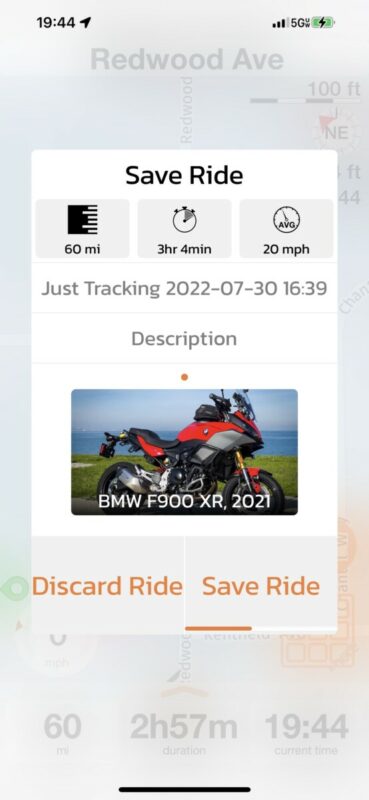
Can you help me understand how to save a ride to a folder other than my Favorites folder?
Quote from Guido on 31.07.2022, 16:50I could have sworn I implemented to choose the folder in this save dialog 🤔 I’ll have another look at this. Meanwhile you can change the folder afterward by selecting the ride from your ride list and then tapping the folder button.
I could have sworn I implemented to choose the folder in this save dialog 🤔 I’ll have another look at this. Meanwhile you can change the folder afterward by selecting the ride from your ride list and then tapping the folder button.
Quote from CMagnuson on 20.10.2024, 18:25Unfortunately, the feedback provided in this thread remains unaddressed in Scenic version 4.
Problems:
All rides in Scenic are saved into a default folder. This default folder cannot be changed. The folder is titled "Rides" when saving a recorded ride, but when viewing the My Recorded Rides screen the folder is not titled "Rides". Instead the folder is titled "Favorites". It is confusing to see the folder titled "Rides" in one location and "Favorites" in another location. It is frustrating to be unable to rename the folder from Favorites to anything else. It is frustrating that I cannot delete the Favorites folder.Expected Behavior:
It should be possible to save a ride to the My Recorded Rides screen without having to put the ride in a folder. Essentially, the "Favorites" folder should be an invisible folder titled "My Recorded Rides" where all rides are saved by default. If the rider wants to create folders to categorize their saved rides, they should have that option like they do today, but they should not be forced to put the ride in a folder. Additionally, riders should be able to navigate to Scenic's settings and change the default location where new rides are saved.It would sure be nice to see these trouble addressed in Scenic version 5.
Unfortunately, the feedback provided in this thread remains unaddressed in Scenic version 4.
Problems:
All rides in Scenic are saved into a default folder. This default folder cannot be changed. The folder is titled "Rides" when saving a recorded ride, but when viewing the My Recorded Rides screen the folder is not titled "Rides". Instead the folder is titled "Favorites". It is confusing to see the folder titled "Rides" in one location and "Favorites" in another location. It is frustrating to be unable to rename the folder from Favorites to anything else. It is frustrating that I cannot delete the Favorites folder.
Expected Behavior:
It should be possible to save a ride to the My Recorded Rides screen without having to put the ride in a folder. Essentially, the "Favorites" folder should be an invisible folder titled "My Recorded Rides" where all rides are saved by default. If the rider wants to create folders to categorize their saved rides, they should have that option like they do today, but they should not be forced to put the ride in a folder. Additionally, riders should be able to navigate to Scenic's settings and change the default location where new rides are saved.
It would sure be nice to see these trouble addressed in Scenic version 5.
Quote from Guido on 20.10.2024, 18:31My Recorded Rides screen the folder is not titled "Rides". Instead the folder is titled "Favorites". It is confusing to see the folder titled "Rides" in one location and "Favorites" in another location.
Agree. I'll fix that for the next update.
At the moment, the default folder that the ride is saved in, is the folder that your last ride was saved to. At least, that's how it should work.
My Recorded Rides screen the folder is not titled "Rides". Instead the folder is titled "Favorites". It is confusing to see the folder titled "Rides" in one location and "Favorites" in another location.
Agree. I'll fix that for the next update.
At the moment, the default folder that the ride is saved in, is the folder that your last ride was saved to. At least, that's how it should work.


