
Add a new POI

Quote from SuperGraupe on 01.06.2024, 03:40Short introduction to my problem.
We are going to ride some off- and onroad tracks in Italy.
Onroad I use Scenic.
Offroad Locus Classic (It's a special navigation app for hiking and biking)To go to the offroad tracks I want to set a POI at the start of the tracks.
So I could easily navigate to the next track.
But I have somme issues.First try:
On the main map I make the tracks visible to find them.
I search the start and tried to pick the coordinates of the start point.
Then I go to add POI and paste the coodinates.
The result it not what I expected.
Second try:
I go to add POI directly.
Choose map.In this map view there are no tracks, POI's like in the main map visible.
So it is impossible to find the start of the track.
To test I choose a random POI.
The position was exactly were I want.Is it possible to show all selected items as on the main map.
Or is there a different way to solve my issue.Greetings,
Michael
Short introduction to my problem.
We are going to ride some off- and onroad tracks in Italy.
Onroad I use Scenic.
Offroad Locus Classic (It's a special navigation app for hiking and biking)
To go to the offroad tracks I want to set a POI at the start of the tracks.
So I could easily navigate to the next track.
But I have somme issues.
First try:
On the main map I make the tracks visible to find them.
I search the start and tried to pick the coordinates of the start point.
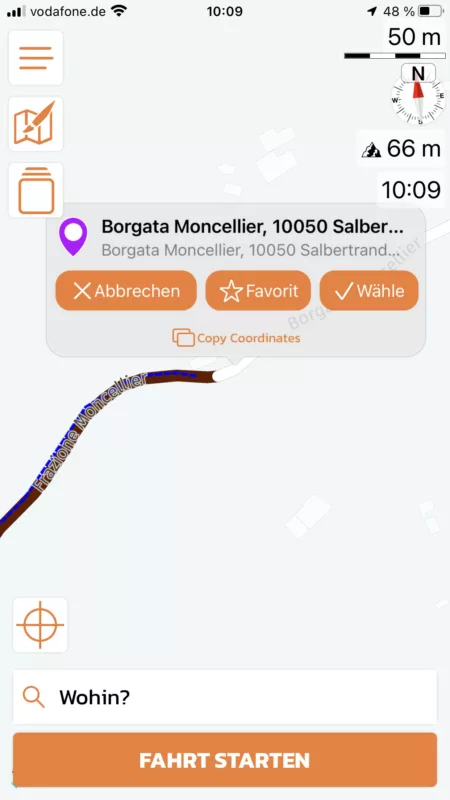
Then I go to add POI and paste the coodinates.
The result it not what I expected.
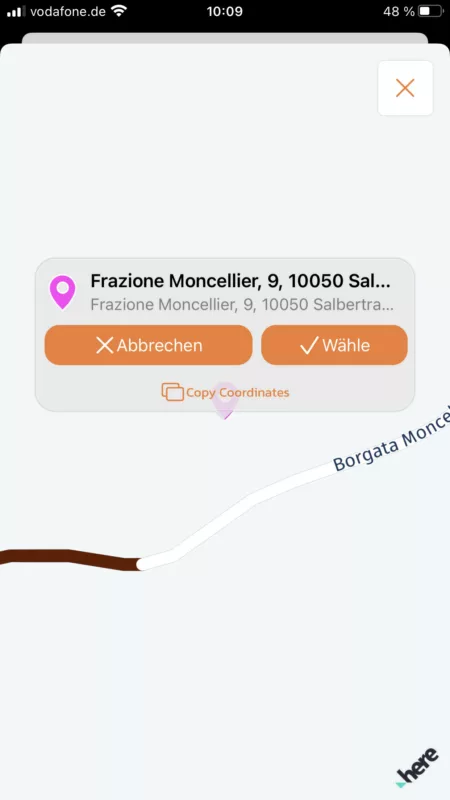
Second try:
I go to add POI directly.
Choose map.
In this map view there are no tracks, POI's like in the main map visible.
So it is impossible to find the start of the track.
To test I choose a random POI.
The position was exactly were I want.
Is it possible to show all selected items as on the main map.
Or is there a different way to solve my issue.
Greetings,
Michael
Quote from SuperGraupe on 01.06.2024, 06:11Found a workaround that works for me.
I used POI Groups:
New textfile with all startingpoints of my tracks (Name, LAT, LON)
New POI Group.
Copy and paste the content of the textfile.Advantage:
Could choose different colors and icons.
Makes it easier to find them on the map.Disadvantage:
Could not navigate directly (not possible for members of a POI group).
Have to choose it over the map.Example:
yellow: Startpoint of the track
red: offroad pass
blue: onroad passThis is the famous Col et Tunnel de Parpaillon
Greetings,
Michael
Found a workaround that works for me.
I used POI Groups:
New textfile with all startingpoints of my tracks (Name, LAT, LON)
New POI Group.
Copy and paste the content of the textfile.
Advantage:
Could choose different colors and icons.
Makes it easier to find them on the map.
Disadvantage:
Could not navigate directly (not possible for members of a POI group).
Have to choose it over the map.
Example:
yellow: Startpoint of the track
red: offroad pass
blue: onroad pass
This is the famous Col et Tunnel de Parpaillon
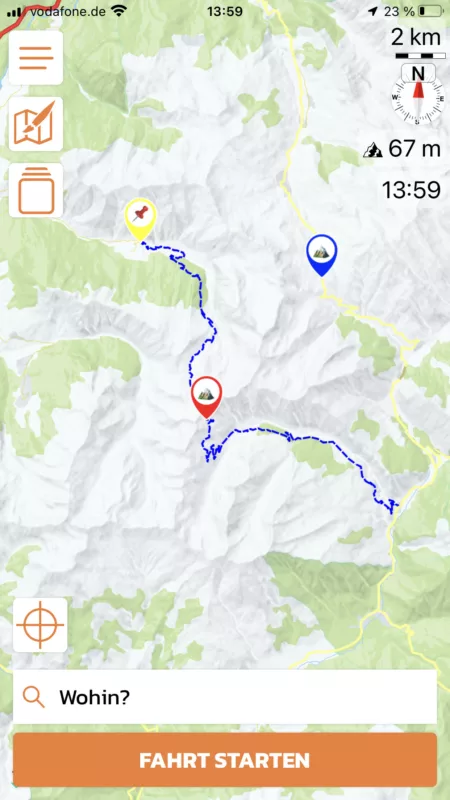
Greetings,
Michael

Quote from Guido on 01.06.2024, 09:20Hi Michael,
When you paste coordinates, Scenic first tries to find an address or place for those coordinates. The actual coordinates of that place or address might be a bit different then what you entered. That's why you are seeing the difference in location.
In this map view there are no tracks, POI's like in the main map visible.
I think this is a bug. I will check this for the next update. Sorry for the inconvenience.
Best regards,
Guido
Hi Michael,
When you paste coordinates, Scenic first tries to find an address or place for those coordinates. The actual coordinates of that place or address might be a bit different then what you entered. That's why you are seeing the difference in location.
In this map view there are no tracks, POI's like in the main map visible.
I think this is a bug. I will check this for the next update. Sorry for the inconvenience.
Best regards,
Guido
Quote from SuperGraupe on 01.06.2024, 13:42Hi Guido,
thanks for your quick response.
Love Scenic. It‘s the best App for street Navigation I know.
Greetings,
Michael
Hi Guido,
thanks for your quick response.
Love Scenic. It‘s the best App for street Navigation I know.
Greetings,
Michael


