
4.13 CarPlay Still Broken

Quote from blackhawk1618 on 19.02.2025, 15:53Hello Guido,
I recently the latest Scenic 4.13 version, but unfortunately, CarPlay is still not functioning as expected.
While using CarPlay for navigation, the screen only displays the pink navigation line without any direction details or road names. However, when I switch back to my iPhone, all the necessary details such as turn-by-turn directions and road names (still not in English) are displayed correctly.
You may please refer to the below screenshots.
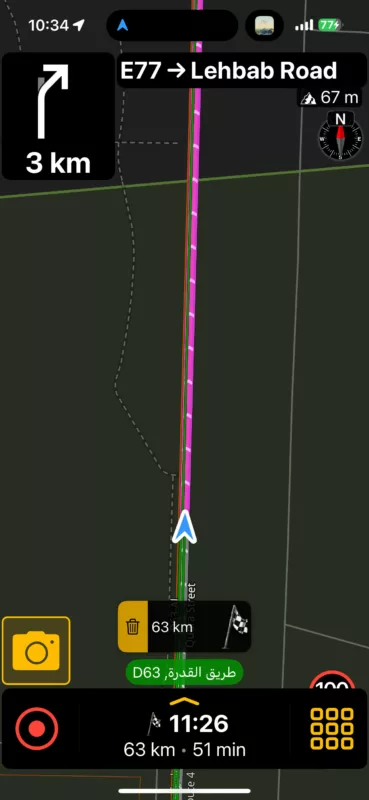
Hello Guido,
I recently the latest Scenic 4.13 version, but unfortunately, CarPlay is still not functioning as expected.
While using CarPlay for navigation, the screen only displays the pink navigation line without any direction details or road names. However, when I switch back to my iPhone, all the necessary details such as turn-by-turn directions and road names (still not in English) are displayed correctly.
You may please refer to the below screenshots.
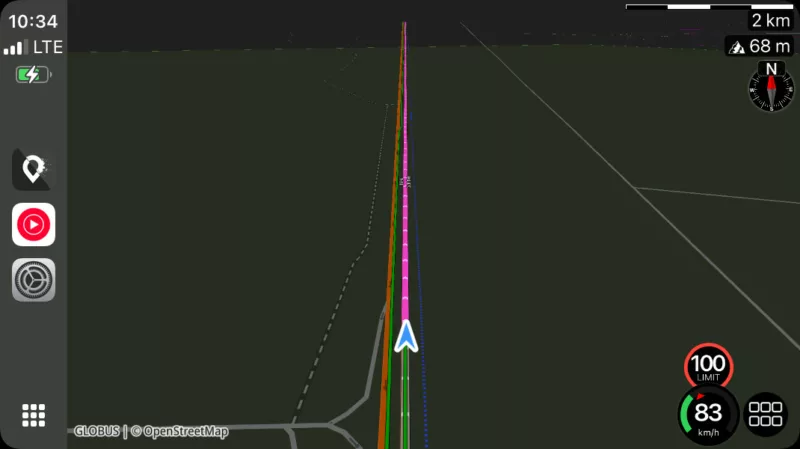

Quote from Guido on 19.02.2025, 17:17I’ve seen this before, but only after a longer break. Thought I had that fixed too, but obviously there is still something missing.
could you tell me:
- Where do you start the navigation? On the phone and then connect to CarPlay, or first connect to CarPlay, and start navigation there?
- Did the navigation instruction show at first and disappear after? If so, do you remember what you did before it disappeared? (E.g. disconnect from CarPlay, switch to another app on CarPlay, switch to splitscreen in CarPlay, etc.)
Sorry for the follow up questions. Trying to get to the bottom of this.
I’ve seen this before, but only after a longer break. Thought I had that fixed too, but obviously there is still something missing.
could you tell me:
- Where do you start the navigation? On the phone and then connect to CarPlay, or first connect to CarPlay, and start navigation there?
- Did the navigation instruction show at first and disappear after? If so, do you remember what you did before it disappeared? (E.g. disconnect from CarPlay, switch to another app on CarPlay, switch to splitscreen in CarPlay, etc.)
Sorry for the follow up questions. Trying to get to the bottom of this.
Quote from blackhawk1618 on 20.02.2025, 00:37Quote from Guido on 19.02.2025, 17:17I’ve seen this before, but only after a longer break. Thought I had that fixed too, but obviously there is still something missing.
could you tell me:
- Where do you start the navigation? On the phone and then connect to CarPlay, or first connect to CarPlay, and start navigation there?
- Did the navigation instruction show at first and disappear after? If so, do you remember what you did before it disappeared? (E.g. disconnect from CarPlay, switch to another app on CarPlay, switch to splitscreen in CarPlay, etc.)
Sorry for the follow up questions. Trying to get to the bottom of this.
I started navigation from point A to point B, and everything worked fine. From point B to point C, I continued recording my ride without navigation. However, when I started navigation again from point C to point D, the information no longer appeared on CarPlay. However, when I switched to my iPhone, it displayed correctly.
From point C to point D, the navigation information disappeared right from the start. I first started the navigation on my iPhone and then connected it to CarPlay.
I hope this information helps.
P.S: Also if you noticed, when I switched from CarPlay to iPhone the Speedometer still gets behind the menu.
Quote from Guido on 19.02.2025, 17:17I’ve seen this before, but only after a longer break. Thought I had that fixed too, but obviously there is still something missing.
could you tell me:
- Where do you start the navigation? On the phone and then connect to CarPlay, or first connect to CarPlay, and start navigation there?
- Did the navigation instruction show at first and disappear after? If so, do you remember what you did before it disappeared? (E.g. disconnect from CarPlay, switch to another app on CarPlay, switch to splitscreen in CarPlay, etc.)
Sorry for the follow up questions. Trying to get to the bottom of this.
I started navigation from point A to point B, and everything worked fine. From point B to point C, I continued recording my ride without navigation. However, when I started navigation again from point C to point D, the information no longer appeared on CarPlay. However, when I switched to my iPhone, it displayed correctly.
From point C to point D, the navigation information disappeared right from the start. I first started the navigation on my iPhone and then connected it to CarPlay.
I hope this information helps.
P.S: Also if you noticed, when I switched from CarPlay to iPhone the Speedometer still gets behind the menu.
Quote from Guido on 20.02.2025, 06:12Was this in one session (one recorded ride)? Or did you start a new navigation every time?
If new session, did you do anything differently when starting the navigation from A to B (where you did get instructions), compared to starting from C to D?
Was this in one session (one recorded ride)? Or did you start a new navigation every time?
If new session, did you do anything differently when starting the navigation from A to B (where you did get instructions), compared to starting from C to D?
Quote from blackhawk1618 on 20.02.2025, 06:45It is in one session (one recorded ride).
It is in one session (one recorded ride).
Quote from Guido on 20.02.2025, 08:04I actually just tried exactly what you did (I think) on my way bringing the kids to school and didn’t have this problem.
These (not consistently reproducible bugs) are the most difficult to solve.
So, in an effort to try and reproduce a few more questions:
- Is your connection with CarPlay wired or wireless?
- Did you switch to another app on CarPlay at any time?
- Did you disconnect from CarPlay at any time? (switching off your vehicle / cutting power to your the CarPlay system would also be a disconnect)
Thanks and sorry for all the questions.
I actually just tried exactly what you did (I think) on my way bringing the kids to school and didn’t have this problem.
These (not consistently reproducible bugs) are the most difficult to solve.
So, in an effort to try and reproduce a few more questions:
- Is your connection with CarPlay wired or wireless?
- Did you switch to another app on CarPlay at any time?
- Did you disconnect from CarPlay at any time? (switching off your vehicle / cutting power to your the CarPlay system would also be a disconnect)
Thanks and sorry for all the questions.
Quote from blackhawk1618 on 20.02.2025, 10:40Quote from Guido on 20.02.2025, 08:04I actually just tried exactly what you did (I think) on my way bringing the kids to school and didn’t have this problem.
These (not consistently reproducible bugs) are the most difficult to solve.
So, in an effort to try and reproduce a few more questions:
- Is your connection with CarPlay wired or wireless?
- Did you switch to another app on CarPlay at any time?
- Did you disconnect from CarPlay at any time? (switching off your vehicle / cutting power to your the CarPlay system would also be a disconnect)
Thanks and sorry for all the questions.
- My CarPlay is wirelessly connected to Carpuride unit for BMW
- Yes, I switched to other apps like Apple Music, Waze on CarPlay while using Scenic navigation and recording the ride.
- Yes, throughout the ride, I made multiple stops and disconnected CarPlay several times by turning off my vehicle, all within a single recorded session.
Quote from Guido on 20.02.2025, 08:04I actually just tried exactly what you did (I think) on my way bringing the kids to school and didn’t have this problem.
These (not consistently reproducible bugs) are the most difficult to solve.
So, in an effort to try and reproduce a few more questions:
- Is your connection with CarPlay wired or wireless?
- Did you switch to another app on CarPlay at any time?
- Did you disconnect from CarPlay at any time? (switching off your vehicle / cutting power to your the CarPlay system would also be a disconnect)
Thanks and sorry for all the questions.
- My CarPlay is wirelessly connected to Carpuride unit for BMW
- Yes, I switched to other apps like Apple Music, Waze on CarPlay while using Scenic navigation and recording the ride.
- Yes, throughout the ride, I made multiple stops and disconnected CarPlay several times by turning off my vehicle, all within a single recorded session.

Quote from massi on 20.02.2025, 11:06Hi,
I had this problem always when loading a planned route.
Did not try another routing so far.
Regards
Marc-Antón
Hi,
I had this problem always when loading a planned route.
Did not try another routing so far.
Regards
Marc-Antón
Quote from Guido on 20.02.2025, 11:34OK. Thank you guys... I'll attempt to reproduce the problem with this information, and hopefully can find the cause + fix.
OK. Thank you guys... I'll attempt to reproduce the problem with this information, and hopefully can find the cause + fix.
Quote from Lo100469 on 20.02.2025, 14:41I had the same issue after stopping for fuel. Going to overview then back to guidance fixed it for me, the instructions were back.
I had the same issue after stopping for fuel. Going to overview then back to guidance fixed it for me, the instructions were back.
Quote from smoeke on 23.02.2025, 04:08Had a similar issue yesterday:
I planned and save a route on iPhone. Then, short before the start of the drive, I loaded the route and changed a waypoint. Left all open on iPhone and got into the car with CarPlay.
Not sure if i pressed „Start“ in Carplay, but I think so. The route was shown on the map. From here on I am not sure if the Box for Route guidance was shown or not.
After a short time I started Google Maps in parallel (shame on me, but sometime i do that to see traffic flow.) and did not have a look at Scenic anymore.
I reached the Stopover, ride was automatically paused and resumed after I got back into the car and started driving again.From this point on I definitely had no route guidance box, but routing was still present on map. As I often drive just map based this was no issue for this drive. But at one point I wanted to skip a Waypoint using the menu in CarPlay. This was not possible. Tried it several times, no change in the route on map at all (and there shoukd have been one, as the next Waypoint was making an extra loop).
Then I just left the calculated route and drove on my own. The route did not change at all.
The whole „no route guidance“ and „not possible to skip waypoint“ looked a bit like I had the planning mode while I was actively driving with CarPlay.
Hope this somehow helps to find the issue. 🙂
OffTopic: Looking forward to get the customizable map styles back soon, it is my most wanted feature! 🙂
Do you already have a time plan for the release (not the general February/March announcement)?
Had a similar issue yesterday:
I planned and save a route on iPhone. Then, short before the start of the drive, I loaded the route and changed a waypoint. Left all open on iPhone and got into the car with CarPlay.
Not sure if i pressed „Start“ in Carplay, but I think so. The route was shown on the map. From here on I am not sure if the Box for Route guidance was shown or not.
After a short time I started Google Maps in parallel (shame on me, but sometime i do that to see traffic flow.) and did not have a look at Scenic anymore.
I reached the Stopover, ride was automatically paused and resumed after I got back into the car and started driving again.
From this point on I definitely had no route guidance box, but routing was still present on map. As I often drive just map based this was no issue for this drive. But at one point I wanted to skip a Waypoint using the menu in CarPlay. This was not possible. Tried it several times, no change in the route on map at all (and there shoukd have been one, as the next Waypoint was making an extra loop).
Then I just left the calculated route and drove on my own. The route did not change at all.
The whole „no route guidance“ and „not possible to skip waypoint“ looked a bit like I had the planning mode while I was actively driving with CarPlay.
Hope this somehow helps to find the issue. 🙂
OffTopic: Looking forward to get the customizable map styles back soon, it is my most wanted feature! 🙂
Do you already have a time plan for the release (not the general February/March announcement)?
Quote from Guido on 23.02.2025, 07:52Ok. It’s possible that you didn’t start the route (so essentially still in planning mode). Did you see the route line turn gray behind you as you were moving? If not, than that’s probably what happened.
In any cases there is still something not Ok with this. I’m investigating.
No exact date for the map customizer. I’m halfway with the development.
Ok. It’s possible that you didn’t start the route (so essentially still in planning mode). Did you see the route line turn gray behind you as you were moving? If not, than that’s probably what happened.
In any cases there is still something not Ok with this. I’m investigating.
No exact date for the map customizer. I’m halfway with the development.

Quote from GHJ on 23.02.2025, 09:41Quote from Lo100469 on 20.02.2025, 14:41I had the same issue after stopping for fuel. Going to overview then back to guidance fixed it for me, the instructions were back.
Me too. I started with a route, all working properly on CarPlay. After fuel stop I had no more guidance on the screen. The route and voice instructions were still there. The ride recording was also ok. Call up overview did not work for me to get the instructions back.
Changing the route also did not help.
Quote from Lo100469 on 20.02.2025, 14:41I had the same issue after stopping for fuel. Going to overview then back to guidance fixed it for me, the instructions were back.
Me too. I started with a route, all working properly on CarPlay. After fuel stop I had no more guidance on the screen. The route and voice instructions were still there. The ride recording was also ok. Call up overview did not work for me to get the instructions back.
Changing the route also did not help.
Quote from smoeke on 23.02.2025, 10:15Quote from Guido on 23.02.2025, 07:52Ok. It’s possible that you didn’t start the route (so essentially still in planning mode). Did you see the route line turn gray behind you as you were moving? If not, than that’s probably what happened.
In any cases there is still something not Ok with this. I’m investigating.
No exact date for the map customizer. I’m halfway with the development.
Ok, I also assumed that. The only thing that was irritating to me: The recording of the driven track worked fine and was shown in the map. So I was also not able to see, if the Route was greyed out behind me, as I have activated the driven Track in the map.
I will habe an eye on it next time.
But maybe one thing: It would be nice if it is more obvious in which mode you are (planning or routing), when you already started the drive (and recording a track). Maybe an additional „Start Routing“ Button, if you already started recording or so, so one isnt mixing up modes due to switching between iPhone and Carplay inbetween. 🙂
Quote from Guido on 23.02.2025, 07:52Ok. It’s possible that you didn’t start the route (so essentially still in planning mode). Did you see the route line turn gray behind you as you were moving? If not, than that’s probably what happened.
In any cases there is still something not Ok with this. I’m investigating.
No exact date for the map customizer. I’m halfway with the development.
Ok, I also assumed that. The only thing that was irritating to me: The recording of the driven track worked fine and was shown in the map. So I was also not able to see, if the Route was greyed out behind me, as I have activated the driven Track in the map.
I will habe an eye on it next time.
But maybe one thing: It would be nice if it is more obvious in which mode you are (planning or routing), when you already started the drive (and recording a track). Maybe an additional „Start Routing“ Button, if you already started recording or so, so one isnt mixing up modes due to switching between iPhone and Carplay inbetween. 🙂
Quote from Guido on 23.02.2025, 10:30Ok. Thanks for all the feedback everyone. I think I have enough info to fix this now. Will work on this (again) in the coming week end hopefully have it fixed in the next update.
Ok. Thanks for all the feedback everyone. I think I have enough info to fix this now. Will work on this (again) in the coming week end hopefully have it fixed in the next update.


