
4.13 actual position with delay

Quote from Middelfrangge on 22.02.2025, 11:33Hi,
I do have a delay of my actual position with version 4.13. The voice commands are correct but my position ist still 50m before the corner and when I hace past the corner after 30-50m ist shows that I am turning what I did some seconds before…..strange and irritating.
Regards
Thomas
Hi,
I do have a delay of my actual position with version 4.13. The voice commands are correct but my position ist still 50m before the corner and when I hace past the corner after 30-50m ist shows that I am turning what I did some seconds before…..strange and irritating.
Regards
Thomas

Quote from Guido on 22.02.2025, 11:36Known problem. I am working on it.
Known problem. I am working on it.
Quote from pleasantone on 28.12.2025, 14:47Guido, I’m still seeing this problem, started with Scenic in CarPlay and dropped CarPlay to debug.
the symptom is like Scenic thinks I’m 4-5 minutes/km behind where I actually am. My Zumo is showing the right location. It’s super weird, has happened both in a suburban environment or in the countryside with no AGPS. I don’t think it’s a GPS problem, more like there is a 5 minute delay loop. When I stop for 5m, scenic will slowly catch up. It is NOT directional because I did a U turn and it took a while to figure it out.
iPhone 16 pro, iOS 26 and 26.2
Guido, I’m still seeing this problem, started with Scenic in CarPlay and dropped CarPlay to debug.
the symptom is like Scenic thinks I’m 4-5 minutes/km behind where I actually am. My Zumo is showing the right location. It’s super weird, has happened both in a suburban environment or in the countryside with no AGPS. I don’t think it’s a GPS problem, more like there is a 5 minute delay loop. When I stop for 5m, scenic will slowly catch up. It is NOT directional because I did a U turn and it took a while to figure it out.
iPhone 16 pro, iOS 26 and 26.2
Quote from Guido on 28.12.2025, 15:175 minutes? Or 5 seconds?
If it’s really 5 minutes then there is something seriously wrong and I would expect more feedback if it’s a structural problem
Some things to check below. They are all relate to how much information needs to be drawn on the map.
- Are you using 3D mode or 2D mode? (3D makes a bigger area visible so more things need to be drawn on the map)
- How many POI groups did you enable in your custom map style (if you are using a custom map style)
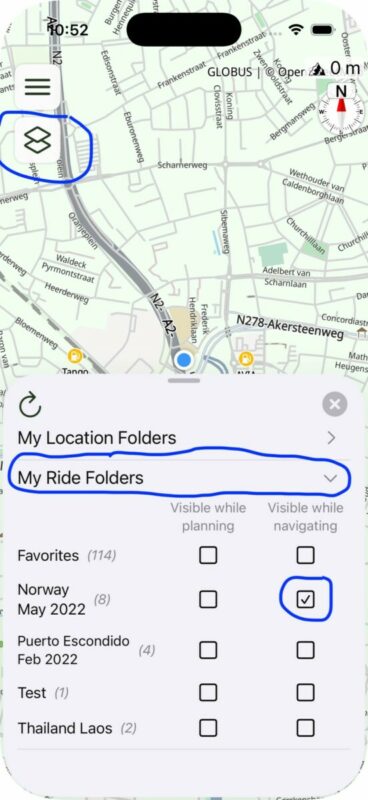
- How many layers did you activate to show on the map during navigation? (2nd button top left > scroll down > expand the My Routes, My Recorded Rides, My POI Groups and My Locations) If you enabled a personal POI group, how many POIs are in that group?
- Do you have offline maps downloaded (if no offline maps then map data needs to be downloaded on the fly which also takes time and processing power)
- What can help sometimes is to force close Scenic and then reopen before setting out on a ride.
Changing / doing these things will all help reduce strain on the CPU and GPU , but it won’t solve minutes of delay. Seconds maybe.
5 minutes? Or 5 seconds?
If it’s really 5 minutes then there is something seriously wrong and I would expect more feedback if it’s a structural problem
Some things to check below. They are all relate to how much information needs to be drawn on the map.
- Are you using 3D mode or 2D mode? (3D makes a bigger area visible so more things need to be drawn on the map)
- How many POI groups did you enable in your custom map style (if you are using a custom map style)
- How many layers did you activate to show on the map during navigation? (2nd button top left > scroll down > expand the My Routes, My Recorded Rides, My POI Groups and My Locations) If you enabled a personal POI group, how many POIs are in that group?
- Do you have offline maps downloaded (if no offline maps then map data needs to be downloaded on the fly which also takes time and processing power)
- What can help sometimes is to force close Scenic and then reopen before setting out on a ride.
Changing / doing these things will all help reduce strain on the CPU and GPU , but it won’t solve minutes of delay. Seconds maybe.
Quote from pleasantone on 28.12.2025, 19:58Nope, minutes or miles/km... if it was just a few seconds I could live with it.
It's insane, I know, as a software engineer, I have no explanation. CarPlay is responsive, it's not a mobile CarPlay issue as far as I can tell, as I went into the iPhone's settings and disabled CarPlay without resetting the routing, and on the iPhone display it was still out of sync. It only happens intermittently, but the first time that it happened, it was not during a complex trip, I was still riding to the starting meeting place. This time it happened about 160km into a trip. We stopped for lunch, and eventually it caught up with the lunch position.
I take it you've never seen this.. As far as data goes:
- I have more than 150 routes/tracks loaded (but obviously only one active).
- Scenic was running in routing mode, with a route that had been imported from BaseCamp Mac.
- I only had 4 locations.
- No POI groups
- 60 recorded rides
- 3D mode
- Offline maps enabled and set for California only, looks like an updated map is available.
I could try uninstalling/installing the app, but wanted to check with you first.
Nope, minutes or miles/km... if it was just a few seconds I could live with it.
It's insane, I know, as a software engineer, I have no explanation. CarPlay is responsive, it's not a mobile CarPlay issue as far as I can tell, as I went into the iPhone's settings and disabled CarPlay without resetting the routing, and on the iPhone display it was still out of sync. It only happens intermittently, but the first time that it happened, it was not during a complex trip, I was still riding to the starting meeting place. This time it happened about 160km into a trip. We stopped for lunch, and eventually it caught up with the lunch position.
I take it you've never seen this.. As far as data goes:
- I have more than 150 routes/tracks loaded (but obviously only one active).
- Scenic was running in routing mode, with a route that had been imported from BaseCamp Mac.
- I only had 4 locations.
- No POI groups
- 60 recorded rides
- 3D mode
- Offline maps enabled and set for California only, looks like an updated map is available.
I could try uninstalling/installing the app, but wanted to check with you first.

Quote from Karlchen on 28.12.2025, 23:23Hallo,
das erinnert mich an Anfang 2025. Mein GPS ist immer nach Links zur Straße gewandert.
Nachdem ich im Radio die GPS-Antenne entfernt habe, war der Fehler weg.
Bitte prüfen Sie mal, ob der Fehler auch da liegt, wenn das iPhone nicht mit dem Radio mit Carplay verbunden ist.
Es reicht nicht, nur Carplay auszuschalten, die Verbindung muss ganz getrennt werden.
Viel Erfolg
Karlchen
Hallo,
das erinnert mich an Anfang 2025. Mein GPS ist immer nach Links zur Straße gewandert.
Nachdem ich im Radio die GPS-Antenne entfernt habe, war der Fehler weg.
Bitte prüfen Sie mal, ob der Fehler auch da liegt, wenn das iPhone nicht mit dem Radio mit Carplay verbunden ist.
Es reicht nicht, nur Carplay auszuschalten, die Verbindung muss ganz getrennt werden.
Viel Erfolg
Karlchen
Quote from Guido on 29.12.2025, 10:54Quote from pleasantone on 28.12.2025, 19:58I take it you've never seen this.. As far as data goes:
- I have more than 150 routes/tracks loaded (but obviously only one active).
- Scenic was running in routing mode, with a route that had been imported from BaseCamp Mac.
- I only had 4 locations.
- No POI groups
- 60 recorded rides
- 3D mode
- Offline maps enabled and set for California only, looks like an updated map is available.
I could try uninstalling/installing the app, but wanted to check with you first.
Indeed I've never seen this before. Users have reported a delay of a second, sometimes a few seconds, but never minutes and kilometers.
You mentioned 60 recorded rides. Have you enabled seeing those rides on the map while navigating (see screenshot)? If so, that could maybe impact performance. Try disabling that and see what happens.
Quote from pleasantone on 28.12.2025, 19:58I take it you've never seen this.. As far as data goes:
- I have more than 150 routes/tracks loaded (but obviously only one active).
- Scenic was running in routing mode, with a route that had been imported from BaseCamp Mac.
- I only had 4 locations.
- No POI groups
- 60 recorded rides
- 3D mode
- Offline maps enabled and set for California only, looks like an updated map is available.
I could try uninstalling/installing the app, but wanted to check with you first.
Indeed I've never seen this before. Users have reported a delay of a second, sometimes a few seconds, but never minutes and kilometers.
You mentioned 60 recorded rides. Have you enabled seeing those rides on the map while navigating (see screenshot)? If so, that could maybe impact performance. Try disabling that and see what happens.
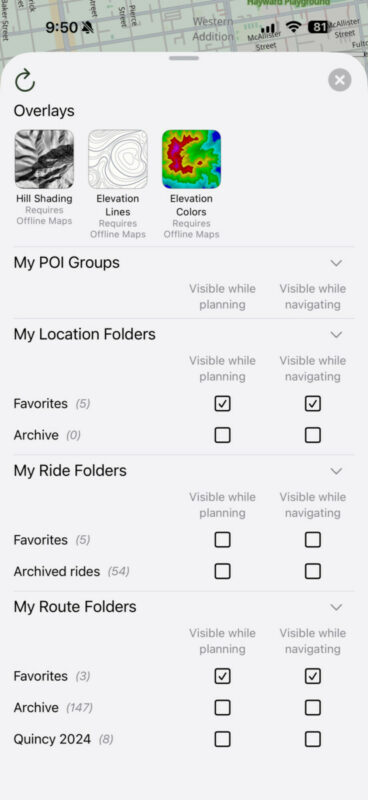
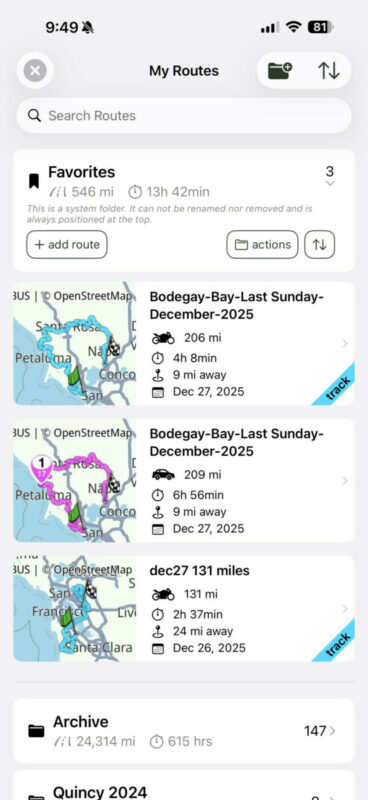
Quote from pleasantone on 29.12.2025, 12:02No, I don't have recorded rides enabled, but you do bring up an interesting point.The way I typically run Scenic, I like to display both the route and track that was generated by BaseCamp at the same time. I organize the current day's route+track using Favorites (I first save the blue line as track, then go back in and save the route after fixing any discrepancies).I use "Favorites" to hold one route, and one track (typically).I move all my old stuff to archive folders.My settings are set to diI display the current route, as well as the track(s) that are in Favorites, so that, should I go off course, I still have the thin blue line of track. The routes/tracks are typically in the 250-350km range.The <rte> section of the GPX had 7385 lines in it -- 25 route/via points, and the rest garmin GPX extension points for embedding a track into the route.There were approximately 5000 track points in the track section.I'm happy to share the GPX file with you if it would help. Here's an excerpt of the BaseCamp format:<rte>
<name>Bodegay-Bay-Last Sunday-December-2025</name>
<extensions>
<gpxx:RouteExtension>
<gpxx:IsAutoNamed>false</gpxx:IsAutoNamed>
<gpxx:DisplayColor>Magenta</gpxx:DisplayColor>
</gpxx:RouteExtension>
<trp:Trip>
<trp:TransportationMode>Motorcycling</trp:TransportationMode>
</trp:Trip>
</extensions>
<rtept lat="37.881416520103812" lon="-122.52449333667755">
<time>2025-12-26T04:57:15Z</time>
<name>Equator Cofees - 244 Highway 1, Mill Valley</name>
<cmt>244 Highway 1</cmt>
<desc>244 Highway 1</desc>
<sym>Restaurant</sym>
<extensions>
<trp:ViaPoint>
<trp:CalculationMode>CurvyRoads</trp:CalculationMode>
<trp:ElevationMode>Standard</trp:ElevationMode>
</trp:ViaPoint>
<gpxx:RoutePointExtension>
<gpxx:Subclass>000000000000FFFFFFFFFFFFFFFFFFFFFFFF</gpxx:Subclass>
<gpxx:rpt lat="37.881395816802979" lon="-122.52453088760376">
<gpxx:Subclass>030009D7EE0138D30B00211600000B000000</gpxx:Subclass>
</gpxx:rpt>
<gpxx:rpt lat="37.881395816802979" lon="-122.52453088760376" />
<gpxx:rpt lat="37.881395816802979" lon="-122.52453088760376" />
<gpxx:rpt lat="37.881395816802979" lon="-122.52453088760376" />
<gpxx:rpt lat="37.881395816802979" lon="-122.52453088760376">
<gpxx:Subclass>030009D7EE0138D30B001F0036007D541C00</gpxx:Subclass>
</gpxx:rpt>
<gpxx:rpt lat="37.881395816802979" lon="-122.52453088760376" />
<gpxx:rpt lat="37.881417274475098" lon="-122.52455234527588" />
<gpxx:rpt lat="37.881524562835693" lon="-122.52461671829224" />
<gpxx:rpt lat="37.881653308868408" lon="-122.52470254898071" />
<gpxx:rpt lat="37.881717681884766" lon="-122.52474546432495" />
<gpxx:rpt lat="37.881760597229004" lon="-122.52478837966919" />
<gpxx:rpt lat="37.881953716278076" lon="-122.52487421035767">
<gpxx:Subclass>030009D7EE0138D30B301F003600C4540800</gpxx:Subclass>
</gpxx:rpt>...Side note: I do have "show original route" also enabled, so I suspect showing the track should not be necessary, it's just an older habit and I really like it being in a different color, rather than just being a slightly thinner line.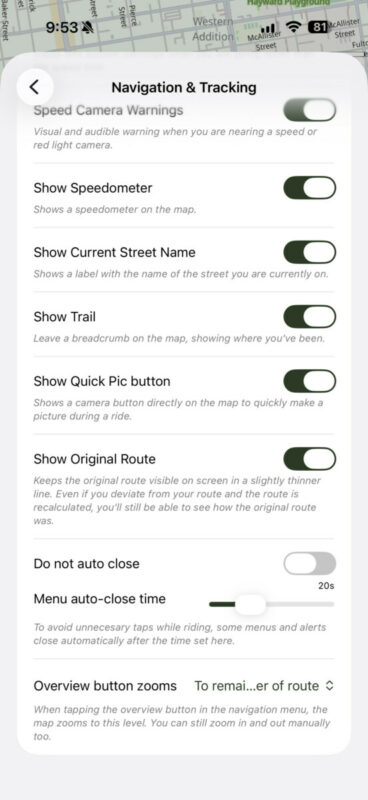
<name>Bodegay-Bay-Last Sunday-December-2025</name>
<extensions>
<gpxx:RouteExtension>
<gpxx:IsAutoNamed>false</gpxx:IsAutoNamed>
<gpxx:DisplayColor>Magenta</gpxx:DisplayColor>
</gpxx:RouteExtension>
<trp:Trip>
<trp:TransportationMode>Motorcycling</trp:TransportationMode>
</trp:Trip>
</extensions>
<rtept lat="37.881416520103812" lon="-122.52449333667755">
<time>2025-12-26T04:57:15Z</time>
<name>Equator Cofees - 244 Highway 1, Mill Valley</name>
<cmt>244 Highway 1</cmt>
<desc>244 Highway 1</desc>
<sym>Restaurant</sym>
<extensions>
<trp:ViaPoint>
<trp:CalculationMode>CurvyRoads</trp:CalculationMode>
<trp:ElevationMode>Standard</trp:ElevationMode>
</trp:ViaPoint>
<gpxx:RoutePointExtension>
<gpxx:Subclass>000000000000FFFFFFFFFFFFFFFFFFFFFFFF</gpxx:Subclass>
<gpxx:rpt lat="37.881395816802979" lon="-122.52453088760376">
<gpxx:Subclass>030009D7EE0138D30B00211600000B000000</gpxx:Subclass>
</gpxx:rpt>
<gpxx:rpt lat="37.881395816802979" lon="-122.52453088760376" />
<gpxx:rpt lat="37.881395816802979" lon="-122.52453088760376" />
<gpxx:rpt lat="37.881395816802979" lon="-122.52453088760376" />
<gpxx:rpt lat="37.881395816802979" lon="-122.52453088760376">
<gpxx:Subclass>030009D7EE0138D30B001F0036007D541C00</gpxx:Subclass>
</gpxx:rpt>
<gpxx:rpt lat="37.881395816802979" lon="-122.52453088760376" />
<gpxx:rpt lat="37.881417274475098" lon="-122.52455234527588" />
<gpxx:rpt lat="37.881524562835693" lon="-122.52461671829224" />
<gpxx:rpt lat="37.881653308868408" lon="-122.52470254898071" />
<gpxx:rpt lat="37.881717681884766" lon="-122.52474546432495" />
<gpxx:rpt lat="37.881760597229004" lon="-122.52478837966919" />
<gpxx:rpt lat="37.881953716278076" lon="-122.52487421035767">
<gpxx:Subclass>030009D7EE0138D30B301F003600C4540800</gpxx:Subclass>
</gpxx:rpt>
Quote from Guido on 29.12.2025, 12:08OK. Indeed if you have "Show original route" enabled you don't need to save and show the track as well.
But... showing the Routes favorites folder (with only 3 routes/tracks) should not cause these kinds of performance problems.
I see that you are on the iOS beta (because you have Speed Cameras enabled).
As this feature is still in beta phase, I wonder if that could cause this. Other testers did not report these delays and I haven't noticed it myself, but perhaps you could try disabling the speed cameras again on your next ride, to see if that makes a difference?
OK. Indeed if you have "Show original route" enabled you don't need to save and show the track as well.
But... showing the Routes favorites folder (with only 3 routes/tracks) should not cause these kinds of performance problems.
I see that you are on the iOS beta (because you have Speed Cameras enabled).
As this feature is still in beta phase, I wonder if that could cause this. Other testers did not report these delays and I haven't noticed it myself, but perhaps you could try disabling the speed cameras again on your next ride, to see if that makes a difference?
Quote from pleasantone on 29.12.2025, 12:45I can disable speed cameras.
Question: since I'm the only one experiencing this, would you like me to uninstall/reinstall Scenic, or would you prefer that we keep looking at this?
I'm OK with blowing away my old data, but I don't want to destroy any breadcrumbs if you want to pursue this.
I can disable speed cameras.
Question: since I'm the only one experiencing this, would you like me to uninstall/reinstall Scenic, or would you prefer that we keep looking at this?
I'm OK with blowing away my old data, but I don't want to destroy any breadcrumbs if you want to pursue this.
Quote from Guido on 29.12.2025, 13:03I'd prefer if you try disabling speed cams first. I'd like to know if this could be the cause.
If that doesn't solve it either, then an uninstall and reinstall would be good as a next step. You won't loose your data. After reinstalling and logging in again, your data will be retrieved from the server. You will need to redownload your offline maps and reconfigure your settings (settings are only stored locally on the device... no in your account on the server).
I'd prefer if you try disabling speed cams first. I'd like to know if this could be the cause.
If that doesn't solve it either, then an uninstall and reinstall would be good as a next step. You won't loose your data. After reinstalling and logging in again, your data will be retrieved from the server. You will need to redownload your offline maps and reconfigure your settings (settings are only stored locally on the device... no in your account on the server).
Quote from Guido on 29.12.2025, 13:22I'm releasing a new beta in a bit with some improvements to speed cams. But I don't expect this to solve your issue though.
I'm releasing a new beta in a bit with some improvements to speed cams. But I don't expect this to solve your issue though.
Quote from pleasantone on 29.12.2025, 14:08OK, will keep an eye out and make sure I'm up to date just to keep my debugging relevant.
Thanks for looking at this!
OK, will keep an eye out and make sure I'm up to date just to keep my debugging relevant.
Thanks for looking at this!
Quote from pleasantone on 11.01.2026, 21:23Well, my resolution was -- it's totally NOT scenic's fault. I'm so sorry for my confusion.
Today I was out on the bike running CarPlay with Google Maps and the exact same thing happened.
It's weird as hell. When going to the split screen main menu (single square), music displays were delayed by >1 minute, Google Maps was showing 1 minute late. Sound (music and navigation audio prompts) were just fine routed through my headphones (bypassing the CarPlay unit). I managed to pull over and quickly disable CarPlay and Google Maps instantly showed where I was. It's definitely an Apple CarPlay bug or bug on my head unit (more likely the later). Absolutely not a Scenic bug.
Just closing the loop, thank you!
Well, my resolution was -- it's totally NOT scenic's fault. I'm so sorry for my confusion.
Today I was out on the bike running CarPlay with Google Maps and the exact same thing happened.
It's weird as hell. When going to the split screen main menu (single square), music displays were delayed by >1 minute, Google Maps was showing 1 minute late. Sound (music and navigation audio prompts) were just fine routed through my headphones (bypassing the CarPlay unit). I managed to pull over and quickly disable CarPlay and Google Maps instantly showed where I was. It's definitely an Apple CarPlay bug or bug on my head unit (more likely the later). Absolutely not a Scenic bug.
Just closing the loop, thank you!
Quote from Guido on 12.01.2026, 11:54Happy to hear that but still strange. What CarPlay unit do you have? And is your phone connected with a cable or wireless? Wireless is known to cause delays… but again… not 60 seconds.
Happy to hear that but still strange. What CarPlay unit do you have? And is your phone connected with a cable or wireless? Wireless is known to cause delays… but again… not 60 seconds.
Quote from pleasantone on 13.01.2026, 11:44Navifly A601-E. It’s a LSJ-601 in ODM talk, white labeled by lots of folks on AliExpress. Wireless.
It’s a very weird situation. I’ve factory reset it multiple times. It is Android based.
Navifly A601-E. It’s a LSJ-601 in ODM talk, white labeled by lots of folks on AliExpress. Wireless.
It’s a very weird situation. I’ve factory reset it multiple times. It is Android based.


