
4.07 bugs (I think)

Quote from ogroggo on 12.12.2024, 16:17I appreciate the effort your doing to migrate Scenic to the new maps provider.
And realise that that cannot be done without the occasional bug.
Here are two that I encountered in v4.07.- gpx import does not work from within the files app (with or without Scenic being opened first). Also import by selecting a file, does not work on iphone: I can navigate to the folder that I put the gpx in but I cannot select it from within Scenic, filename is greyed out.
I can import via a weblink but not twice in a row.- when editing a rout, I cannot select waypoints that I want to delete, shift or so
I like the new maps by yhe way : the hill shading and elevation coloring are great !
And I am thrilled that the option to show routes, previous rides, POIs is back jn 4.07, like you announced it would be
BR
Georges
I appreciate the effort your doing to migrate Scenic to the new maps provider.
And realise that that cannot be done without the occasional bug.
Here are two that I encountered in v4.07.
- gpx import does not work from within the files app (with or without Scenic being opened first). Also import by selecting a file, does not work on iphone: I can navigate to the folder that I put the gpx in but I cannot select it from within Scenic, filename is greyed out.
I can import via a weblink but not twice in a row.
- when editing a rout, I cannot select waypoints that I want to delete, shift or so
I like the new maps by yhe way : the hill shading and elevation coloring are great !
And I am thrilled that the option to show routes, previous rides, POIs is back jn 4.07, like you announced it would be
BR
Georges

Quote from Marts on 12.12.2024, 17:24I just tested the import function.
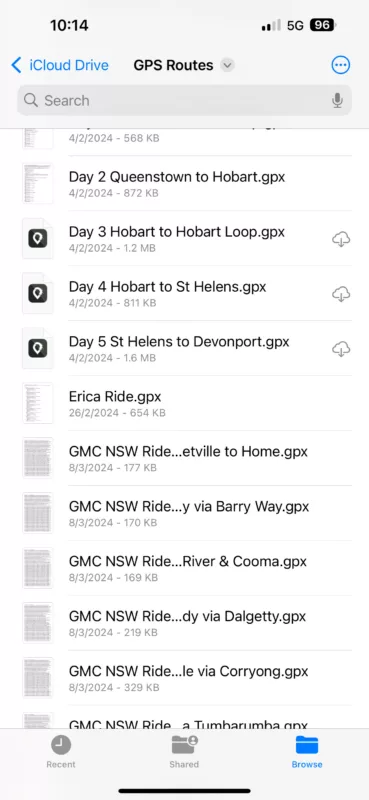
I opened the Files app and navigated to iCloud Drive. Then I tapped on a GPX file (one that I created earlier) and it opened as a bunch of text. The share button works but Scenic isn't mentioned in the list of actions. I exited the GPX file back to the list of files in that folder. I then long pressed on a GPX file to bring up the actions menu. I tapped on "share" and again, no option to share or import to Scenic. A number of apps were available (don't know what Twitter can do with GPX files but it was one of the options).
I opened web app on here and was able to import as per the normal process.
FILE TYPE ASSOCIATION ISSUE?
I don't know what's going on here with regards to GPX files. Some show a thumbnail of text, others show the Scenic icon (they don't import, either).
Is this an IOS problem or Scenic related?
I just tested the import function.
I opened the Files app and navigated to iCloud Drive. Then I tapped on a GPX file (one that I created earlier) and it opened as a bunch of text. The share button works but Scenic isn't mentioned in the list of actions. I exited the GPX file back to the list of files in that folder. I then long pressed on a GPX file to bring up the actions menu. I tapped on "share" and again, no option to share or import to Scenic. A number of apps were available (don't know what Twitter can do with GPX files but it was one of the options).
I opened web app on here and was able to import as per the normal process.
FILE TYPE ASSOCIATION ISSUE?
I don't know what's going on here with regards to GPX files. Some show a thumbnail of text, others show the Scenic icon (they don't import, either).
Is this an IOS problem or Scenic related?

Quote from Guido on 12.12.2024, 17:30Hi Georges,
Selecting waypoints has been resolved in v4.08. It was released earlier today but is being rolled gradually. You can manually update already: https://apps.apple.com/app/id1089668246
The import GPX thing is a weird one. I’ve had more reports, but I can not reproduce it myself.
Importing by selecting a file… What do you mean exactly by that? You can’t select an actual GPX file from within Scenic, unless I added that feature without knowing it 🙂.
Perhaps as a workaround you can use the webapp to place the GPX files in the import queue: https://scenicapp.space/webapp.php
Thank you and best regards,
Guido
Hi Georges,
Selecting waypoints has been resolved in v4.08. It was released earlier today but is being rolled gradually. You can manually update already: https://apps.apple.com/app/id1089668246
The import GPX thing is a weird one. I’ve had more reports, but I can not reproduce it myself.
Importing by selecting a file… What do you mean exactly by that? You can’t select an actual GPX file from within Scenic, unless I added that feature without knowing it 🙂.
Perhaps as a workaround you can use the webapp to place the GPX files in the import queue: https://scenicapp.space/webapp.php
Thank you and best regards,
Guido
Quote from Guido on 12.12.2024, 17:35Hi Marts,
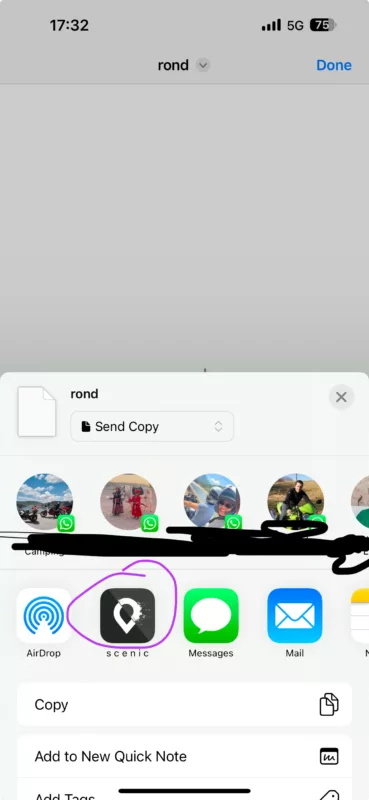
I get Scenic in the list… see screenshot. Is Scenic not under the ‘more’ button if you swipe to the right?
Sometimes an iPhone restart works with these kind of things (where it loses the file type - app associations).
I’m not sure about the thumbnails. Perhaps the ones you opened before show text.
What iOS version are you running?
Best regards,
Guido
Hi Marts,
I get Scenic in the list… see screenshot. Is Scenic not under the ‘more’ button if you swipe to the right?
Sometimes an iPhone restart works with these kind of things (where it loses the file type - app associations).
I’m not sure about the thumbnails. Perhaps the ones you opened before show text.
What iOS version are you running?
Best regards,
Guido
Quote from Marts on 12.12.2024, 17:41I'm running 18.11. It's now, as I type this, updating to 18.2.
When it's updated I'll look at it again and see if Scenic is in the list.
I'll get back to you on this...
I'm running 18.11. It's now, as I type this, updating to 18.2.
When it's updated I'll look at it again and see if Scenic is in the list.
I'll get back to you on this...
Quote from Marts on 12.12.2024, 18:42Figured it out.
There is an option to either "collaborate" or "Send Copy". I had "Collaborate" selected. I needed to selet "Send Copy" for it to work. As soon as I selected it Scenic appeared in the list of apps.
And I tested it. It imported OK and gave me the usual two files of the same GPX, one of which is called "track", to import.
All working fine.
Figured it out.
There is an option to either "collaborate" or "Send Copy". I had "Collaborate" selected. I needed to selet "Send Copy" for it to work. As soon as I selected it Scenic appeared in the list of apps.
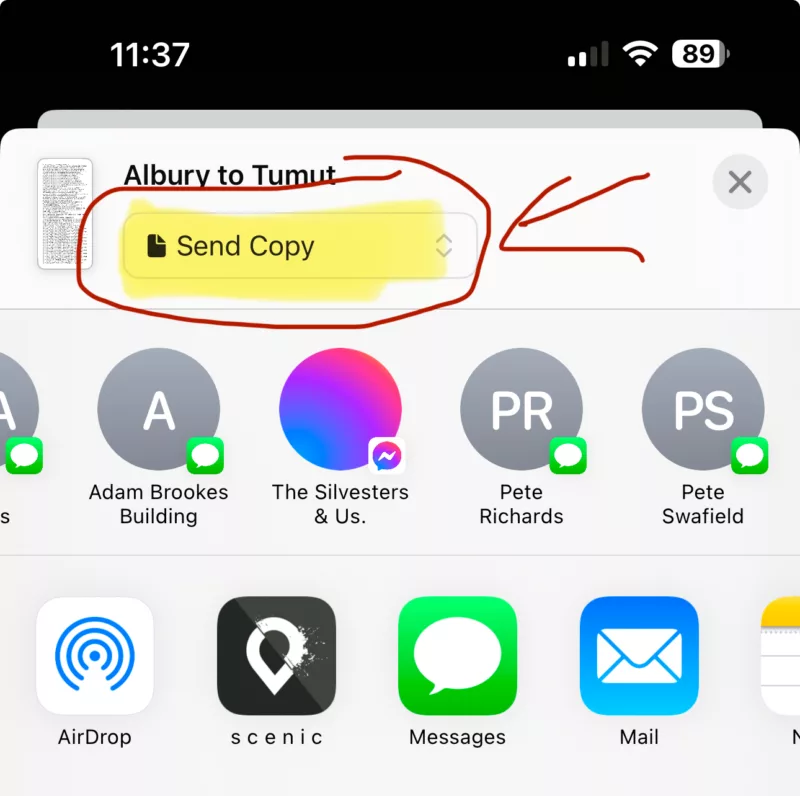
And I tested it. It imported OK and gave me the usual two files of the same GPX, one of which is called "track", to import.
All working fine.
Quote from ogroggo on 13.12.2024, 15:15
Hello Guido and Marts,
Thanks for the quick responses and tips:
Good to hear that you already spotted and squashed that waypoint selection bug !
As for the gpx file import, I confused things a bit, I am afraid: the greyed out files and inability to select them occur when I try to import from the web-app on my iphone 14 with iOS 18.1.1, when I click the button “drop files here or click to select”
Marts: I did not know the collaboration option existed I checked but have the ‘send copy’ option selected.
What happens when I indeed send the copy to Scenic is a bit erratic:
Sometimes Scenic does not show the ‘import track or track plus waypoints’ screen at all but opens immediately in the screen above.
Sometimes the import selection screen shows very briefly but before I can select anything, it disappears and I land on the screen above.
Sometimes the import screen is displayed longer and I can make a selection.Could it be some timer or time-out error?
BR,
Georges
Hello Guido and Marts,
Thanks for the quick responses and tips:
Good to hear that you already spotted and squashed that waypoint selection bug !
As for the gpx file import, I confused things a bit, I am afraid: the greyed out files and inability to select them occur when I try to import from the web-app on my iphone 14 with iOS 18.1.1, when I click the button “drop files here or click to select”
Marts: I did not know the collaboration option existed I checked but have the ‘send copy’ option selected.
What happens when I indeed send the copy to Scenic is a bit erratic:
Sometimes Scenic does not show the ‘import track or track plus waypoints’ screen at all but opens immediately in the screen above.
Sometimes the import selection screen shows very briefly but before I can select anything, it disappears and I land on the screen above.
Sometimes the import screen is displayed longer and I can make a selection.
Could it be some timer or time-out error?
BR,
Georges
Quote from Guido on 13.12.2024, 18:25the greyed out files and inability to select them occur when I try to import from the web-app on my iphone
I’ll try and take a look at that tomorrow. Since it’s the webapp it doesn’t require an app update. I’ll report back tomorrow. Meanwhile, on the desktop, it works.
Sometimes Scenic does not show the ‘import track or track plus waypoints’ screen at all but opens immediately in the screen above.
Sometimes the import selection screen shows very briefly but before I can select anything, it disappears and I land on the screen above.
Sometimes the import screen is displayed longer and I can make a selection.Could it be some timer or time-out error?
Yes most likely a timer thing. An app update is needed to fix it, but I’ve not been able to reliably reproduce the issue, which makes debugging and fixing a bit difficult.
the greyed out files and inability to select them occur when I try to import from the web-app on my iphone
I’ll try and take a look at that tomorrow. Since it’s the webapp it doesn’t require an app update. I’ll report back tomorrow. Meanwhile, on the desktop, it works.
Sometimes Scenic does not show the ‘import track or track plus waypoints’ screen at all but opens immediately in the screen above.
Sometimes the import selection screen shows very briefly but before I can select anything, it disappears and I land on the screen above.
Sometimes the import screen is displayed longer and I can make a selection.Could it be some timer or time-out error?
Yes most likely a timer thing. An app update is needed to fix it, but I’ve not been able to reliably reproduce the issue, which makes debugging and fixing a bit difficult.
Quote from ogroggo on 14.12.2024, 01:50Hello Guido,
Update: yesterday evening (NL time), I upgraded to 4.09 via the app store.
Erratic behavior is still there but the import seems to succeed more often.With that is workable for me.
I fully understand the difficulty of finding a bug of this kind, so please do not make this a top priority.if I have new observations on the reproducability, I’ll let you know
Importing via the webapp on the iPhone, would be my backup option when on-tour, if the direct import does not work.
At home I can also use the computerThanks again for the quick reactions and feedback. Impressive !
BR,
Georges
Hello Guido,
Update: yesterday evening (NL time), I upgraded to 4.09 via the app store.
Erratic behavior is still there but the import seems to succeed more often.
With that is workable for me.
I fully understand the difficulty of finding a bug of this kind, so please do not make this a top priority.
if I have new observations on the reproducability, I’ll let you know
Importing via the webapp on the iPhone, would be my backup option when on-tour, if the direct import does not work.
At home I can also use the computer
Thanks again for the quick reactions and feedback. Impressive !
BR,
Georges


