
4.06 CarPlay lag and freeze

Quote from Old Man Emu on 26.11.2024, 01:33I did a few simple drives with very few waypoints today using CarPlay 4.06
I found that the position on the screen and voice instructions were at least 40 meters behind my actual position, though when I stopped at a corner the position on screen caught up to me.
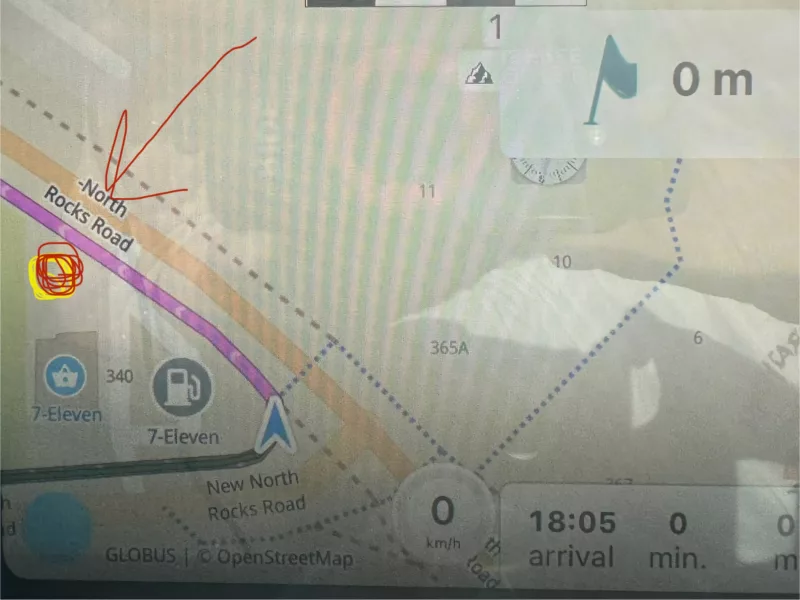
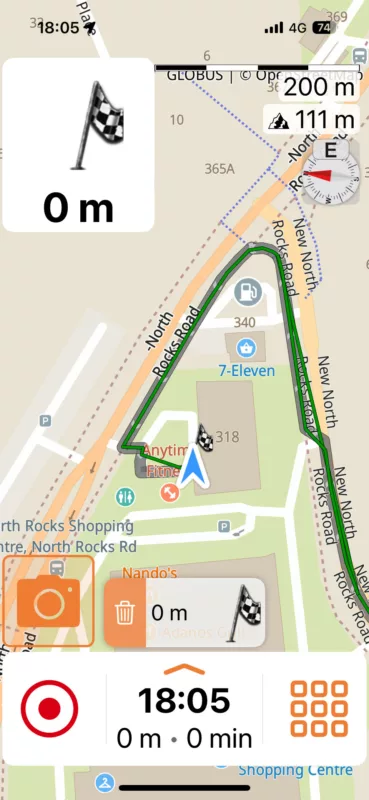
The pointer on the map also froze on a number of occasions and would not progress but when looking at the phone map the position was up to date as per pics below;
Carplay frozen with destination shown with red arrow
Scenic still functioning on the phone
During CarPlay screen freezes a cancel ride and re-entry of the destination did not resolve the situation. It was just empty.
Dark mode in a tunnel also did not turn off.
I did a few simple drives with very few waypoints today using CarPlay 4.06
I found that the position on the screen and voice instructions were at least 40 meters behind my actual position, though when I stopped at a corner the position on screen caught up to me.
The pointer on the map also froze on a number of occasions and would not progress but when looking at the phone map the position was up to date as per pics below;
Carplay frozen with destination shown with red arrow
Scenic still functioning on the phone
During CarPlay screen freezes a cancel ride and re-entry of the destination did not resolve the situation. It was just empty.
Dark mode in a tunnel also did not turn off.

Quote from Guido on 27.11.2024, 10:48Hmm. Thank you. I'll have a look. Sounds like a performance problem.
Hmm. Thank you. I'll have a look. Sounds like a performance problem.

Quote from Marts on 05.12.2024, 21:00Yesterday I used Scenic to navigate to a suburb west of Melbourne, Victoria, Australia. I live 2 hours EAST of Melbourne so the route took me through the city via the freeways and toll roads til I got off them and navigated the local streets to get to my destination.
Then, when I left I asked it to take me to my next destination, a hospital that is east of Melbourne.
When on the freeway it seemed fine as there are few turns/intersections. However, once I got into the local streets and encountered a lot of turns, corners and so on, I found that the map instructions were being displayed after I turned down a particular street. And map orientation also lagged the turns.
The setup is an iphone 14 Pro Max in carplay mode with a Kia Sorento car.
So, yeah, I'm seeing the lag, too.
Yesterday I used Scenic to navigate to a suburb west of Melbourne, Victoria, Australia. I live 2 hours EAST of Melbourne so the route took me through the city via the freeways and toll roads til I got off them and navigated the local streets to get to my destination.
Then, when I left I asked it to take me to my next destination, a hospital that is east of Melbourne.
When on the freeway it seemed fine as there are few turns/intersections. However, once I got into the local streets and encountered a lot of turns, corners and so on, I found that the map instructions were being displayed after I turned down a particular street. And map orientation also lagged the turns.
The setup is an iphone 14 Pro Max in carplay mode with a Kia Sorento car.
So, yeah, I'm seeing the lag, too.
Quote from Old Man Emu on 05.12.2024, 22:25Quote from Marts on 05.12.2024, 21:00… once I got into the local streets and encountered a lot of turns, corners and so on, I found that the map instructions were being displayed after I turned down a particular street. And map orientation also lagged the turns.
The setup is an iphone 14 Pro Max in carplay mode with a Kia Sorento car.
So, yeah, I'm seeing the lag, too.
Yeas, it’s about 40 meters late.
Quote from Marts on 05.12.2024, 21:00… once I got into the local streets and encountered a lot of turns, corners and so on, I found that the map instructions were being displayed after I turned down a particular street. And map orientation also lagged the turns.
The setup is an iphone 14 Pro Max in carplay mode with a Kia Sorento car.
So, yeah, I'm seeing the lag, too.
Yeas, it’s about 40 meters late.
Quote from Marts on 07.12.2024, 21:27An update of sorts from my experience with Ver 4.x and Carplay.
My main use case (as the hipster millennials might call it) is to use it in conjunction with a Chigee AIO-5 Lite device and my iPhone 14 Pro Max on the motorbike.
Yesterday and today I got to try it out for the first time on a proper ride.
My comments above refered to using it with wired Carplay in the car. Today I got to observe it connected to the Chigee in wireless mode. There is still a little bit of lag when entering/exiting intersections and directions that are displayed on the screen. But for the riding that I do it's no big deal at this point.
The lag is maybe a second or two behind real time, if that. In the Kia Sorento it was significantly more. Of course, the phone was sitting in a console and GPS signal may not be that great in that situation. On the bike, though, it's mounted in a Quadlock sitting over the handlebar mount so the phone has full view of the sky.
Anyway, that's all that I can add to the discussion. Maybe there is something that Guido can do to improve things. Dunno.
An update of sorts from my experience with Ver 4.x and Carplay.
My main use case (as the hipster millennials might call it) is to use it in conjunction with a Chigee AIO-5 Lite device and my iPhone 14 Pro Max on the motorbike.
Yesterday and today I got to try it out for the first time on a proper ride.
My comments above refered to using it with wired Carplay in the car. Today I got to observe it connected to the Chigee in wireless mode. There is still a little bit of lag when entering/exiting intersections and directions that are displayed on the screen. But for the riding that I do it's no big deal at this point.
The lag is maybe a second or two behind real time, if that. In the Kia Sorento it was significantly more. Of course, the phone was sitting in a console and GPS signal may not be that great in that situation. On the bike, though, it's mounted in a Quadlock sitting over the handlebar mount so the phone has full view of the sky.
Anyway, that's all that I can add to the discussion. Maybe there is something that Guido can do to improve things. Dunno.
Quote from Marts on 09.12.2024, 19:51A further update on the lag issue.
Today I used it again in the car. And this time I tested it when both following a route (a single "go to home" one) and in tracking or following mode - I don't know what the correct term for it is.
When going around corners when following the route the lag for guidance is there. And the map also lags as far as rotating or orientation goes. ie. turn east after heading south and it takes a few seconds to rotate. But if it's just following, that is, no route planned or entered, the map rotation is fairly quick.
A further update on the lag issue.
Today I used it again in the car. And this time I tested it when both following a route (a single "go to home" one) and in tracking or following mode - I don't know what the correct term for it is.
When going around corners when following the route the lag for guidance is there. And the map also lags as far as rotating or orientation goes. ie. turn east after heading south and it takes a few seconds to rotate. But if it's just following, that is, no route planned or entered, the map rotation is fairly quick.
Quote from Guido on 09.12.2024, 20:03It’s probably lagging more with a route because more code is processed with every coordinate that is received. I’ll see if I can optimize that.
It’s probably lagging more with a route because more code is processed with every coordinate that is received. I’ll see if I can optimize that.

Quote from Bob on 13.12.2024, 04:48If it helps...I used Scenic to map a route to pass about 10 specific stops, and several vias forcing a specific path. All the stops were residential locations in suburban areas of a medium sized city. Navigating using car play, it started out normal. About mid way through, it was a little sluggish. Nearing the end of the route, after making a turn, it took a very long time (several blocks) to figure out where the next turn was. Sometimes I had to turn based on the visual map, never getting the next turn displayed. But it never crashed. iPhone 14 pro Scenic 4.07.
If it helps...I used Scenic to map a route to pass about 10 specific stops, and several vias forcing a specific path. All the stops were residential locations in suburban areas of a medium sized city. Navigating using car play, it started out normal. About mid way through, it was a little sluggish. Nearing the end of the route, after making a turn, it took a very long time (several blocks) to figure out where the next turn was. Sometimes I had to turn based on the visual map, never getting the next turn displayed. But it never crashed. iPhone 14 pro Scenic 4.07.
Quote from Guido on 13.12.2024, 12:08Yes... that might help. Thank you!
Yes... that might help. Thank you!


