
3D display mode during navigation

Quote from BrAtKo on 23.07.2024, 07:57
Hello I'm using Scenic only few days, jumped from Tom Tom Go which is 12EUR per year (after I replaced terrible Garmin XT by CarPlay LCD on motorcycle), what I'm missing is real 3D maps displaying on mine CarPlay. There is no difference if I have 2D or 3D option from menu (changed to 45 degrees). I was expecting the mode like from TT Go see pic. Why it it not possible please ? I've found the TomTom Go still more usefull for mine motocycle trips in compare with Scenic (feels more buggy, zooming is not ideal too even after tweaking) - in CarPlay mode. I can't fully rely on Scenic yet, I switch to TomTom constantly while on the road and I'm a little confused and I'm getting frustrated as well. Thanks for help with adoption. P.S. for planning Im using kurviger (12EUR) or sometimes plan.tomtom.com (free)
Hello I'm using Scenic only few days, jumped from Tom Tom Go which is 12EUR per year (after I replaced terrible Garmin XT by CarPlay LCD on motorcycle), what I'm missing is real 3D maps displaying on mine CarPlay. There is no difference if I have 2D or 3D option from menu (changed to 45 degrees). I was expecting the mode like from TT Go see pic. Why it it not possible please ? I've found the TomTom Go still more usefull for mine motocycle trips in compare with Scenic (feels more buggy, zooming is not ideal too even after tweaking) - in CarPlay mode. I can't fully rely on Scenic yet, I switch to TomTom constantly while on the road and I'm a little confused and I'm getting frustrated as well. Thanks for help with adoption. P.S. for planning Im using kurviger (12EUR) or sometimes plan.tomtom.com (free)
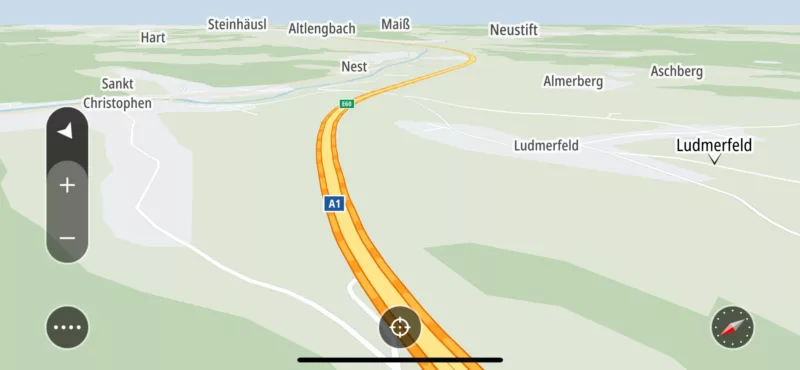

Quote from Guido on 23.07.2024, 08:07The 3D "level" in Scenic depends on the zoom mode you chose. The default is turn based zoom, which changes the zoom level AND the 3D angle depending on how close you are to the next turn. If next turn is far away, the 3D zoom will be more like 2D. If you want 3D all the time you can switch to speed based zoom. Here's a help article: https://scenic.app/help/speed-based-and-turn-based-zoom/
The 3D "level" in Scenic depends on the zoom mode you chose. The default is turn based zoom, which changes the zoom level AND the 3D angle depending on how close you are to the next turn. If next turn is far away, the 3D zoom will be more like 2D. If you want 3D all the time you can switch to speed based zoom. Here's a help article: https://scenic.app/help/speed-based-and-turn-based-zoom/


