
[3.59] Again strange routing results

Quote from massi on 06.05.2024, 01:03Hi,
I just planned a tour with "Power-Planer", from Linz/Rhine to Willingen (Upland), routing algorithm is "curvy".
At two places I got this:
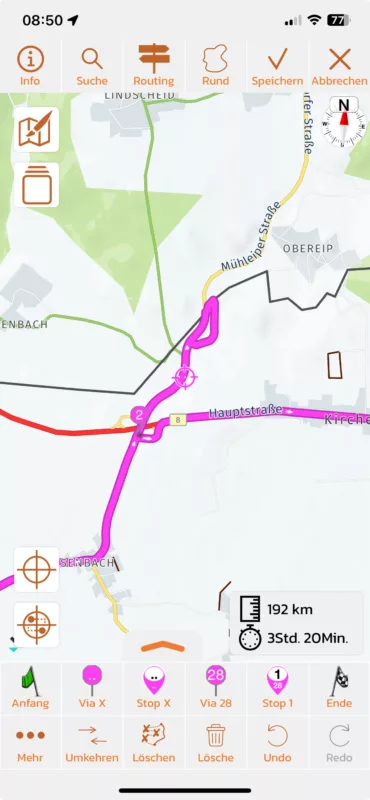
When I move the waypoint a little before or behind the ramp it work o.k.
It seems that it has something to do with the ramp.
I think this is a bug, perhaps a problem on the "kurviger" side.
Regards
Marc-Antón
Hi,
I just planned a tour with "Power-Planer", from Linz/Rhine to Willingen (Upland), routing algorithm is "curvy".
At two places I got this:
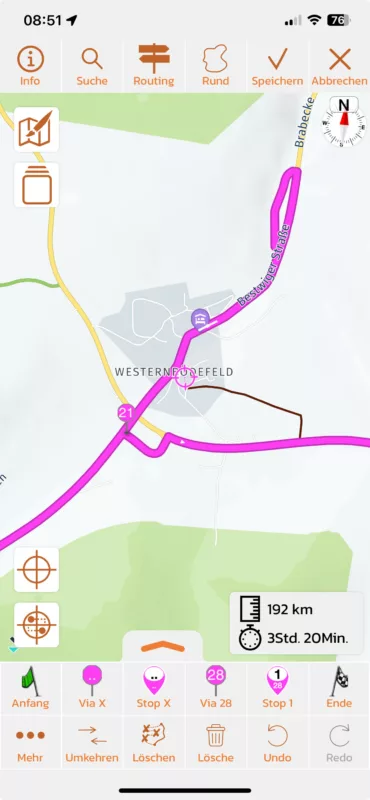
When I move the waypoint a little before or behind the ramp it work o.k.
It seems that it has something to do with the ramp.
I think this is a bug, perhaps a problem on the "kurviger" side.
Regards
Marc-Antón

Quote from johansw on 06.05.2024, 03:15Yes, I have also learnt that when planning routes with viapoints set automatically, I have to make a detailed check to avoid these mishaps. They do not occur so often, but a nuisanse if you havent removed them before you arrive there.. Would be nice to avoid these 😊
Yes, I have also learnt that when planning routes with viapoints set automatically, I have to make a detailed check to avoid these mishaps. They do not occur so often, but a nuisanse if you havent removed them before you arrive there.. Would be nice to avoid these 😊

Quote from Guido on 06.05.2024, 09:25This is not a Kurviger problem as such. It's more a combination between Kurviger and Scenic. Kurviger often returns via points that are ON a junction. Scenic sometimes interprets these wrong (as being on another street of that junction), and thus sends you in a small loop to pass that via point. I already have some logic in Scenic that moves vias points away from junctions, but this does not work perfectly / in all cases. I'll have another look at that algorithm to see if I can improve it.
This is not a Kurviger problem as such. It's more a combination between Kurviger and Scenic. Kurviger often returns via points that are ON a junction. Scenic sometimes interprets these wrong (as being on another street of that junction), and thus sends you in a small loop to pass that via point. I already have some logic in Scenic that moves vias points away from junctions, but this does not work perfectly / in all cases. I'll have another look at that algorithm to see if I can improve it.

Quote from Knuspermuesli on 10.05.2024, 12:50Had the exact same issue today.
But I didn't plan the route, I just added a destination and changed to "curvy".
I started my route and again I should leave my route to drive a circle and back to my original route.
Also I should exit a roundabout in the 5th exit... the roundabout has only 4 exit, that means I should drive one time around the roundabout 😀
And a new bug is that the app is crashing on my iphone 12 mini (ios 17.5) when I add a destination and change to curvy.
The app close instantly.
I am sorry but the app is absolutly annoying.
I regret the invest of a bit more than 100 eur.A video about the crashing:
https://www.youtube.com/watch?v=bp4f-qTQWm8
Had the exact same issue today.
But I didn't plan the route, I just added a destination and changed to "curvy".
I started my route and again I should leave my route to drive a circle and back to my original route.
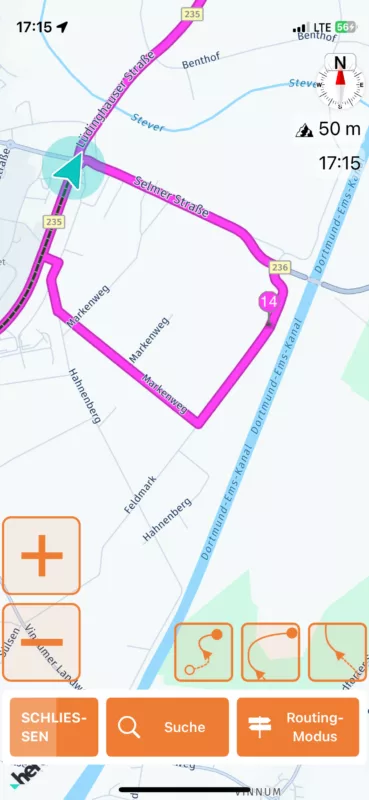
Also I should exit a roundabout in the 5th exit... the roundabout has only 4 exit, that means I should drive one time around the roundabout 😀
And a new bug is that the app is crashing on my iphone 12 mini (ios 17.5) when I add a destination and change to curvy.
The app close instantly.
I am sorry but the app is absolutly annoying.
I regret the invest of a bit more than 100 eur.
A video about the crashing:
Quote from Guido on 10.05.2024, 13:35Sorry for your bad experience @knuspermuesli. I understand the frustration.
Both the loop and roundabout issue is caused by Kurviger using a different map than Scenic. As a short term solution I’m working on improving the matching algorithm, like mentioned above. But that will never be 100% for all routes. I’m also working on a more structural solution to resolve this, but that will take a while longer.
Regarding the crash… I just tried to reproduce it but I couldn’t. Does this happen every time, with different destinations too?
Would you mind sending me the coordinates of the start and destination for the crash in the video? You can copy paste coordinates by long pressing on the map and then choose “copy coordinates”. If you prefer not to post them here you can send me an email through the email button at the bottom of the help page.
Best regards,
Guido
Sorry for your bad experience @knuspermuesli. I understand the frustration.
Both the loop and roundabout issue is caused by Kurviger using a different map than Scenic. As a short term solution I’m working on improving the matching algorithm, like mentioned above. But that will never be 100% for all routes. I’m also working on a more structural solution to resolve this, but that will take a while longer.
Regarding the crash… I just tried to reproduce it but I couldn’t. Does this happen every time, with different destinations too?
Would you mind sending me the coordinates of the start and destination for the crash in the video? You can copy paste coordinates by long pressing on the map and then choose “copy coordinates”. If you prefer not to post them here you can send me an email through the email button at the bottom of the help page.
Best regards,
Guido
Quote from Knuspermuesli on 10.05.2024, 15:08Hi
I have send an e-mail with the coodinates.
Not all destinations results in a crash.
But the destionations I've send you are crashing when I choose "curvy fast" and above (curvy, extra curvy).
Seems has something todo with kurviger (again :D)Regards
Hi
I have send an e-mail with the coodinates.
Not all destinations results in a crash.
But the destionations I've send you are crashing when I choose "curvy fast" and above (curvy, extra curvy).
Seems has something todo with kurviger (again :D)
Regards


