
3.51 weird CarPlay issues and bugs

Quote from DarrenS on 03.02.2024, 10:16Hi,
Just been for my first ride using CarPlay since the 3,51 update and it seems to have a few issues and features removed. This is premium account with maps download after the latest update.
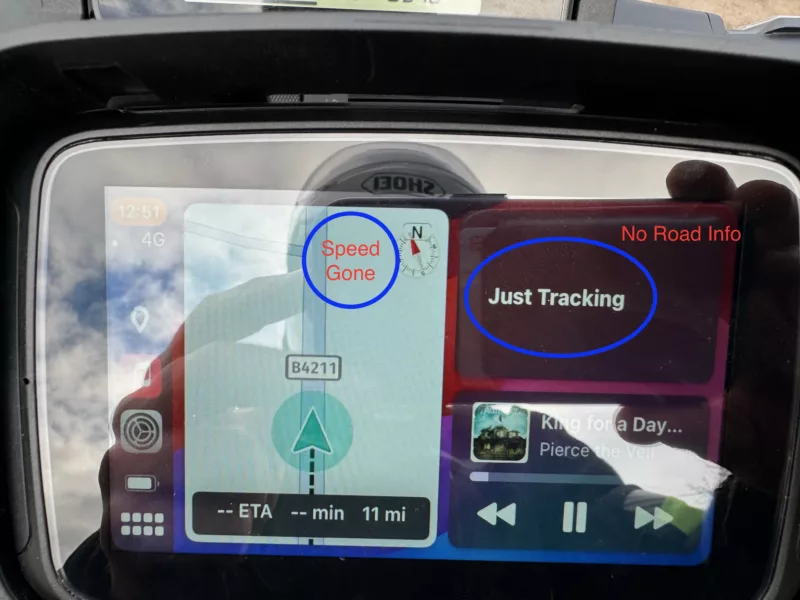
- The CarPlay split screen (where you have the smaller map and music) no longer shows location names in the top right - it only shows 'Just Tracking' or 'where to, start a ride' - in the previous version after a few minutes this showed the current road name, so it seems like a removed feature?
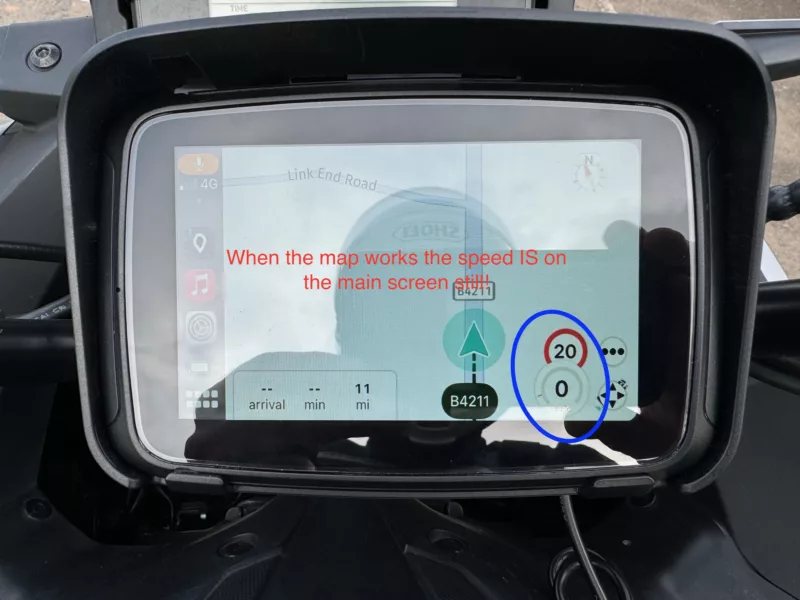
- Same Screen, this time the map. Pre version 3.5 it showed the current and maximum speed at the top of the mini map next to the compass. Now it only shows a much reduced size compass and no speed information. (this speed information is on the main map page if that page works - see next issue)
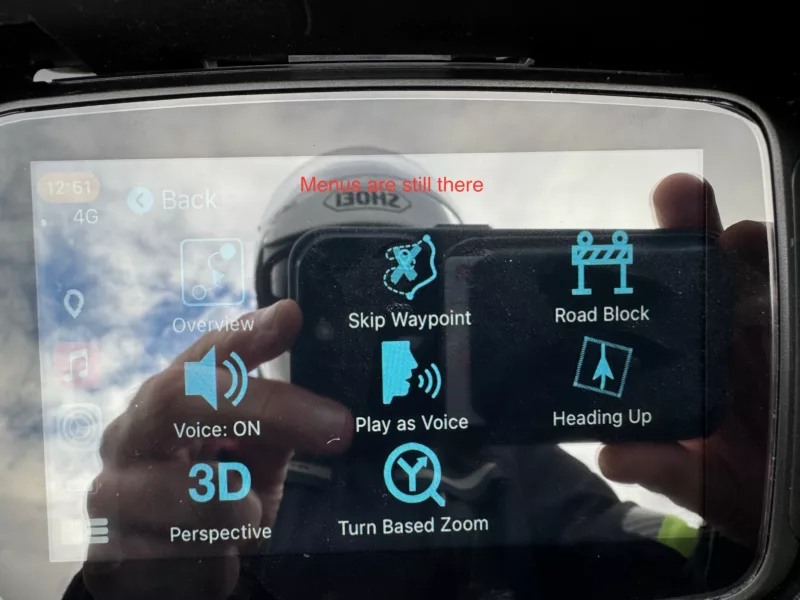
- There is a bug whereby the main map is blank - no map, no speed info, only the controls - when this occurs the mini map on the split screen still works, still shows the correct info, and still moves as you do. But the main map is blank (randomly either white or black). Rebooting the phone and car play may or may not give the map on the next startup. I can't seem to find a pattern - although I do believe the first time you go the main map it is there, and it is on sub subsequent loads of the main map that fails (ie you go from main map to menu, split screen, music, etc then back to main map).
- When I complete a ride via car play it saves ok. But when I next go into the app it tells me the tracking had an issue and asks me to save or discard the ride. The app tells me the correct distance etc before I click save, but if I save here it gives me 0 distance etc.
I've added some screenshots to give more context.


Hi,
Just been for my first ride using CarPlay since the 3,51 update and it seems to have a few issues and features removed. This is premium account with maps download after the latest update.
- The CarPlay split screen (where you have the smaller map and music) no longer shows location names in the top right - it only shows 'Just Tracking' or 'where to, start a ride' - in the previous version after a few minutes this showed the current road name, so it seems like a removed feature?
- Same Screen, this time the map. Pre version 3.5 it showed the current and maximum speed at the top of the mini map next to the compass. Now it only shows a much reduced size compass and no speed information. (this speed information is on the main map page if that page works - see next issue)
- There is a bug whereby the main map is blank - no map, no speed info, only the controls - when this occurs the mini map on the split screen still works, still shows the correct info, and still moves as you do. But the main map is blank (randomly either white or black). Rebooting the phone and car play may or may not give the map on the next startup. I can't seem to find a pattern - although I do believe the first time you go the main map it is there, and it is on sub subsequent loads of the main map that fails (ie you go from main map to menu, split screen, music, etc then back to main map).
- When I complete a ride via car play it saves ok. But when I next go into the app it tells me the tracking had an issue and asks me to save or discard the ride. The app tells me the correct distance etc before I click save, but if I save here it gives me 0 distance etc.
I've added some screenshots to give more context.

Quote from Guido on 03.02.2024, 10:25Ok. I’ll have a look at this. Releasing an update next week with these “teething problems” fixed.
Ok. I’ll have a look at this. Releasing an update next week with these “teething problems” fixed.
Quote from Deleted user on 04.02.2024, 05:22One additional: Just installed 3.51. I have premium for life. It’s a fresh install after resetting my phone (iPhone 14 on ios 17.3). Scenic does not appear on the list when customizing my carplay apps from phone settings. How do I make it appear?
One additional: Just installed 3.51. I have premium for life. It’s a fresh install after resetting my phone (iPhone 14 on ios 17.3). Scenic does not appear on the list when customizing my carplay apps from phone settings. How do I make it appear?
Quote from DarrenS on 04.02.2024, 08:40Hi Guido
Another ride today and did some more testing for point 3 (the blank main map page). Seems there a few ways to replicate that may help you testing.
Again booted everything up, and the main map loaded ok - went the split screen, and back to the main map and it was blank.
However, this time I left it that way and just used the split screen. When I finished, I went to the main (still blank) map screen, and 'finished ride' and saved from there.
Upon save completion the map appeared.
Went back to split screen and back to main screen - blank.
Clicked start ride from main screen - map came back
Back to split screen (or another app) and back, and map gone
So it seems you can replicate this issue by starting and stopping a ride from the main screen, and see the map appear/disappear
Hopefully that may help in troubleshooting 🙂
Hi Guido
Another ride today and did some more testing for point 3 (the blank main map page). Seems there a few ways to replicate that may help you testing.
Again booted everything up, and the main map loaded ok - went the split screen, and back to the main map and it was blank.
However, this time I left it that way and just used the split screen. When I finished, I went to the main (still blank) map screen, and 'finished ride' and saved from there.
Upon save completion the map appeared.
Went back to split screen and back to main screen - blank.
Clicked start ride from main screen - map came back
Back to split screen (or another app) and back, and map gone
So it seems you can replicate this issue by starting and stopping a ride from the main screen, and see the map appear/disappear
Hopefully that may help in troubleshooting 🙂
Quote from Guido on 04.02.2024, 10:19Quote from kmatsdaddy on 04.02.2024, 05:22One additional: Just installed 3.51. I have premium for life. It’s a fresh install after resetting my phone (iPhone 14 on ios 17.3). Scenic does not appear on the list when customizing my carplay apps from phone settings. How do I make it appear?
To be honest. I don’t know. This is arranged by iOS. Perhaps you need to connect to CarPlay a first time with Scenic installed to make it appear in the list.
Quote from kmatsdaddy on 04.02.2024, 05:22One additional: Just installed 3.51. I have premium for life. It’s a fresh install after resetting my phone (iPhone 14 on ios 17.3). Scenic does not appear on the list when customizing my carplay apps from phone settings. How do I make it appear?
To be honest. I don’t know. This is arranged by iOS. Perhaps you need to connect to CarPlay a first time with Scenic installed to make it appear in the list.
Quote from Guido on 04.02.2024, 10:47Quote from DarrenS on 04.02.2024, 08:40Hi Guido
Another ride today and did some more testing for point 3 (the blank main map page). Seems there a few ways to replicate that may help you testing.
Again booted everything up, and the main map loaded ok - went the split screen, and back to the main map and it was blank.
However, this time I left it that way and just used the split screen. When I finished, I went to the main (still blank) map screen, and 'finished ride' and saved from there.
Upon save completion the map appeared.
Went back to split screen and back to main screen - blank.
Clicked start ride from main screen - map came back
Back to split screen (or another app) and back, and map gone
So it seems you can replicate this issue by starting and stopping a ride from the main screen, and see the map appear/disappear
Hopefully that may help in troubleshooting
Thanks Darren. Very helpful!

Quote from DarrenS on 04.02.2024, 08:40Hi Guido
Another ride today and did some more testing for point 3 (the blank main map page). Seems there a few ways to replicate that may help you testing.
Again booted everything up, and the main map loaded ok - went the split screen, and back to the main map and it was blank.
However, this time I left it that way and just used the split screen. When I finished, I went to the main (still blank) map screen, and 'finished ride' and saved from there.
Upon save completion the map appeared.
Went back to split screen and back to main screen - blank.
Clicked start ride from main screen - map came back
Back to split screen (or another app) and back, and map gone
So it seems you can replicate this issue by starting and stopping a ride from the main screen, and see the map appear/disappear
Hopefully that may help in troubleshooting
Thanks Darren. Very helpful!
Quote from Deleted user on 04.02.2024, 12:46Restarting the phone fixed the problem
Restarting the phone fixed the problem
Quote from DarrenS on 25.02.2024, 10:31Hi Guido
Just tried 3.53 this weekend to check out the CarPlay progress, and see a lot of progress has been made on the points I made above - thanks 😉
However, a couple of things are still not functioning as I would expect - are these still being worked on or are these just the way it will be with 3.5x? (in red below)
Taking the points in the order I first mentioned them:
- The CarPlay split screen (where you have the smaller map and music) no longer shows location names in the top right - it only shows 'Just Tracking' or 'where to, start a ride' - in the previous version after a few minutes this showed the current road name, so it seems like a removed feature?
- In the 3.53 version this still does not show road names when not navigating, still just says tracking- Same Screen, this time the map. Pre version 3.5 it showed the current and maximum speed at the top of the mini map next to the compass. Now it only shows a much reduced size compass and no speed information. (this speed information is on the main map page if that page works - see next issue)
- This has improved but still does not work as expected. Current speed is not there perfect, however current speed limit still has an issue. When I am travelling and the speed limit changes the speed limit will be shown whether I am on the main app map or the car play split screen app. However, this will only then persist if I do not change screen. Example 1: If I switch between main app screen and car play split screen the speed limit then disappears until the speed limit then changes, so it does not persist through a map screen change. Example 2: I switch to another app or menu outside of scenic (music, main menu, etc) then when I go back to scenic the icon for the speed limit is still there, but shows the speed of '-0' - again until the speed limit then changes (again on both maps)- There is a bug whereby the main map is blank - no map, no speed info, only the controls - when this occurs the mini map on the split screen still works, still shows the correct info, and still moves as you do. But the main map is blank (randomly either white or black). Rebooting the phone and car play may or may not give the map on the next startup. I can't seem to find a pattern - although I do believe the first time you go the main map it is there, and it is on sub subsequent loads of the main map that fails (ie you go from main map to menu, split screen, music, etc then back to main map).
- Much better - had a blank map twice this weekend but not worked out the trigger yet. In general it is much more stable.- When I complete a ride via car play it saves ok. But when I next go into the app it tells me the tracking had an issue and asks me to save or discard the ride. The app tells me the correct distance etc before I click save, but if I save here it gives me 0 distance etc.
- Fully Resolved.Thanks again, and as always great app.
Darren
Hi Guido
Just tried 3.53 this weekend to check out the CarPlay progress, and see a lot of progress has been made on the points I made above - thanks 😉
However, a couple of things are still not functioning as I would expect - are these still being worked on or are these just the way it will be with 3.5x? (in red below)
Taking the points in the order I first mentioned them:
- The CarPlay split screen (where you have the smaller map and music) no longer shows location names in the top right - it only shows 'Just Tracking' or 'where to, start a ride' - in the previous version after a few minutes this showed the current road name, so it seems like a removed feature?
- In the 3.53 version this still does not show road names when not navigating, still just says tracking - Same Screen, this time the map. Pre version 3.5 it showed the current and maximum speed at the top of the mini map next to the compass. Now it only shows a much reduced size compass and no speed information. (this speed information is on the main map page if that page works - see next issue)
- This has improved but still does not work as expected. Current speed is not there perfect, however current speed limit still has an issue. When I am travelling and the speed limit changes the speed limit will be shown whether I am on the main app map or the car play split screen app. However, this will only then persist if I do not change screen. Example 1: If I switch between main app screen and car play split screen the speed limit then disappears until the speed limit then changes, so it does not persist through a map screen change. Example 2: I switch to another app or menu outside of scenic (music, main menu, etc) then when I go back to scenic the icon for the speed limit is still there, but shows the speed of '-0' - again until the speed limit then changes (again on both maps) - There is a bug whereby the main map is blank - no map, no speed info, only the controls - when this occurs the mini map on the split screen still works, still shows the correct info, and still moves as you do. But the main map is blank (randomly either white or black). Rebooting the phone and car play may or may not give the map on the next startup. I can't seem to find a pattern - although I do believe the first time you go the main map it is there, and it is on sub subsequent loads of the main map that fails (ie you go from main map to menu, split screen, music, etc then back to main map).
- Much better - had a blank map twice this weekend but not worked out the trigger yet. In general it is much more stable. - When I complete a ride via car play it saves ok. But when I next go into the app it tells me the tracking had an issue and asks me to save or discard the ride. The app tells me the correct distance etc before I click save, but if I save here it gives me 0 distance etc.
- Fully Resolved.
Thanks again, and as always great app.
Darren
Quote from Guido on 26.02.2024, 08:45Thanks for the feedback Darren. I'll have a look at this for the next update.
Regarding point 3 (the blank map). Here are the different scenarios that are differentiated in the app / CarPlay. This might help identify in what scenario this happens. I'll try my best to find it too, but if you happen to go out for a ride, you can pay attention to this.
- Scenic fully closed when connecting to CarPlay vs Scenic already open on the iPhone when you connect CarPlay
- If Scenic was already open, there are two additional scenarios: Scenic in background on the iPhone (or iPhone locked) vs iPhone screen ON (unlocked) and Scenic in the foreground.
- CarPlay starts Scenic on split screen vs CarPlay starts full screen (Typically CarPlay remembers the setting and will start up the way it was when last disconnecting / shutting down)
Thanks and cheers,
Guido
Thanks for the feedback Darren. I'll have a look at this for the next update.
Regarding point 3 (the blank map). Here are the different scenarios that are differentiated in the app / CarPlay. This might help identify in what scenario this happens. I'll try my best to find it too, but if you happen to go out for a ride, you can pay attention to this.
- Scenic fully closed when connecting to CarPlay vs Scenic already open on the iPhone when you connect CarPlay
- If Scenic was already open, there are two additional scenarios: Scenic in background on the iPhone (or iPhone locked) vs iPhone screen ON (unlocked) and Scenic in the foreground.
- CarPlay starts Scenic on split screen vs CarPlay starts full screen (Typically CarPlay remembers the setting and will start up the way it was when last disconnecting / shutting down)
Thanks and cheers,
Guido
Quote from DarrenS on 26.02.2024, 10:45Hi Guido,
Afraid I won't get out again until the weekend, but I am pretty sure both times I got the blank map was at the start of a days ride, in which case the app would have been closed on the phone.
Thanks
Darren
Hi Guido,
Afraid I won't get out again until the weekend, but I am pretty sure both times I got the blank map was at the start of a days ride, in which case the app would have been closed on the phone.
Thanks
Darren
Quote from DarrenS on 10.03.2024, 12:37Hi Guido,
Just wanted to check in and say over the last two weekends riding it looks like all the issues above are now resolved. I did have a blank map briefly but that was after a CarPlay crash so I don't think related to the map.
I do have a suggestion for a future release, but will post that in a new post.
Great work and great app
Darren
Hi Guido,
Just wanted to check in and say over the last two weekends riding it looks like all the issues above are now resolved. I did have a blank map briefly but that was after a CarPlay crash so I don't think related to the map.
I do have a suggestion for a future release, but will post that in a new post.
Great work and great app
Darren


