3.5 Card not show all roads anymore

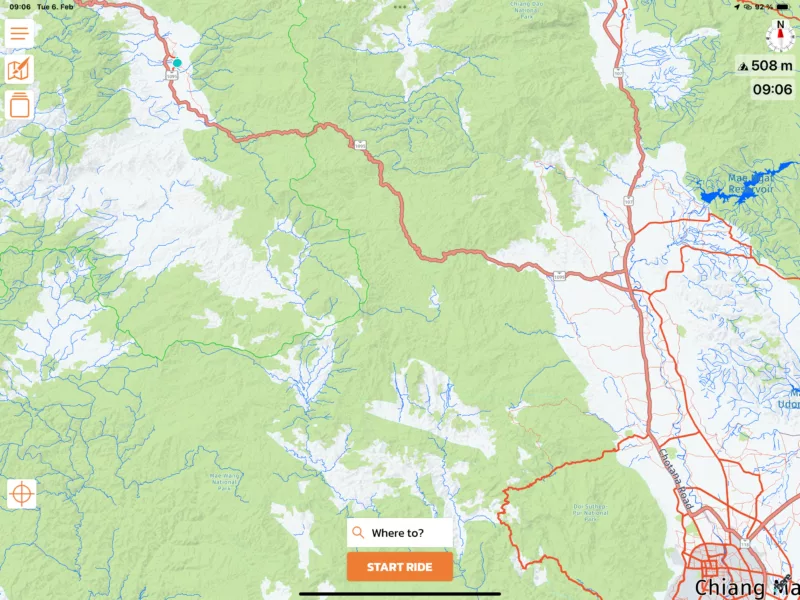
Quote from steve001 on 04.02.2024, 19:49When I import roads from Google maps, the roads are shown, in the power planner they disappear. Rural roads in Asia are very important for good rides.
Also the number of the roads are so small, they should be bigger shown.
Enclosed i have screenshot.
Please can you take care of this problem, otherwise its not possible to plan on scenic, i think it was better before.
Right these days i am on the way.
Thank you in advance.
Stephan

When I import roads from Google maps, the roads are shown, in the power planner they disappear. Rural roads in Asia are very important for good rides.
Also the number of the roads are so small, they should be bigger shown.
Enclosed i have screenshot.
Please can you take care of this problem, otherwise its not possible to plan on scenic, i think it was better before.
Right these days i am on the way.
Thank you in advance.
Stephan


Quote from Guido on 04.02.2024, 21:11Hi Stephan,
Im not 100% sure but perhaps something went wrong with your map updates. Could you try removing Scenic from your device and redownloading from the App Store?
If that doesn’t help, please let me know. In that case I’ll need to report this to Scenic’s map provider (HERE maps).
Best regards,
Guido
Hi Stephan,
Im not 100% sure but perhaps something went wrong with your map updates. Could you try removing Scenic from your device and redownloading from the App Store?
If that doesn’t help, please let me know. In that case I’ll need to report this to Scenic’s map provider (HERE maps).
Best regards,
Guido
Quote from steve001 on 05.02.2024, 05:22Hello Guido,
I install it on 2 devices, one on iPad Pro and one on iPhone 12 and it’s the same result. It seems that Here not show smaller roads I drive this road today and it was fantastic and no traffic.
I try everything also re install.
Now, I have to plan with OSM or Google and after import to Scenic but this is not the best solution.
Some bugs i think if useful for the developer:
1. Its not possible anymore to turn of the voice for navigation.
2. Settings is not possible while in navigation
3. Turn off or on the Skip Via Button in the Settings has no effect, the Skip Via button is always on.
4. In Route planing, its not possible to show the elevation anymore
5. In recorded Routes you cannot choose a route public after riding it.
One thing its different from the older version: The screen is a little overloaded, it would be nice if there is more space for the Map.
Thank you!
Anyway its a great app.
Stephan
Hello Guido,
I install it on 2 devices, one on iPad Pro and one on iPhone 12 and it’s the same result. It seems that Here not show smaller roads I drive this road today and it was fantastic and no traffic.
I try everything also re install.
Now, I have to plan with OSM or Google and after import to Scenic but this is not the best solution.
Some bugs i think if useful for the developer:
1. Its not possible anymore to turn of the voice for navigation.
2. Settings is not possible while in navigation
3. Turn off or on the Skip Via Button in the Settings has no effect, the Skip Via button is always on.
4. In Route planing, its not possible to show the elevation anymore
5. In recorded Routes you cannot choose a route public after riding it.
One thing its different from the older version: The screen is a little overloaded, it would be nice if there is more space for the Map.
Thank you!
Anyway its a great app.
Stephan
Quote from Guido on 05.02.2024, 10:16Hi Stephan,
Thanks for the additional details.
A follow up question: are the roads not on the map at all, or is the problem that they don't show up when you are zoomed out a lot. In other words, do the roads start showing, when you zoom in more?
1. Its not possible anymore to turn of the voice for navigation.
This is still possible with this button:
There are now three sound modes. ON (all instructions). Alerts Only (no voice instructions, but still warnings for recalculations, safety cameras). OFF (no sound at all).
2. Settings is not possible while in navigation
Yes. Had more reports. Will be fixed in next version.
3. Turn off or on the Skip Via Button in the Settings has no effect, the Skip Via button is always on.
Yes. Had more reports. Will be fixed in next version.
4. In Route planing, its not possible to show the elevation anymore
This is a bug. Will fix for the next version.
5. In recorded Routes you cannot choose a route public after riding it.
This was never possible. You can only make routes public. Not recorded rides. You can, however, share a recorded ride. To do this, select the ride from your recorded ride list and then tap the "share" button at the bottom.
Hi Stephan,
Thanks for the additional details.
A follow up question: are the roads not on the map at all, or is the problem that they don't show up when you are zoomed out a lot. In other words, do the roads start showing, when you zoom in more?
1. Its not possible anymore to turn of the voice for navigation.
This is still possible with this button:
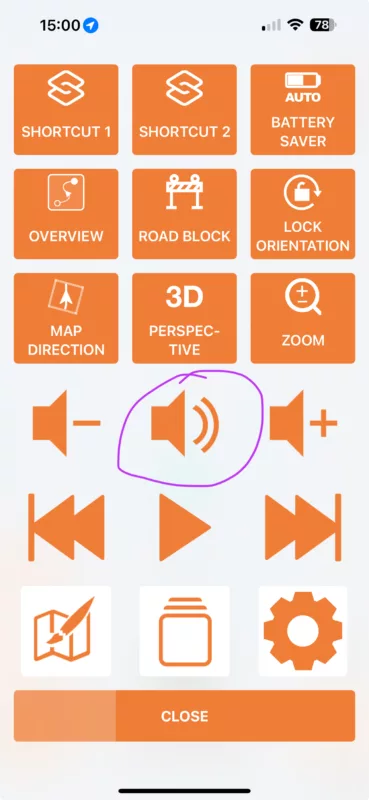
There are now three sound modes. ON (all instructions). Alerts Only (no voice instructions, but still warnings for recalculations, safety cameras). OFF (no sound at all).
2. Settings is not possible while in navigation
Yes. Had more reports. Will be fixed in next version.
3. Turn off or on the Skip Via Button in the Settings has no effect, the Skip Via button is always on.
Yes. Had more reports. Will be fixed in next version.
4. In Route planing, its not possible to show the elevation anymore
This is a bug. Will fix for the next version.
5. In recorded Routes you cannot choose a route public after riding it.
This was never possible. You can only make routes public. Not recorded rides. You can, however, share a recorded ride. To do this, select the ride from your recorded ride list and then tap the "share" button at the bottom.
Quote from steve001 on 05.02.2024, 20:30Hello Guido,
Thank you for your detailing explanations.
Enclosed I send you the screenshot from the map.
When I zoom in very deep, I can see the roads and I can follow them. I didn’t see this before.
With this zoom I am not able to do plan a route because sometimes the routs are ending nowhere.
This is the example from Pai to Chiang Mai, the blue Road I drive yesterday. Very good route.
So, thank you again for your time and always good ride
Stephan

Hello Guido,
Thank you for your detailing explanations.
Enclosed I send you the screenshot from the map.
When I zoom in very deep, I can see the roads and I can follow them. I didn’t see this before.
With this zoom I am not able to do plan a route because sometimes the routs are ending nowhere.
This is the example from Pai to Chiang Mai, the blue Road I drive yesterday. Very good route.
So, thank you again for your time and always good ride
Stephan